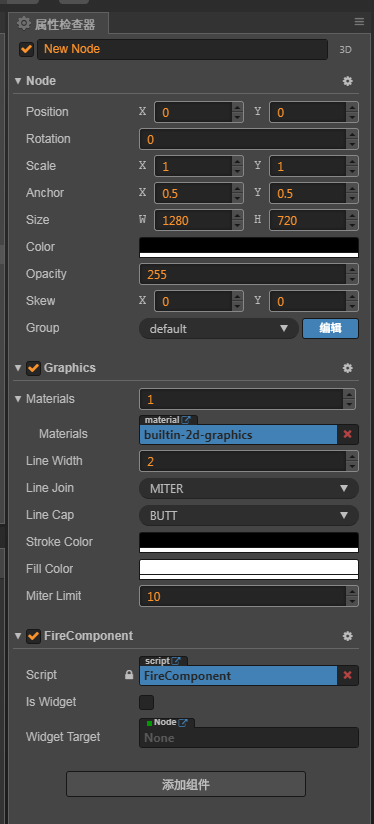
const { ccclass, property } = cc._decorator;
@ccclass
export default class FireComponent extends cc.Component {
    @property
    isWidget: boolean = false;
    @property(cc.Node)
    _widgetTarget: cc.Node = null;
    @property(cc.Node)
    public get widgetTarget() {
        return this._widgetTarget;
    }
    public set widgetTarget(value) {
        this._widgetTarget = value;
        this.isWidget = !!this._widgetTarget;
        if (!CC_EDITOR) {
            this.initWidgit();
        }
    }

    private gfx: cc.Graphics = null;
    private particlesSet: Set<Data[]> = new Set();
    onLoad() {
        this.gfx = this.node.addComponent(cc.Graphics);

        // widgit
        this.initWidgit();
        // touch
        this.initTouch();
    }

    onDestroy() {

    }

    private initWidgit() {
        // 全屏适配
        if (!this.isWidget) return;
        let canvas = cc.find("Canvas");
        let widget = this.node.addComponent(cc.Widget);
        widget.target = this.widgetTarget || canvas;
        widget.isAlignTop = true;
        widget.isAlignLeft = true;
        widget.isAlignRight = true;
        widget.isAlignBottom = true;
        widget.left = 0;
        widget.right = 0;
        widget.top = 0;
        widget.bottom = 0;
        widget.alignMode = cc.Widget.AlignMode.ON_WINDOW_RESIZE;
    }

    private initTouch() {
        // 点击事件
        this.node.on(cc.Node.EventType.TOUCH_END, (event: cc.Event.EventTouch) => {
            let wpos = event.getLocation();
            let npos = this.node.convertToNodeSpaceAR(wpos);
            this.fire(npos.x, npos.y);
        })
    }

    private fire(x, y) {
        // 生成烟花
        // this.gfx.clear();
        this.createFireworks(x, y);
    }

    private tick() {
        this.gfx.fillColor = cc.color(0, 0, 0, 26);
        this.gfx.fillRect(-this.node.width / 2, -this.node.height / 2, this.node.width, this.node.height);
        this.drawFireworks();
    }

    private createFireworks(sx, sy) {
        if (this.particlesSet.size >= 2) {
            return;
        }
        let particles = [];
        this.particlesSet.add(particles);

        var hue = Math.floor(Math.random() * 51) + 150;
        var hueVariance = 30;
        var count = 100;
        for (var i = 0; i < count; i++) {
            var angle = Math.floor(Math.random() * 360);
            var p = {
                radians: angle * Math.PI / 180,
                x: sx,
                y: sy,
                speed: (Math.random() * 5) + .4,
                radius: 0,
                size: Math.floor(Math.random() * 3) + 1,
                hue: Math.floor(Math.random() * 2 * hueVariance) + (hue - hueVariance),
                brightness: Math.floor(Math.random() * 31) + 50,
                alpha: (Math.floor(Math.random() * 61) + 40) / 100
            };
            p.radius = p.speed;
            particles.push(p);
        }
    }

    private drawFireworks() {
        // this.gfx.clear();
        let isDraw = false;
        this.particlesSet.forEach((data: Data[]) => {
            let count = 0;
            for (var i = 0; i < data.length; i++) {
                var p = data[i];
                var vx = Math.cos(p.radians) * p.radius;
                var vy = Math.sin(p.radians) * p.radius + 0.4;
                p.x -= vx;
                p.y -= vy;
                p.radius *= 1 - p.speed / 100;
                p.alpha -= 0.02;
                if (p.alpha > 0.1) {
                    isDraw = true;
                    this.gfx.arc(p.x, p.y, p.size, 0, Math.PI * 2, false);
                    this.gfx.fillColor = this.hsla2rgba('hsla(' + p.hue + ', 100%, ' + p.brightness + '%)', p.alpha);
                    this.gfx.fill();
                } else {
                    count++;
                }
            }
            if (count >= data.length - 4) {
                this.particlesSet.delete(data);
                isDraw = true;
            }
        });
        if (!isDraw) {
            this.gfx.clear();
        }
    }

    private hsla2rgba(str, alpha): cc.Color {
        const colorArr = str.match(/\d+/g);
        let [h, s, l] = colorArr;
        h = parseFloat(h) / 360;
        s = parseFloat(s) / 100;
        l = parseFloat(l) / 100;
        if (s === 0) {
            l = Math.round(l * 255);
            return cc.color(l, l, l, Math.round(alpha * 255));
        }
        const getRGB = num => {
            let q = l >= 0.5 ? l + s - l * s : l * (1 + s); // 注意是数字1加上s,不是字母l
            let p = 2 * l - q;
            if (num < 0) {
                num += 1;
            }
            if (num > 1) {
                num -= 1;
            }
            switch (true) {
                case num > 2 / 3:
                    num = p;
                    break;
                case num >= 1 / 2:
                    num = p + (q - p) * 6 * (2 / 3 - num);
                    break;
                case num >= 1 / 6:
                    num = q;
                    break;
                default:
                    num = p + (q - p) * 6 * num;
                    break;
            }
            return Math.round(num * 255);
        };
        let r = getRGB(h + 1 / 3);
        let g = getRGB(h);
        let b = getRGB(h - 1 / 3);
        return cc.color(r, g, b, Math.round(alpha * 255));
    }

    update() {
        this.tick();
    }
}

export class Data {
    public radians: number = 0;
    public x: number = 0;
    public y: number = 0;
    public speed: number = 0;
    public radius: number = 0;
    public size: number = 0;
    public hue: number = 0;
    public brightness: number = 0;
    public alpha: number = 0;
}