
你这样试一下:
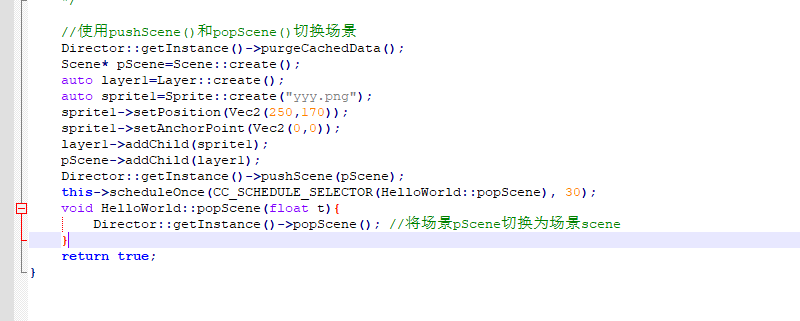
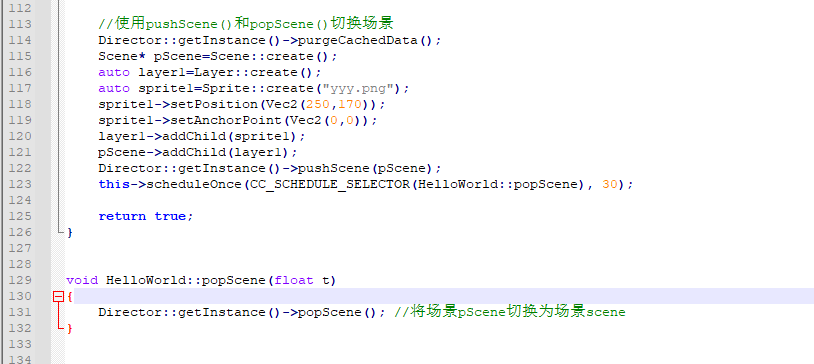
改为这样后虽然可以替换,但是替换的顺序却反过来了,
似乎先替换为scene场景,过了一会儿之后再替换为pScene场景。
我希望先替换为pScene场景,然后再替换为scene场景。
这个你可以自己组织一下逻辑。~
尝试将这行:
Director::getInstance()->pushScene(pScene);
放到init()成员函数外,但却出错
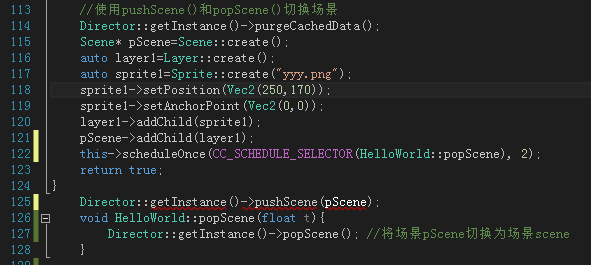
不知如何修改?
你的语法错误,你可以使用 Layer 去实现这个,Scene 不好实现。语法没弄明白,很难写代码。
这个是我实现的你说的效果,你只需要替换 Classes 文件夹的 HelloWorldScene.cpp,HelloWorldScene.h,TranslationLayer.cpp,TranslationLayer.h。在你的项目应该就可以了,还有 Resources 文件夹下的所有资源。你下载试一下。Demo.zip (525.7 KB)
替换后项目中Classes文件夹中有6个文件,如下图:
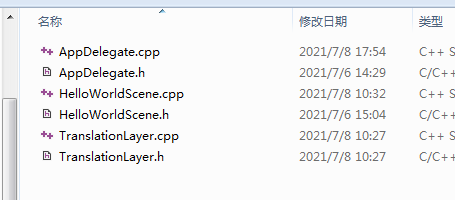
当在VS中打开项目文件的时候,资源管理器中显示只有4个文件,如下图:
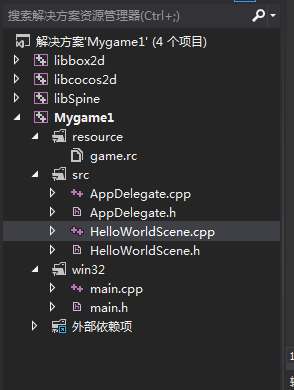
为什么另外两个文件TranslationLayer.cpp和TranslationLayer.h没有显示?
替换后运行该项目,出现以下错误:
2>AppDelegate.obj : warning LNK4075: 忽略“/EDITANDCONTINUE”(由于“/SAFESEH”规范)
2> 正在创建库 D:\cocos2d-x-3.5\tests\Mygame\proj.win32\Debug.win32\Mygame.lib 和对象 D:\cocos2d-x-3.5\tests\Mygame\proj.win32\Debug.win32\Mygame.exp
2>HelloWorldScene.obj : error LNK2019: 无法解析的外部符号 “public: static class cocos2d::Layer * __cdecl TranslationLayer::createLayer(void)” (?createLayer@TranslationLayer@@SAPAVLayer@cocos2d@@XZ),该符号在函数 “public: void __thiscall HelloWorld::menuCloseCallback(class cocos2d::Ref *)” (?menuCloseCallback@HelloWorld@@QAEXPAVRef@cocos2d@@@Z) 中被引用
2>D:\cocos2d-x-3.5\tests\Mygame\proj.win32\Debug.win32\Mygame.exe : fatal error LNK1120: 1 个无法解析的外部命令
2>
你要导入这两个文件:先确保你的 Classes 文件夹下面有这两个文件。
第一步:
右键 src ==》 筛选器 ==》 点击添加 ==》 现有项
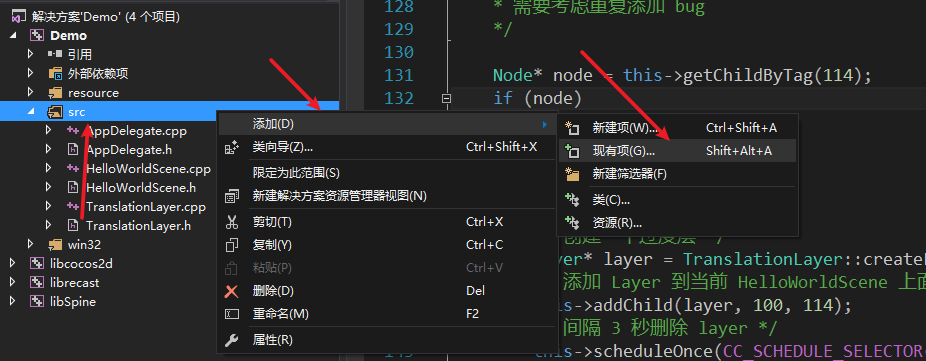
第二步:
选中 ==》 TranslationLayer.h 和 TranslationLayer.cpp 文件 ==》 点击添加。即可导入到项目。
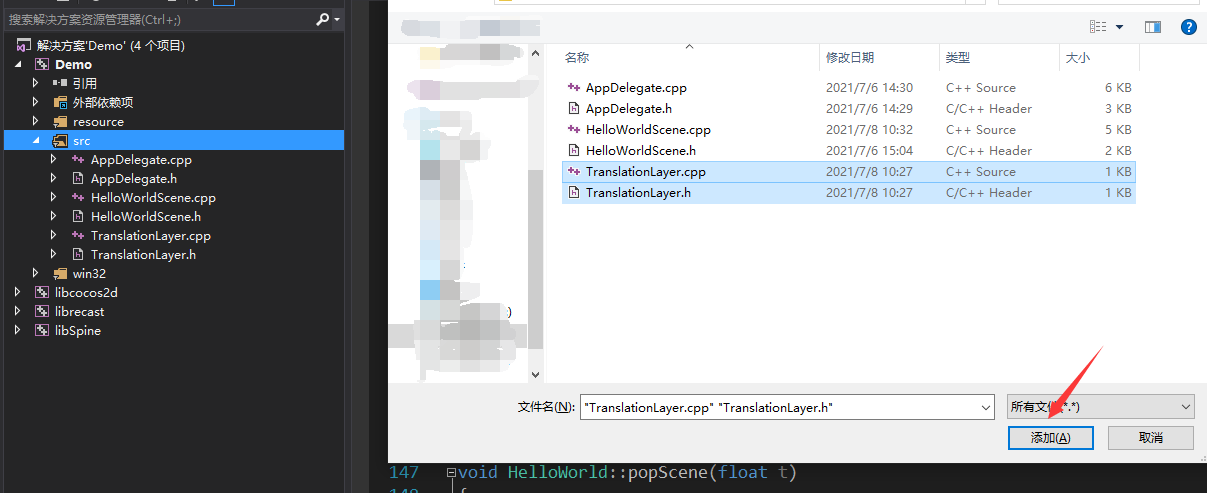
这样去导入之后再编译。
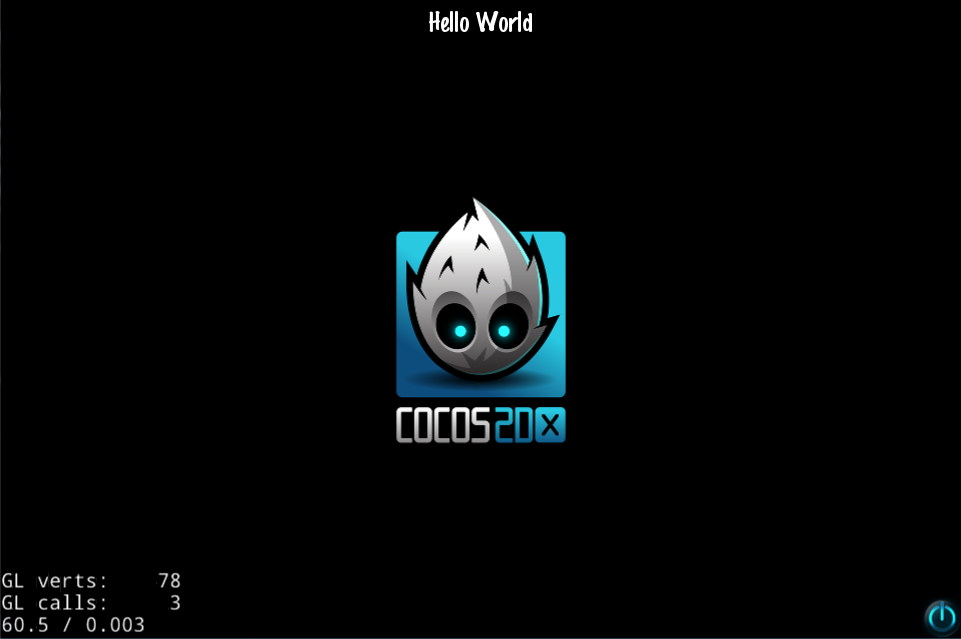
点击右下角按钮、
在HelloWorldScene.cpp文件中,下面每一个用//标注的问题能否逐一解答下?代码如下:
// 1. super init first
if ( !Scene::init() )   //这行是什么意思?
{
    return false;
}

auto visibleSize = Director::getInstance()->getVisibleSize();//这里的visibleSize是什么意思?
Vec2 origin = Director::getInstance()->getVisibleOrigin();//这里的origin是什么意思?

/////////////////////////////
// 2. add a menu item with "X" image, which is clicked to quit the program
//    you may modify it.

// add a "close" icon to exit the progress. it's an autorelease object
auto closeItem = MenuItemImage::create(
                                       "CloseNormal.png",
                                       "CloseSelected.png",
                                       CC_CALLBACK_1(HelloWorld::menuCloseCallback, this));

if (closeItem == nullptr ||                     //这行是什么意思?
    closeItem->getContentSize().width <= 0 ||   //这行是什么意思?
    closeItem->getContentSize().height <= 0)    //这行是什么意思?
{
    problemLoading("'CloseNormal.png' and 'CloseSelected.png'"); //这行是什么意思?
}
else
{
    float x = origin.x + visibleSize.width - closeItem->getContentSize().width/2; //这里的origin.x和visibleSize.width和getContentSize()分别是什么意思?
    float y = origin.y + closeItem->getContentSize().height/2;
    closeItem->setPosition(Vec2(x,y));
}

// create menu, it's an autorelease object
auto menu = Menu::create(closeItem, NULL);//上面图片按钮closeItem的各项参数已经设置好了,为什么这里还有再创建Mune对象?这一步是不是多余的?
menu->setPosition(Vec2::ZERO);  //这行括号中的参数(Vec2::ZERO)是左下角还是右下角?
this->addChild(menu, 1); //这行是将menu对象作为节点添加到场景中还是添加到层中?还有这里的1是什么意思?getVisibleSize () 返回可见OpenGL视图大小,以点为单位。
getVisibleOrigin () 返回可见OpenGL视图起始点,以点为单位。
getVisibleSize:获得可视区域的大小。若是设计分辨率跟屏幕尺寸一样大,则getVisibleSize便是
getWinSize。
getWinSize:获取屏幕大小。
getVisibleOrigin:表示可视区域的起点坐标。
另外还有一个就是Node节点里面的getContentSize()函数。
getContentSize : 来获得节点(Node)原始的大小。只是逻辑尺寸,不是像素。
problemLoading("‘CloseNormal.png’ and ‘CloseSelected.png’"); // 一个输出提示函数
// Print useful error message instead of segfaulting when files are not there.
static void problemLoading(const char* filename)
{
printf(“Error while loading: %s\n”, filename);
printf(“Depending on how you compiled you might have to add ‘Resources/’ in front of filenames in HelloWorldScene.cpp\n”);
}
不是多余的,这个必须加到 Menu 里面才可以使用 MenuItem。
左下角。至于为什么会显示在右小角,是因为 closeItem 设置在了右下角。
1 就是 tag。
HelloWorldScene.cpp文件中以下这段代码是什么意思?
// 1. super init first
if ( !Scene::init() ) //这行是什么意思?
{
return false;
}
还有以下3行,如何判断是添加到层中,还是添加到场景中。
this->addChild(menu, 1);//这个menu是添加到层layer中还是添加到场景scene中?
// add the label as a child to this layer
this->addChild(label, 1); //为什么这行的label是添加到层layer中?而不是添加到场景scene中?
// add the sprite as a child to this layer
this->addChild(sprite, 0);//为什么这行的sprite是添加到层layer中?而不是添加到场景scene中?
这个是因为初始化派生类需要初始化基类的一些方法。所以需要判断基类是不是初始化成功了,不成功就不让代码再往下执行,没意义。
场景和层都是一个抽象的节点。你可以往场景里面添加层,也可以添加 Sprite, Label,… 的节点类型,UI 节点什么的,至于这几段代码加到的是什么地方,很好的区分方式,看看是谁调用了 addChild ,谁调用就是加到谁的下面作为子节点。这段代码的 this 指向的是 HelloWorldScene,加到的是 HelloWorldScene 下面成为子节点。
建议看看: Cocos 2d-x 官方文档。
在HelloWorldScene.cpp文件中,以下这段代码的作用是什么?
Scene* HelloWorld::createScene()
{
return HelloWorld::create();
}
是不是创建了一个HelloWorld类下的Scene场景?因此该文件下所有的addChild都被HelloWorldScene调用?因此HelloWorldScene.cpp文件下所有的this都指向HelloWorldScene?是这样吗?
还有TranslationLayer.cpp文件下,以下这段代码的作用是什么?
Layer* TranslationLayer::createLayer()
{
return TranslationLayer::create();
}
是不是创建了一个TranslationLayer类下的Layer层?因此该文件下所有的addChild都被TranslationLayer调用?因此TranslationLayer.cpp文件下所有的this都指向TranslationLayer?是这样吗?
暂时这么理解没有错。
Scene* HelloWorld::createScene()
{
return HelloWorld::create();
}
这两段代码一样的,都是创建一个自身继承的对象。
可以这么理解,TranslationLayer 是父节点,其余的都是子节点。
将以下这段代码:
void HelloWorld::menuCloseCallback(Ref* pSender)
{
/*
* 添加一个 Layer 作为一个过渡层
* 需要考虑重复添加 bug
*/
Node* node = this->getChildByTag(114);
if (node)
{
	return;
}
else
{
	/* 创建一个过度层 */
	Layer* layer = TranslationLayer::createLayer();
	/* 添加 Layer 到当前 HelloWorldScene 上面 */
	this->addChild(layer, 1, 114);
	/* 间隔 3 秒删除 layer */
	this->scheduleOnce(CC_SCHEDULE_SELECTOR(HelloWorld::popScene), 3);
}
}
修改为下面这样也可以:
void HelloWorld::menuCloseCallback(Ref* pSender)
{
Layer* layer = TranslationLayer::createLayer();
/* 添加 Layer 到当前 HelloWorldScene 上面 /
this->addChild(layer, 1, 114);
/ 间隔 3 秒删除 layer */
this->scheduleOnce(CC_SCHEDULE_SELECTOR(HelloWorld::popScene), 3);
}
是不是意味着这几行是多余的?
Node* node = this->getChildByTag(114);
if (node)
{
return;
}
这几行是判断,如果有114节点了,就不执行下方代码了,防止重复添加。是有必要的
HelloWorldScene.h头文件中,下面用//标注的地方能否解释下它的含义?
#ifndef HELLOWORLD_SCENE_H
#define HELLOWORLD_SCENE_H
#include “cocos2d.h”
class HelloWorld : public cocos2d::Scene //这行的含义是什么?
{
public:
static cocos2d::Scene* createScene();
virtual bool init();

// a selector callback
void menuCloseCallback(cocos2d::Ref* pSender);

// implement the "static create()" method manually
CREATE_FUNC(HelloWorld);         //这行的含义是什么?为什么要手动实现静态方法?

void popScene(float t);
};
#endif // HELLOWORLD_SCENE_H
在HelloWorldScene.cpp文件中,下面代码出现这个错误:
auto closeItem1 = MenuItemImage::create(
“CloseNormal.png”,
“CloseSelected.png”,
CC_CALLBACK_1(Www::menuCloseCallback, this));
错误如下:
error:class类"Www"没有成员"menuCloseCallback"。
还有下面代码出现这个错误:
void Www::menuCloseCallback(Ref* pSender)
{
this->scheduleOnce(CC_SCHEDULE_SELECTOR(Www::popScene), 2);
}
错误如下:
error:class类"Www"没有成员"popScene"。
error:this只能用于非静态成员函数内部。
但是我已经在类"Www"中添加了成员函数menuCloseCallback和成员函数popScene,为什么还有上面这些错误?
声明类"Www"的WwwScene.h文件如下:
#ifndef WWW_SCENE
#define WWW_SCENE
#include “cocos2d.h”
class Www : public cocos2d::Scene
{
public:
static cocos2d::Scene* createScene();
virtual bool init();
void menuCloseCallback(cocos2d::Ref* pSender);
CREATE_FUNC(Www);
void popScene(float t);
};
#endif
已将demo文件上传,麻烦看一下怎么回事。
demo.rar (824.5 KB)