
。。。这不能动态设置吧!
cc.Component.EventHandle的component就可以根据拉入的node来自动改变

那你去看看引擎源码的实现吧,在配合看看编辑器对应的组件是怎么做的
怎么看源码,我是菜鸟,不知道在哪看
/*
 Copyright (c) 2013-2016 Chukong Technologies Inc.
 Copyright (c) 2017-2020 Xiamen Yaji Software Co., Ltd.

 https://www.cocos.com/

 Permission is hereby granted, free of charge, to any person obtaining a copy
 of this software and associated engine source code (the "Software"), a limited,
  worldwide, royalty-free, non-assignable, revocable and non-exclusive license
 to use Cocos Creator solely to develop games on your target platforms. You shall
  not use Cocos Creator software for developing other software or tools that's
  used for developing games. You are not granted to publish, distribute,
  sublicense, and/or sell copies of Cocos Creator.

 The software or tools in this License Agreement are licensed, not sold.
 Xiamen Yaji Software Co., Ltd. reserves all rights not expressly granted to you.

 THE SOFTWARE IS PROVIDED "AS IS", WITHOUT WARRANTY OF ANY KIND, EXPRESS OR
 IMPLIED, INCLUDING BUT NOT LIMITED TO THE WARRANTIES OF MERCHANTABILITY,
 FITNESS FOR A PARTICULAR PURPOSE AND NONINFRINGEMENT. IN NO EVENT SHALL THE
 AUTHORS OR COPYRIGHT HOLDERS BE LIABLE FOR ANY CLAIM, DAMAGES OR OTHER
 LIABILITY, WHETHER IN AN ACTION OF CONTRACT, TORT OR OTHERWISE, ARISING FROM,
 OUT OF OR IN CONNECTION WITH THE SOFTWARE OR THE USE OR OTHER DEALINGS IN
 THE SOFTWARE.
*/

/**
 * @packageDocumentation
 * @module event
 */

import { ccclass, type, serializable, editable, tooltip } from 'cc.decorator';
import { Node } from '../scene-graph';
import { legacyCC } from '../global-exports';

/**
 * @en
 * The EventHandler class sets the event callback in the scene.
 * This class allows the user to set the callback target node, target component name, component method name, and call the target method through the `emit` method.
 * @zh
 * “EventHandler” 类用来设置场景中的事件回调,该类允许用户设置回调目标节点,目标组件名,组件方法名,并可通过 emit 方法调用目标函数。
 *
 * @example
 * ```ts
 * // Let's say we have a MainMenu component on newTarget
 * // file: MainMenu.ts
 * @ccclass('MainMenu')
 * export class MainMenu extends Component {
 *     // sender: the node MainMenu.ts belongs to
 *     // eventType: CustomEventData
 *     onClick (sender, eventType) {
 *         cc.log('click');
 *     }
 * }
 *
 * import { Component } from 'cc';
 * const eventHandler = new Component.EventHandler();
 * eventHandler.target = newTarget;
 * eventHandler.component = "MainMenu";
 * eventHandler.handler = "OnClick";
 * eventHandler.customEventData = "my data";
 * ```
 */
@ccclass('cc.ClickEvent')
export class EventHandler {
    get _componentName () {
        this._genCompIdIfNeeded();

        return this._compId2Name(this._componentId);
    }
    set _componentName (value) {
        this._componentId = this._compName2Id(value);
    }

    /**
     * @en
     * Dispatching component events.
     * @zh
     * 组件事件派发。
     *
     * @param events - The event list to be emitted
     * @param args - The callback arguments
     */
    public static emitEvents (events: EventHandler[], ...args: any[]) {
        for (let i = 0, l = events.length; i < l; i++) {
            const event = events[i];
            if (!(event instanceof EventHandler)) {
                continue;
            }

            event.emit(args);
        }
    }
    /**
     * @en
     * The node that contains target component
     * @zh
     * 事件响应组件和函数所在节点
     */
    @serializable
    @type(legacyCC.Node)
    @tooltip('i18n:button.click_event.target')
    public target: Node | null = null;
    /**
     * @en
     * The name of the component(script) that contains target callback, such as the name 'MainMenu' of the script in the example
     * @zh
     * 事件响应函数所在组件名(脚本名), 比如例子中的脚本名 'MainMenu'
     */
    // only for deserializing old project component field
    @serializable
    @editable
    @tooltip('i18n:button.click_event.component')
    public component = '';

    @serializable
    public _componentId = '';

    /**
     * @en
     * Event handler, such as the callback function name 'onClick' in the example
     * @zh
     * 响应事件函数名,比如例子中的 'onClick' 方法名
     */
    @serializable
    @editable
    @tooltip('i18n:button.click_event.handler')
    public handler = '';

    /**
     * @en
     * Custom Event Data
     * @zh
     * 自定义事件数据
     */
    @serializable
    @editable
    @tooltip('i18n:button.click_event.customEventData')
    public customEventData = '';

    /**
     * @en Trigger the target callback with given arguments
     * @zh 触发目标组件上的指定 handler 函数,可以选择传递参数。
     * @param params - The arguments for invoking the callback
     * @example
     * ```ts
     * import { Component } from 'cc';
     * const eventHandler = new Component.EventHandler();
     * eventHandler.target = newTarget;
     * eventHandler.component = "MainMenu";
     * eventHandler.handler = "OnClick"
     * eventHandler.emit(["param1", "param2", ....]);
     * ```
     */
    public emit (params: any[]) {
        const target = this.target;
        if (!legacyCC.isValid(target)) { return; }

        this._genCompIdIfNeeded();
        const compType = legacyCC.js._getClassById(this._componentId);

        const comp = target!.getComponent(compType);
        if (!legacyCC.isValid(comp)) { return; }

        const handler = comp![this.handler];
        if (typeof (handler) !== 'function') { return; }

        if (this.customEventData != null && this.customEventData !== '') {
            params = params.slice();
            params.push(this.customEventData);
        }

        handler.apply(comp, params);
    }

    private _compName2Id (compName) {
        const comp = legacyCC.js.getClassByName(compName);
        return legacyCC.js._getClassId(comp);
    }

    private _compId2Name (compId) {
        const comp = legacyCC.js._getClassById(compId);
        return legacyCC.js.getClassName(comp);
    }

    // to be deprecated in the future
    private _genCompIdIfNeeded () {
        if (!this._componentId) {
            this._componentName = this.component;
            this.component = '';
        }
    }
}

legacyCC.Component.EventHandler = EventHandler;
大佬能不能直接发个脚本给我研究研究呀
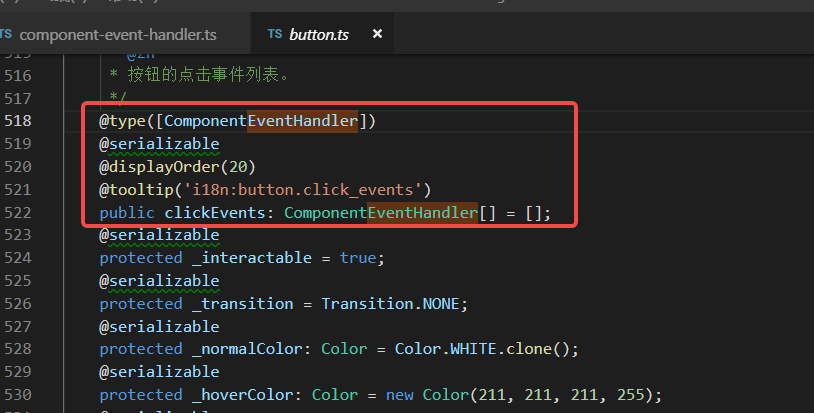
EventHandle里面用到的装饰器是从哪里来的呀,找不到cc.decorator,cc._decorator的type是在property中的,感觉不太一样
等我忙完,试着给你弄一个
好的,谢谢大佬
我看了一下引擎里面EventHandle的实现,比较复杂的是
通过Name获取Class
legacyCC.js.getClassByName
和
通过Id获取Class
legacyCC.js._getClassById
这两个引擎实现比较复杂。如果不是很必须的话,建议不用模仿去做了,如果很必须的话,你试着继承EventHandle去做做。
给你说一下引擎代码的相对CocosDashboard目录的路径:CocosDashboard\resources\.editors\Creator\3.3.2\resources\resources\3d\engine
我这边看的是3.3.2版本的,你根据你的cocos版本去看就行了。
vs code 中 ctrl+p 搜索 component-event-handler.ts
我放弃了,源码里面的装饰器有些复杂,不太好把它弄得项目中,我直接用string类型吧
该主题在最后一个回复创建后14天后自动关闭。不再允许新的回复。