
大家好,我是来自【欢乐互娱】的欢乐小学生,之前分享了一篇部分优化大致思路的文档,今天就选择其中一个进行具体解析,附带开箱即用源码
优化契机
前段时间一个同事发现游戏在出现明显卡顿,排查后发现是频繁调用本地数据读写造成的
封装setstorage函数的原理
1:每次get和set都在内存中缓存,优先读取内存中的数据
2:对可以检测玩家切后台,退出游戏操作的机型,则缓存本地数据在切后台,退游戏时候进行
3:对不可获取的平台,则在数据发生改变时写入本地缓存
原理图
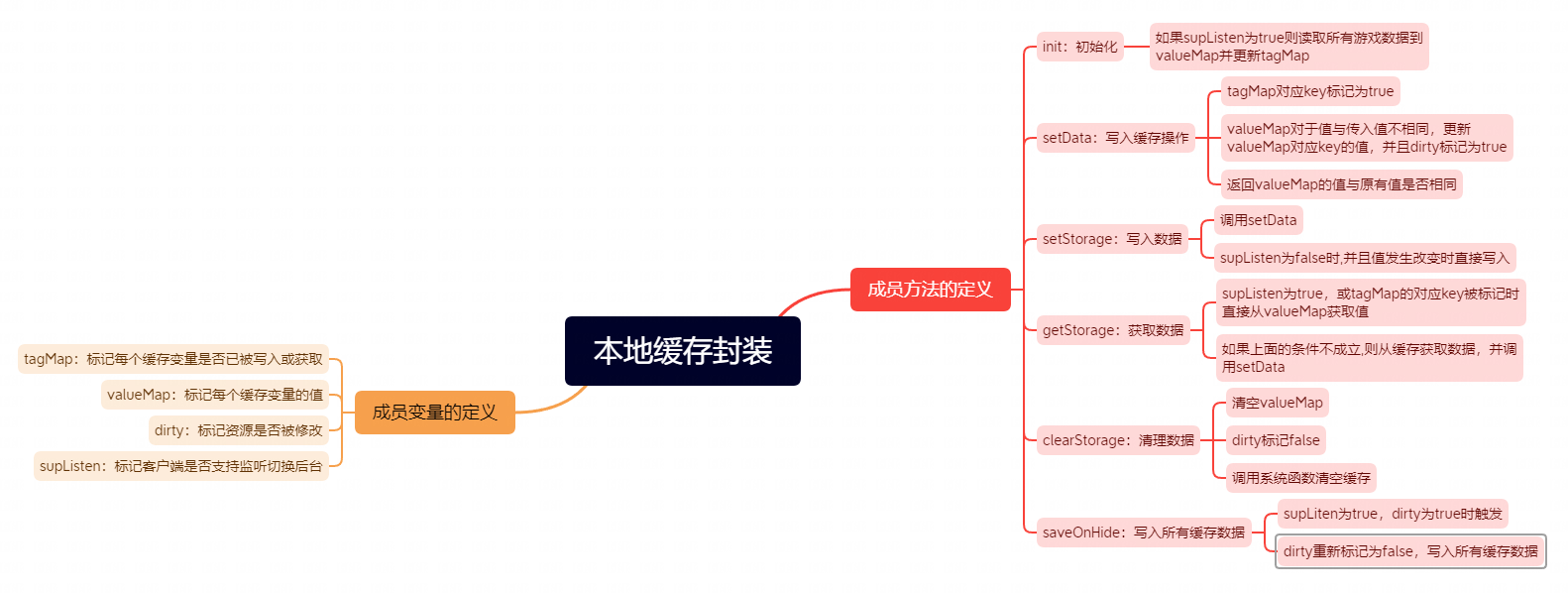
开箱即用源码带注释
/**

 * 重写读取本地数据的接口

 * 将数据做一层缓存,优先从缓存中读取

 */

export default class LocalStorage

{

    //被重写的原方法

    private m_stOldSetStorage: Function;

    private m_stOldSetStorageSync: Function;

    private m_stOldGetStorage: Function;

    private m_stOldGetStorageSync: Function;

    private m_stOldClearStorage: Function;

    //所有缓存数据(取出来的缓存数据有可能是空的)

    private m_mapLocalData: {[key: string]: any} = {};

    //判断当前数据是否研已经被获取或者写入

    private m_mapGetTag: {[key: string]: boolean} = {};

    //数据是否已经被更新

    private m_bDirty: boolean = false;

    //是否支持监听游戏关闭或者结束(支持则所有写入放在游戏结束)

    private m_bSupListen: boolean = false;

    private readonly GAME_DATA: string = "game_data";

    //被优化的io次数

    private m_iCount: number = 0;

    //是否打开日志显示

    private m_bOpenLog: boolean = false;

    //同步写入本地缓存

    private SetStorage(key: string,value: string | any): void

    {

        if(this.SetData(key,value,true) && !this.m_bSupListen)

        {

            this.AddLog();

            this.m_stOldSetStorage(key,value);

        }

    }

    //异步写入本地缓存

    private SetStorageSync(key: string,value: string | any): void

    {

        if(this.SetData(key,value,true) && !this.m_bSupListen)

        {

            this.m_stOldSetStorageSync(key,value);

        }

    }

    //异步获取本地缓存

    private GetStorage(key: string,callback: Function): void

    {

        if(this.m_bSupListen || this.m_mapGetTag[key])

        {

            callback(this.GetData(key));

        }

        else

        {

            let callBack2 = (val) =>

            {

                this.SetData(key,val);

                callback(val);

            }

            this.m_stOldGetStorage(key,callBack2);

        }

    }

    //同步获取本地缓存

    private GetStorageSync(key: string): any

    {

        if(this.m_bSupListen || this.m_mapGetTag[key])

        {

            return this.GetData(key);

        }

        else

        {

            let data = this.m_stOldGetStorageSync(key);

            this.SetData(key,data);

            return data;

        }

    }

    //清理本地缓存

    private ClearStorage(): void

    {

        this.m_mapLocalData = {};

        this.m_bDirty = false;

        this.m_stOldClearStorage();

    }

    //写入数据到字典中

    private SetData(key: string,value: string | any,isSave: boolean = false): boolean

    {

        this.m_mapGetTag[key] = true;

        if(this.m_mapLocalData[key] != value)

        {

            this.m_mapLocalData[key] = value;

            this.m_bDirty = true;

            return true;

        }

        else

        {

            if(isSave)

            {

                this.m_iCount++;

            }

            return false;

        }

    }

    //从字典中获取数据

    private GetData(key: string): any

    {

        this.AddLog();

        return this.m_mapLocalData[key];

    }

    //统计优化的缓存次数

    private AddLog(): void

    {

        this.m_iCount++;

        if(this.m_bOpenLog)

        {

            console.log("减少缓存io次数:",this.m_iCount);

        }

    }

    //重写sdk的部分方法,加入缓存实现

    public ChangeStorageFunc(): void

    {

        //缓存原有的数据写入方法

        let plat = Core.PlatformSDK;

        this.m_stOldSetStorage = plat.SetStorage;

        this.m_stOldSetStorageSync = plat.SetStorageSync;

        this.m_stOldGetStorage = plat.GetStorage;

        this.m_stOldGetStorageSync = plat.GetStorageSync;

        this.m_stOldClearStorage = plat.ClearStorage;

        //重新注入新的实现

        plat.SetStorage = this.SetStorage.bind(this);

        plat.SetStorageSync = this.SetStorageSync.bind(this);

        plat.GetStorage = this.GetStorage.bind(this);

        plat.GetStorageSync = this.GetStorageSync.bind(this);

        plat.ClearStorage = this.ClearStorage.bind(this);

        if(this.m_bSupListen)

        {

            this.m_mapLocalData = JSON.parse(this.m_stOldGetStorageSync(this.GAME_DATA)) || {};

        }

    }

    //保存所有数据当游戏关闭或者退出时,或延迟保存

    public SaveAll(): void

    {

        if(this.m_bSupListen && this.m_bDirty && this.m_stOldGetStorageSync)

        {

            this.m_bDirty = false;

            this.m_stOldGetStorageSync(this.GAME_DATA,JSON.stringify(this.m_mapLocalData));

        }

    }

}
有兴趣的可以关注【数字媒体与游戏开发】公众号,后续我会补充很多实现的细节, 我们可以深入交流


