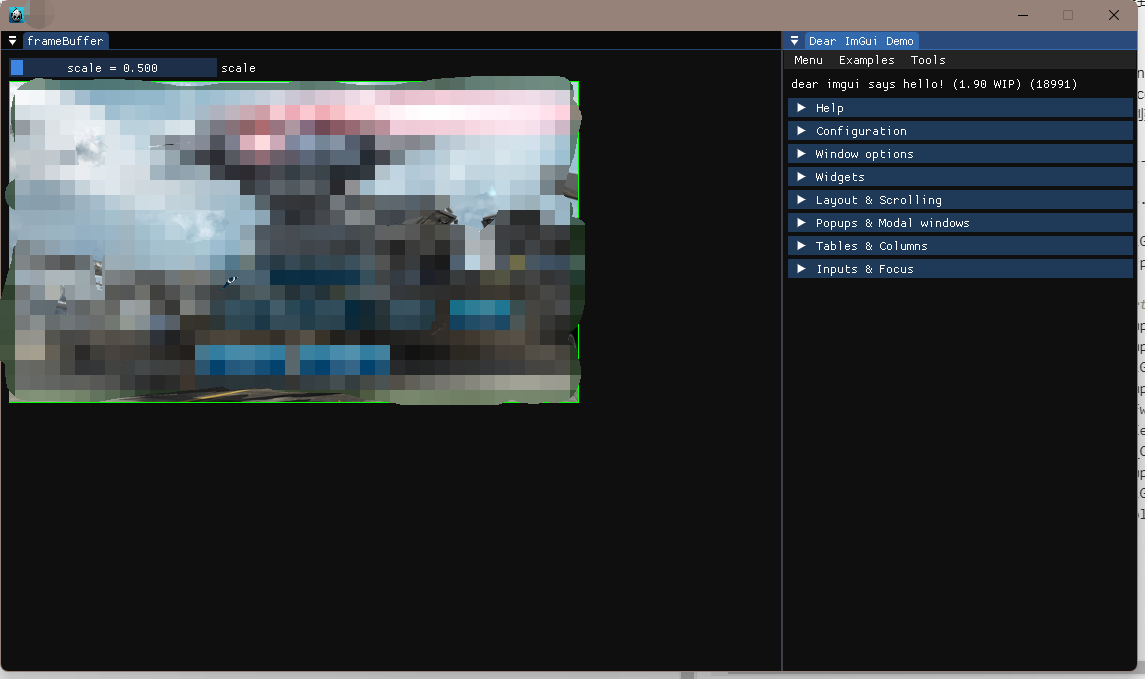
首先感谢前人的分享
我们设置几个集成的规则:
- 不能污染游戏的环境
- 能够访问游戏的内存
- 游戏画面作为子节点(类似unity布局)
- 可切换成纯win32窗口显示
总结一下前人的分享,游戏界面都是主界面,全部覆盖win32窗口,并不能作为子节点。(至少没有示例)
所以,这篇分享主要解决的问题是怎么能够把游戏界面在IMGUI子窗口中渲染。
思路:
做引擎编辑器,最常用的做法是framebuffer,来显示游戏画面。
那我们用framebuffer做离线渲染,作为图片放入到IMGUI子窗口中即可。
以下都是以windows平台opengl为例
- 创建两个窗口window1,window2.
- window1 作为游戏窗口,创建framebuffer。
- window2 作为编辑器窗口。
- window1 的context共享到window2。window2就可以访问window1的内存了。
- 隐藏window1窗口。
- 先切换context到window1,拿到framebuffer,再切换context到window2,渲染IMGUI。
- 渲染IMGUI,拿到window1的framebuffer,作为Image渲染到IMGUI子窗口即可。
FAQ:
- opengl 2 在IMGUI中,上述方案,渲染有问题。升级至opengl 3即可。
- 最新glfw3.3.8用cocos创建窗口的方式,启动崩溃。降至cocos当前使用版本3.3.3即可。
- IMGUI dock分支,可以把子窗口拖出 win32窗口,但是会创建一个独立的进程。
是因为windows平台下,没有描述窗口之间的关系。
static ImGuiViewport* ImGui_ImplGlfw_GetParentViewport(ImGuiViewport const& viewport)
{
    return viewport.ParentViewportId ? ImGui::FindViewportByID(viewport.ParentViewportId) : nullptr;
}

static void ImGui_ImplGlfw_AddParentToView(ImGuiViewport const& viewport, ImGuiViewport const& parent_viewport)
{
#ifdef _WIN32
    ::SetWindowLongPtr((HWND)viewport.PlatformHandleRaw, GWLP_HWNDPARENT, (LONG_PTR)parent_viewport.PlatformHandleRaw);
#endif
}

static void ImGui_ImplGlfw_CreateWindow(ImGuiViewport* viewport)
{
    ImGui_ImplGlfw_Data* bd = ImGui_ImplGlfw_GetBackendData();
    ImGui_ImplGlfw_ViewportData* vd = IM_NEW(ImGui_ImplGlfw_ViewportData)();
    viewport->PlatformUserData = vd;

    // GLFW 3.2 unfortunately always set focus on glfwCreateWindow() if GLFW_VISIBLE is set, regardless of GLFW_FOCUSED
    // With GLFW 3.3, the hint GLFW_FOCUS_ON_SHOW fixes this problem
    glfwWindowHint(GLFW_VISIBLE, false);
    glfwWindowHint(GLFW_FOCUSED, false);
#if GLFW_HAS_FOCUS_ON_SHOW
    glfwWindowHint(GLFW_FOCUS_ON_SHOW, false);
 #endif
    glfwWindowHint(GLFW_DECORATED, (viewport->Flags & ImGuiViewportFlags_NoDecoration) ? false : true);
#if GLFW_HAS_WINDOW_TOPMOST
    glfwWindowHint(GLFW_FLOATING, (viewport->Flags & ImGuiViewportFlags_TopMost) ? true : false);
#endif
    GLFWwindow* share_window = (bd->ClientApi == GlfwClientApi_OpenGL) ? bd->Window : nullptr;
    vd->Window = glfwCreateWindow((int)viewport->Size.x, (int)viewport->Size.y, "No Title Yet", nullptr, share_window);
    vd->WindowOwned = true;
    viewport->PlatformHandle = (void*)vd->Window;
#ifdef _WIN32
    viewport->PlatformHandleRaw = glfwGetWin32Window(vd->Window);
#elif defined(__APPLE__)
    viewport->PlatformHandleRaw = (void*)glfwGetCocoaWindow(vd->Window);
#endif
    glfwSetWindowPos(vd->Window, (int)viewport->Pos.x, (int)viewport->Pos.y);

    if (ImGuiViewport* parent_viewport = ImGui_ImplGlfw_GetParentViewport(*viewport))
        ImGui_ImplGlfw_AddParentToView(*viewport, *parent_viewport);

    // Install GLFW callbacks for secondary viewports
    glfwSetWindowFocusCallback(vd->Window, ImGui_ImplGlfw_WindowFocusCallback);
    glfwSetCursorEnterCallback(vd->Window, ImGui_ImplGlfw_CursorEnterCallback);
    glfwSetCursorPosCallback(vd->Window, ImGui_ImplGlfw_CursorPosCallback);
    glfwSetMouseButtonCallback(vd->Window, ImGui_ImplGlfw_MouseButtonCallback);
    glfwSetScrollCallback(vd->Window, ImGui_ImplGlfw_ScrollCallback);
    glfwSetKeyCallback(vd->Window, ImGui_ImplGlfw_KeyCallback);
    glfwSetCharCallback(vd->Window, ImGui_ImplGlfw_CharCallback);
    glfwSetWindowCloseCallback(vd->Window, ImGui_ImplGlfw_WindowCloseCallback);
    glfwSetWindowPosCallback(vd->Window, ImGui_ImplGlfw_WindowPosCallback);
    glfwSetWindowSizeCallback(vd->Window, ImGui_ImplGlfw_WindowSizeCallback);
    if (bd->ClientApi == GlfwClientApi_OpenGL)
    {
        glfwMakeContextCurrent(vd->Window);
        glfwSwapInterval(0);
    }
}
对比修改就可以了。
放个最后效果