1.介绍
due是一款基于Go语言开发的轻量级、高性能分布式游戏服务器框架。 其中,模块设计方面借鉴了kratos的模块设计思路,旨在为游戏服务器开发提供完善、高效、标准化的解决方案。 框架自创建至今已在多个企业级游戏项目中上线实践过,稳定性有充分的保障。
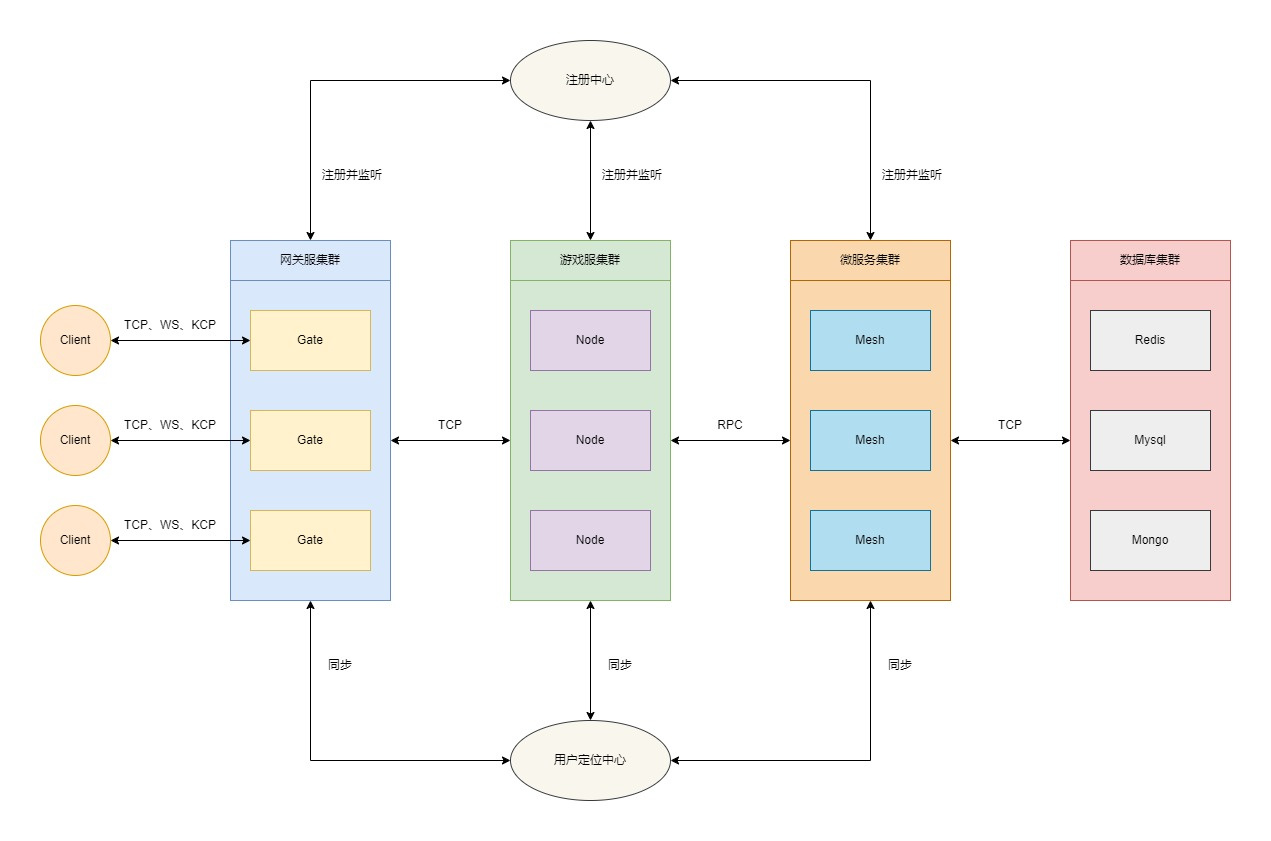
2.优势
-
 简单性:架构简单,源码简洁易理解。
 -
 便捷性:仅暴露必要的调用接口,减轻开发者的心智负担。
 -
 高性能:框架原生实现集群通信方案,普通机器单线程也能轻松实现20W的TPS。
 -
 标准化:框架原生提供标准化的开发规范,无论多么复杂的项目也能轻松应对。
 -

高效性:框架原生提供tcp、kcp、ws等协议的服务器,方便开发者快速构建各种类型的网关服务器。
-
 稳定性:所有发布的正式版本均已通过内部真实业务的严格测试,具备较高的稳定性。
 -
 扩展性:采用良好的接口设计,方便开发者设计实现自有功能。
 -
 平滑性:引入■■量,通过控制服务注册中心来实现优雅地滚动更新。
 -
 扩容性:通过优雅的路由分发机制,理论上可实现无限扩容。
 -
 易调试:框架原生提供了tcp、kcp、ws等协议的客户端,方便开发者进行独立的调试全流程调试。
 -
 可管理:提供完善的后台管理接口,方便开发者快速实现自定义的后台管理功能。
3.功能
-
网关:支持tcp、kcp、ws等协议的网关服务器。
-
日志:支持std、zap、logrus、aliyun、tencent等多种日志组件。
-
注册:支持consul、etcd、nacos等多种服务注册中心。
-
协议:支持json、protobuf、msgpack等多种通信协议。
-
配置:支持consul、etcd、nacos等多种配置中心;并支持json、yaml、toml、xml等多种文件格式。
-
通信:支持grpc、rpcx等多种高性能通信方案。
-
重启:支持服务器的平滑重启。
-
事件:支持redis、nats、kafka、rabbitMQ等事件总线实现方案。
-
加密:支持rsa、ecc等多种加密方案。
-
服务:支持grpc、rpcx等多种微服务解决方案。
-
灵活:支持单体、分布式等多种架构方案。
-
Web:提供http协议的fiber服务器及swagger文档解决方案。
-
工具:提供due-cli脚手架工具箱,可快速构建集群项目。
-
缓存:支持redis、memcache等多种常用的缓存方案。
-
Actor:提供完善actor模型解决方案。
-
分布式锁:支持redis、memcache等多种分布式锁解决方案。
4.下一期新功能规划
- 高性能日志库
5.特殊说明
在due交流群中经常有小伙伴提及到Gate、Node、Mesh之间到底是个什么关系,这里就做一个统一的解答
-
Gate:网关服,主要用于管理客户端连接,接收客户端的路由消息,并分发路由消息到不同的的Node节点服。
-
Node: 节点服,作为整个集群系统的核心组件,主要用于核心逻辑业务的编写。Node节点服务可以根据业务需要做成有状态或无状态的节点,当作为无状态的节点时,Node节点与Mesh微服务基本无异;但当Node节点作为有状态节点时,Node节点便不能随意更新进行重启操作。故而Node与Mesh分离的业务场景的价值就体现出来了。
-
Mesh:微服务,主要用于无状态的业务逻辑编写。Mesh能做的功能Node一样可以完成,如何选择完全取决于自身业务场景,开发者可以根据自身业务场景灵活搭配。
6.通信协议
在due框架中,通信协议统一采用size+header+route+seq+message的格式:
1.数据包
0 1 2 3 4 5 6 7 0 1 2 3 4 5 6 7 0 1 2 3 4 5 6 7 0 1 2 3 4 5 6 7 0 1 2 3 4 5 6 7 0 1 2 3 4 5 6 7 0 1 2 3 4 5 6 7 0 1 2 3 4 5 6 7 0 1 2 3 4 5 6 7+---------------------------------------------------------------+-+-------------+-------------------------------+-------------------------------+| size |h| extcode | route | seq |+---------------------------------------------------------------+-+-------------+-------------------------------+-------------------------------+| message data ... |+-----------------------------------------------------------------------------------------------------------------------------------------------+
2.心跳包
0 1 2 3 4 5 6 7 0 1 2 3 4 5 6 7 0 1 2 3 4 5 6 7 0 1 2 3 4 5 6 7 0 1 2 3 4 5 6 7 0 1 2 3 4 5 6 7 0 1 2 3 4 5 6 7 0 1 2 3 4 5 6 7 0 1 2 3 4 5 6 7+---------------------------------------------------------------+-+-------------+---------------------------------------------------------------+| size |h| extcode | heartbeat time (ns) |+---------------------------------------------------------------+-+-------------+---------------------------------------------------------------+
size: 4 bytes
-
包长度位
-
固定长度为4字节,且不可修改
header: 1 bytes
h: 1 bit
-
心跳标识位
-
%x0 表示数据包
-
%x1 表示心跳包
extcode: 7 bit
-
扩展操作码
-
暂未明确定义具体操作码
route: 1 bytes | 2 bytes | 4 bytes
-
消息路由
-
默认采用2字节,可通过打包器配置packet.routeBytes进行修改
-
不同的路由对应不同的业务处理流程
-
心跳包无消息路由位
-
此参数由业务打包器打包,服务器开发者和客户端开发者均要关心此参数
seq: 0 bytes | 1 bytes | 2 bytes | 4 bytes
-
消息序列号
-
默认采用2字节,可通过打包器配置packet.seqBytes进行修改
-
可通过将打包器配置packet.seqBytes设置为0来屏蔽使用序列号
-
消息序列号常用于请求/响应模型的消息对儿的确认
-
心跳包无消息序列号位
-
此参数由业务打包器packet.Packer打包,服务器开发者和客户端开发者均要关心此参数
message data: n bytes
-
消息数据
-
心跳包无消息数据
-
此参数由业务打包器packet.Packer打包,服务器开发者和客户端开发者均要关心此参数
heartbeat time: 8 bytes
-
心跳数据
-
数据包无心跳数据
-
上行心跳包无需携带心跳数据,下行心跳包默认携带8 bytes的服务器时间(ns),可通过网络库配置进行设置是否携带下行包时间信息
-
此参数由网络框架层自动打包,服务端开发者不关注此参数,客户端开发者需关注此参数
7.相关工具链
1.安装protobuf编译器(使用场景:开发mesh微服务)
- Linux, using apt or apt-get, for example:
apt install -y protobuf-compiler protoc --version # Ensure compiler version is 3+
- MacOS, using Homebrew:
brew install protobuf protoc --version # Ensure compiler version is 3+
- Windows, download from Github:
2.安装protobuf go代码生成工具(使用场景:开发mesh微服务)
go install google.golang.org/protobuf/cmd/protoc-gen-go@latest
3.安装grpc代码生成工具(使用场景:使用GRPC组件开发mesh微服务)
go install google.golang.org/grpc/cmd/protoc-gen-go-grpc@latest
4.安装rpcx代码生成工具(使用场景:使用RPCX组件开发mesh微服务)
go install github.com/rpcxio/protoc-gen-rpcx@latest
5.安装gorm dao代码生成工具(使用场景:使用GORM作为数据库orm)
go install github.com/dobyte/gorm-dao-generator@latest
6.安装mongo dao代码生成工具(使用场景:使用MongoDB作为数据库orm)
go install github.com/dobyte/mongo-dao-generator@latest
8.配置中心
1.功能介绍
配置中心主要定位于业务的配置管理,提供快捷灵活的配置方案。支持完善的读取、修改、删除、热更新等功能。
2.支持组件
-
file
-
etcd
-
consul
-
nacos
9.注册中心
1.功能介绍
注册中心用于集群实例的服务注册和发现。支撑整个集群的无感知停服、重启、动态扩容等功能。
2.支持组件
-
etcd
-
consul
-
nacos
10.网络模块
1.功能介绍
网络模块主要以组件的形式集成于网关模块,为网关提供灵活的网络通信支持。
2.支持组件
-
tcp
-
kcp
-
ws
11.快速开始
下面我们就通过两段简单的代码来体验一下due的魅力,Let’s go~~
1.启动组件
docker-compose up
docker-compose.yaml文件已在docker目录中备好,可以直接取用
2.获取框架
go get -u github.com/dobyte/due/v2@latest go get -u github.com/dobyte/due/locate/redis/v2
3.构建Gate服务器
package mainimport ( "github.com/dobyte/due/locate/redis/v2""github.com/dobyte/due/network/ws/v2""github.com/dobyte/due/registry/consul/v2""github.com/dobyte/due/v2"“github.com/dobyte/due/v2/cluster/gate”)funcmain() { // 创建容器container:=due.NewContainer() // 创建服务器server:=ws.NewServer() // 创建用户定位器locator:=redis.NewLocator() // 创建服务发现registry:=consul.NewRegistry() // 创建网关组件component:=gate.NewGate( gate.WithServer(server), gate.WithLocator(locator), gate.WithRegistry(registry), ) // 添加网关组件container.Add(component) // 启动容器container.Serve() }
4.启动Gate服务器
$ go run main.go ____ __ ________ / __ / / / / / / / / / / / / __/ / // / // / /_ //_/___/ ┌──────────────────────────────────────────────────────┐| [Website] https://github.com/dobyte/due || [Version] v2.1.0 |└──────────────────────────────────────────────────────┘ ┌────────────────────────Global────────────────────────┐| PID: 27159 || Mode: debug |└──────────────────────────────────────────────────────┘ ┌─────────────────────────Gate─────────────────────────┐| Name: gate || Link: 172.22.243.151:46545 || Server: [ws] 0.0.0.0:3553 || Locator: redis || Registry: consul |└──────────────────────────────────────────────────────┘
5.构建Node服务器
package mainimport ( “fmt”"github.com/dobyte/due/locate/redis/v2""github.com/dobyte/due/registry/consul/v2""github.com/dobyte/due/v2"“github.com/dobyte/due/v2/cluster/node”“github.com/dobyte/due/v2/codes”“github.com/dobyte/due/v2/log”“github.com/dobyte/due/v2/utils/xtime”)constgreet=1funcmain() { // 创建容器container:=due.NewContainer() // 创建用户定位器locator:=redis.NewLocator() // 创建服务发现registry:=consul.NewRegistry() // 创建节点组件component:=node.NewNode( node.WithLocator(locator), node.WithRegistry(registry), ) // 初始化监听initListen(component.Proxy()) // 添加节点组件container.Add(component) // 启动容器container.Serve() }// 初始化监听funcinitListen(proxy*node.Proxy) { proxy.Router().AddRouteHandler(greet, false, greetHandler) }typegreetReqstruct { Messagestringjson:"message"}typegreetResstruct { Codeintjson:"code"Messagestringjson:"message"}funcgreetHandler(ctx node.Context) { req:=&greetReq{} res:=&greetRes{} deferfunc() { iferr:=ctx.Response(res); err!=nil { log.Errorf(“response message failed: %v”, err) } }() iferr:=ctx.Parse(req); err!=nil { log.Errorf(“parse request message failed: %v”, err) res.Code=codes.InternalError.Code() return } log.Info(req.Message) res.Code=codes.OK.Code() res.Message=fmt.Sprintf(“I’m server, and the current time is: %s”, xtime.Now().Format(xtime.DateTime)) }
6.启动Node服务器
$ go run main.go ____ __ ________ / __ / / / / / / / / / / / / __/ / // / // / /_ //_/___/ ┌──────────────────────────────────────────────────────┐| [Website] https://github.com/dobyte/due || [Version] v2.1.0 |└──────────────────────────────────────────────────────┘ ┌────────────────────────Global────────────────────────┐| PID: 27390 || Mode: debug |└──────────────────────────────────────────────────────┘ ┌─────────────────────────Node─────────────────────────┐| Name: node || Link: 172.22.243.151:37901 || Codec: json || Locator: redis || Registry: consul || Encryptor: - || Transporter: - |└──────────────────────────────────────────────────────┘
7.构建测试客户端
package mainimport ( “fmt”"github.com/dobyte/due/eventbus/nats/v2""github.com/dobyte/due/network/ws/v2""github.com/dobyte/due/v2"“github.com/dobyte/due/v2/cluster”“github.com/dobyte/due/v2/cluster/client”“github.com/dobyte/due/v2/eventbus”“github.com/dobyte/due/v2/log”“github.com/dobyte/due/v2/utils/xtime”“time”)constgreet=1funcmain() { // 初始化事件总线eventbus.SetEventbus(nats.NewEventbus()) // 创建容器container:=due.NewContainer() // 创建客户端组件component:=client.NewClient( client.WithClient(ws.NewClient()), ) // 初始化监听initListen(component.Proxy()) // 添加客户端组件container.Add(component) // 启动容器container.Serve() }// 初始化监听funcinitListen(proxyclient.Proxy) { // 监听组件启动proxy.AddHookListener(cluster.Start, startHandler) // 监听连接建立proxy.AddEventListener(cluster.Connect, connectHandler) // 监听消息回复proxy.AddRouteHandler(greet, greetHandler) }// 组件启动处理器funcstartHandler(proxyclient.Proxy) { if_, err:=proxy.Dial(); err!=nil { log.Errorf(“gate connect failed: %v”, err) return } }// 连接建立处理器funcconnectHandler(connclient.Conn) { doPushMessage(conn) }// 消息回复处理器funcgreetHandler(ctxclient.Context) { res:=&greetRes{} iferr:=ctx.Parse(res); err!=nil { log.Errorf(“invalid response message, err: %v”, err) return } ifres.Code!=0 { log.Errorf(“node response failed, code: %d”, res.Code) return } log.Info(res.Message) time.AfterFunc(time.Second, func() { doPushMessage(ctx.Conn()) }) }// 推送消息funcdoPushMessage(conn*client.Conn) { err:=conn.Push(&cluster.Message{ Route: 1, Data: &greetReq{ Message: fmt.Sprintf(“I’m client, and the current time is: %s”, xtime.Now().Format(xtime.DateTime)), }, }) iferr!=nil { log.Errorf(“push message failed: %v”, err) } }typegreetReqstruct { Messagestringjson:"message"}typegreetResstruct { Codeintjson:"code"Messagestringjson:"message"}
8.启动客户端
$ go run main.go ____ __ ________ / __ / / / / / / / / / / / / __/ / // / // / /_ //_/___/ ┌──────────────────────────────────────────────────────┐| [Website] https://github.com/dobyte/due || [Version] v2.1.0 |└──────────────────────────────────────────────────────┘ ┌────────────────────────Global────────────────────────┐| PID: 27801 || Mode: debug |└──────────────────────────────────────────────────────┘ ┌────────────────────────Client────────────────────────┐| Name: client || Codec: json || Protocol: ws || Encryptor: - |└──────────────────────────────────────────────────────┘ INFO[2024/07/03 14:53:08.969845] main.go:72 [I’m server, and the current time is: 2024-07-03 14:53:08]INFO[2024/07/03 14:53:09.983827] main.go:72 [I’m server, and the current time is: 2024-07-03 14:53:09] INFO[2024/07/03 14:53:10.986592] main.go:72 [I’m server, and the current time is: 2024-07-03 14:53:10]INFO[2024/07/03 14:53:11.988530] main.go:72 [I’m server, and the current time is: 2024-07-03 14:53:11] INFO[2024/07/03 14:53:12.991217] main.go:72 [I’m server, and the current time is: 2024-07-03 14:53:12]INFO[2024/07/03 14:53:13.995049] main.go:72 [I’m server, and the current time is: 2024-07-03 14:53:13]
12.压力测试
1.压测机器
Ubuntu 20.04.6 LTS 13th Gen Intel(R) Core(TM) i5-13400F 16GB
2.压测结果
____ __ ________ / __ \/ / / / ____/ / / / / / / / __/ / /_/ / /_/ / /___ /_____/\____/_____/ ┌──────────────────────────────────────────────────────┐| [Website] https://github.com/dobyte/due || [Version] v2.1.0 |└──────────────────────────────────────────────────────┘ ┌────────────────────────Global────────────────────────┐| PID: 28660 || Mode: debug |└──────────────────────────────────────────────────────┘ ┌────────────────────────Client────────────────────────┐| Name: client || Codec: json || Protocol: tcp || Encryptor: - |└──────────────────────────────────────────────────────┘ server : tcp concurrency : 50 latency : 4.741343s data size : 1.00KB sent requests : 1000000 received requests : 1000000 throughput (TPS) : 210910 -------------------------------- server : tcp concurrency : 100 latency : 4.697039s data size : 1.00KB sent requests : 1000000 received requests : 1000000 throughput (TPS) : 212900 -------------------------------- server : tcp concurrency : 200 latency : 4.447127s data size : 1.00KB sent requests : 1000000 received requests : 1000000 throughput (TPS) : 224864 -------------------------------- server : tcp concurrency : 300 latency : 5.616742s data size : 1.00KB sent requests : 1000000 received requests : 1000000 throughput (TPS) : 178039 -------------------------------- server : tcp concurrency : 400 latency : 4.726411s data size : 1.00KB sent requests : 1000000 received requests : 1000000 throughput (TPS) : 211577 -------------------------------- server : tcp concurrency : 500 latency : 5.054949s data size : 1.00KB sent requests : 1000000 received requests : 1000000 throughput (TPS) : 197825 -------------------------------- server : tcp concurrency : 1000 latency : 5.486149s data size : 1.00KB sent requests : 1000000 received requests : 1000000 throughput (TPS) : 182277 -------------------------------- server : tcp concurrency : 1000 latency : 7.753779s data size : 2.00KB sent requests : 1000000 received requests : 1000000 throughput (TPS) : 128969 --------------------------------
本测试结果仅供参考,详细测试用例代码请查看due-benchmark
13.其他组件
- 日志组件
-
tencent: github.com/dobyte/due/log/zap/v2
- 网络组件
- 注册发现
- 传输组件
- 定位组件
- 事件总线
- Web组件
- 配置中心
- 缓存组件
- 分布式锁组件
14.其他客户端
-
due-client-ts
-
due-client-shape
15.详细示例
-
due-examples
-
due-chat
-
due-doudizhu-server 高性能分布式游戏服务器商业实战案例-斗地主服务器
开发交流反馈