
摘要
根据论坛孙二喵大佬分享的3.x的转场特效进行改成2.4.15可以使用的shader,理论上2.4的都可以使用吧。
开始
效果演示:

使用方法:
创建一个材质球要选择当前过度场景的shader然后设置图片大小(screenSize),并且选择要过滤到的图像纹理(subTexture),也可以设置方块大小(tranSize)
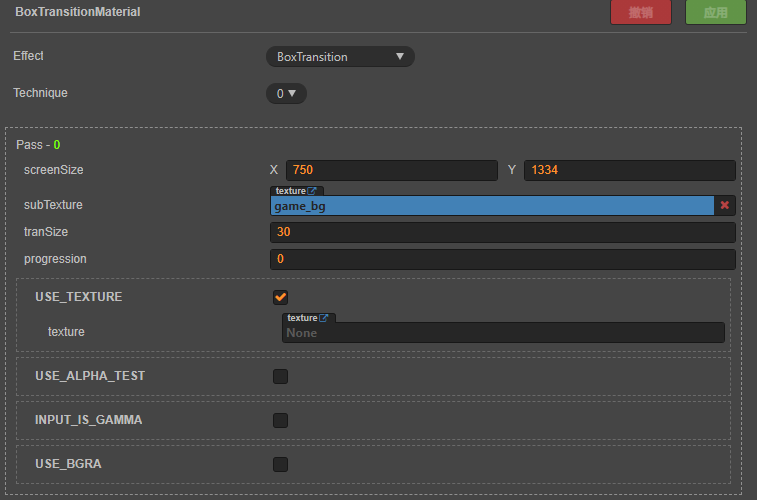
Shader代码和使用方法:
CCEffect %{
  techniques:
  - passes:
    - vert: vs
      frag: fs
      blendState:
        targets:
        - blend: true
      rasterizerState:
        cullMode: none
      properties:
        texture: { value: white }
        alphaThreshold: { value: 0.5 }
        screenSize: { value: [ 720, 1280 ] }
        subTexture: { value: grey }
        tranSize: { value: 36 }
        progression: { value: 0 }
}%


CCProgram vs %{
  precision highp float;

  #include <cc-global>
  #include <cc-local>

  in vec3 a_position;
  in vec4 a_color;
  out vec4 v_color;

  #if USE_TEXTURE
  in vec2 a_uv0;
  out vec2 v_uv0;
  #endif

  void main () {
    vec4 pos = vec4(a_position, 1);

    #if CC_USE_MODEL
    pos = cc_matViewProj * cc_matWorld * pos;
    #else
    pos = cc_matViewProj * pos;
    #endif

    #if USE_TEXTURE
    v_uv0 = a_uv0;
    #endif

    v_color = a_color;

    gl_Position = pos;
  }
}%


CCProgram fs %{
  precision highp float;

  #include <alpha-test>
  #include <texture>

  in vec4 v_color;

  #if USE_TEXTURE
  in vec2 v_uv0;
  uniform sampler2D texture;
  #endif

  uniform UBO_1 {
    //屏幕尺寸,用来计算格子的尺寸
    vec2 screenSize;
    //progression 控制了过渡的进度,从 0 到 1。在 progression 值为 0 时,显示的是原图;当 progression 为 1 时,显示的是新图。
    float progression = 0;
    //过渡是通过格子状的更新方式进行的,格子的大小由 tranSize 控制。每个像素位置的判断决定了是否显示原图或新图
    float tranSize;
  };


  uniform sampler2D subTexture;

  vec4 BoxTransition(vec4 color, vec4 mixcolor, vec2 uv, float progression) {
    vec2 fragCoord = gl_FragCoord.xy;

    fragCoord.y = screenSize.y - fragCoord.y; // 反转y轴,使其从上到下

    vec2 blockPos = vec2(progression) * screenSize.xy; // 计算当前过渡进度所在的格子位置
    vec2 p = ceil(fragCoord / tranSize) * tranSize; // 计算当前像素所属的格子位置

    // 计算进度,基于格子的相对位置
    float progress = (p.x + p.y) / (blockPos.x + blockPos.y);

    vec2 v = abs(fragCoord - p + vec2(tranSize / 2.));

    // 使用格子更新效果,若进度较高,则显示新图
    if (max(v.x, v.y) * progress < tranSize / 2.) {
      color = mixcolor;
    }

    return color;
  }

  void main () {
    vec4 o = vec4(1, 1, 1, 1);

    #if USE_TEXTURE
      CCTexture(texture, v_uv0, o); // 显示原图
    #endif

    vec4 mixColor = vec4(1, 1, 1, 1);
    CCTexture(subTexture, v_uv0, mixColor); // 显示新图

    o = BoxTransition(o, mixColor, v_uv0, progression); // 进行过渡

    o *= v_color; // 混合颜色

    ALPHA_TEST(o);

    #if USE_BGRA
      gl_FragColor = o.bgra;
    #else
      gl_FragColor = o.rgba;
    #endif
  }
}%
在需要用到转场过度的地方进行调用代码
 	// 初始值设置为 0
 	let start = { num: 0 };
 	// 目标值设置为 1
	let end = { num: 1 };
	// 获取节点上的Material,各版本可能存在差异
    let sprite = this.node.getComponent(cc.Sprite);
    let mat = sprite.getMaterial(0);
    // 利用tween进行过渡
    cc.tween(start)
      .delay(0.0010)
      .to(1.5, end, {
          onUpdate(target:any, ratio:any) {
              // 根据动画的进度比例来更新
              mat.setProperty("progression", target.num);
          },
      })
      .start();