
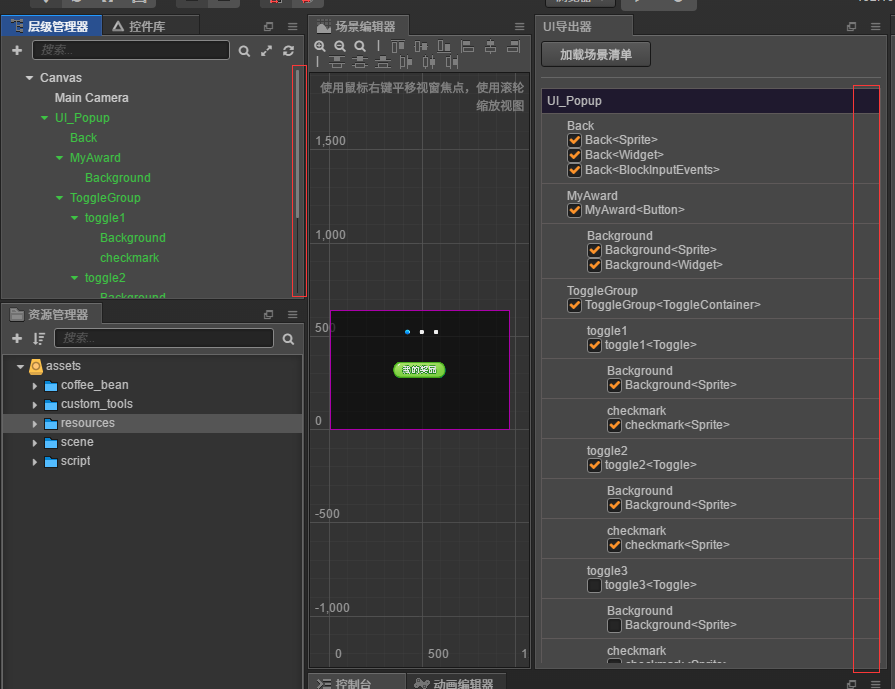
请问如何给自定义面板添加滚动条啊
我试过给容器div增加 flow:auto 或者flow:scroll
加了可以显示一条竖线
但是滚动条无法显示
文档里面也没有
自己回复

再附加样式
:host {
margin: 5px;
}
h2 {
color: #f90;
}
.ui{
list-style:none;
position: relative;
padding: 5px;
border: 1px solid #5e5959;
}
.header{
background-color: rgb(31, 25, 46);
margin-top: 10px;
}
.child{
border-top:0;
}
@import url(theme://globals/fontello.css);
:host {
  display: flex;
  flex-direction: column;
}

h3 {
  margin-top: 0;
  margin-bottom: 10px;
}

.toolbar {
  display: flex;
  flex-direction: row;
  align-items: center;

  padding: 10px;
}

#view {
  flex: 1;

  padding: 10px;
  padding-top: 0px;

  overflow-y: auto;
  overflow-x: hidden;
}

div.section {
  border-bottom: 1px solid #666;
  padding-bottom: 10px;
  margin-bottom: 10px;
}

div.section:last-child {
  border-bottom: 0px;
}

div.group {
  min-width: 420px;
  margin-bottom: 5px;

  display: flex;
  flex-direction: row;
  align-items: center;
  flex-wrap: wrap;
}

span {
  margin-right: 0.25em;
}
.fit,.fixed-bottom,.fixed-top {
right: 0
}
.fit,.fixed-bottom,.fixed-left {
bottom: 0;
left: 0
}
.layout.horizontal,.layout.horizontal-reverse,.layout.vertical,.layout.vertical-reverse {
display: -ms-flexbox;
display: -webkit-flex;
display: flex
}
.layout.inline {
display: -ms-inline-flexbox;
display: -webkit-inline-flex;
display: inline-flex
}
.layout.horizontal {
-ms-flex-direction: row;
-webkit-flex-direction: row;
flex-direction: row
}
.layout.horizontal-reverse {
-ms-flex-direction: row-reverse;
-webkit-flex-direction: row-reverse;
flex-direction: row-reverse
}
.layout.vertical {
-ms-flex-direction: column;
-webkit-flex-direction: column;
flex-direction: column
}
.layout.vertical-reverse {
-ms-flex-direction: column-reverse;
-webkit-flex-direction: column-reverse;
flex-direction: column-reverse
}
.layout.wrap {
-ms-flex-wrap: wrap;
-webkit-flex-wrap: wrap;
flex-wrap: wrap
}
.layout.wrap-reverse {
-ms-flex-wrap: wrap-reverse;
-webkit-flex-wrap: wrap-reverse;
flex-wrap: wrap-reverse
}
.flex-auto {
-ms-flex: 1 1 auto;
-webkit-flex: 1 1 auto;
flex: 1 1 auto
}
.flex-none {
-ms-flex: none;
-webkit-flex: none;
flex: none
}
.flex,.flex-1 {
-ms-flex: 1;
-webkit-flex: 1;
flex: 1
}
.flex-2 {
-ms-flex: 2;
-webkit-flex: 2;
flex: 2
}
.flex-3 {
-ms-flex: 3;
-webkit-flex: 3;
flex: 3
}
.flex-4 {
-ms-flex: 4;
-webkit-flex: 4;
flex: 4
}
.flex-5 {
-ms-flex: 5;
-webkit-flex: 5;
flex: 5
}
.flex-6 {
-ms-flex: 6;
-webkit-flex: 6;
flex: 6
}
.flex-7 {
-ms-flex: 7;
-webkit-flex: 7;
flex: 7
}
.flex-8 {
-ms-flex: 8;
-webkit-flex: 8;
flex: 8
}
.flex-9 {
-ms-flex: 9;
-webkit-flex: 9;
flex: 9
}
.flex-10 {
-ms-flex: 10;
-webkit-flex: 10;
flex: 10
}
.flex-11 {
-ms-flex: 11;
-webkit-flex: 11;
flex: 11
}
.flex-12 {
-ms-flex: 12;
-webkit-flex: 12;
flex: 12
}
.layout.start {
-ms-flex-align: start;
-webkit-align-items: flex-start;
align-items: flex-start
}
.layout.center,.layout.center-center {
-ms-flex-align: center;
-webkit-align-items: center;
align-items: center
}
.layout.end {
-ms-flex-align: end;
-webkit-align-items: flex-end;
align-items: flex-end
}
.layout.start-justified {
-ms-flex-pack: start;
-webkit-justify-content: flex-start;
justify-content: flex-start
}
.layout.center-center,.layout.center-justified {
-ms-flex-pack: center;
-webkit-justify-content: center;
justify-content: center
}
.layout.end-justified {
-ms-flex-pack: end;
-webkit-justify-content: flex-end;
justify-content: flex-end
}
.layout.around-justified {
-ms-flex-pack: around;
-webkit-justify-content: space-around;
justify-content: space-around
}
.layout.justified {
-ms-flex-pack: justify;
-webkit-justify-content: space-between;
justify-content: space-between
}
.self-start {
-ms-align-self: flex-start;
-webkit-align-self: flex-start;
align-self: flex-start
}
.self-center {
-ms-align-self: center;
-webkit-align-self: center;
align-self: center
}
.self-end {
-ms-align-self: flex-end;
-webkit-align-self: flex-end;
align-self: flex-end
}
.self-stretch {
-ms-align-self: stretch;
-webkit-align-self: stretch;
align-self: stretch
}
.block {
display: block
}[hidden] {
display: none!important
}
.invisible {
visibility: hidden!important
}
.relative {
position: relative
}
.fit {
position: absolute;
top: 0
}
body.fullbleed {
margin: 0;
height: 100vh
}
.scroll {
-webkit-overflow-scrolling: touch;
overflow: auto
}
.fixed-bottom,.fixed-left,.fixed-right,.fixed-top {
position: fixed
}
.fixed-top {
top: 0;
left: 0
}
.fixed-right {
top: 0;
right: 0;
bottom: 0
}
.fixed-left {
top: 0
}
:host {
overflow: hidden;
contain: content
}
h1,h2,h3,h4,h5 {
font-family: Roboto,-apple-system,BlinkMacSystemFont,‘Helvetica Neue’,‘Segoe UI’,Oxygen,Ubuntu,Cantarell,‘Open Sans’,sans-serif;
font-weight: 700;
padding: 0
}
a {
color: #fd942b;
text-decoration: none
}
a:active,a:hover {
text-decoration: underline
}
hr {
border: 0;
padding: 0;
margin-top: 10px;
margin-bottom: 10px;
height: 1px;
background-color: #666
}
::-webkit-scrollbar {
height: 11px;
width: 11px
}
::-webkit-scrollbar-thumb {
border-radius: 5px;
border: 4px solid transparent;
background: #7d7d7d;
background-clip: content-box
}
::-webkit-scrollbar-thumb:hover {
border-radius: 5px;
border: 3px solid transparent;
background: #fd942b;
background-clip: content-box
}
::-webkit-scrollbar-track {
border: 5px solid transparent;
background: rgba(0,0,0,.5);
background-clip: content-box
}
::-webkit-scrollbar-track:hover {
border: 5px solid transparent;
background: rgba(0,0,0,.5);
background-clip: content-box
}
::-webkit-scrollbar-corner {
display: none
}
::-webkit-scrollbar-button {
display: none
}
.scroll::-webkit-scrollbar-thumb:hover {
border-radius: 5px;
border: 3px solid transparent;
background: #fd942b;
background-clip: content-box;
transition: background .5s
}