大佬们,请教个问题。
我的需求是:将构建后的自动图集资源分类。
疑问:
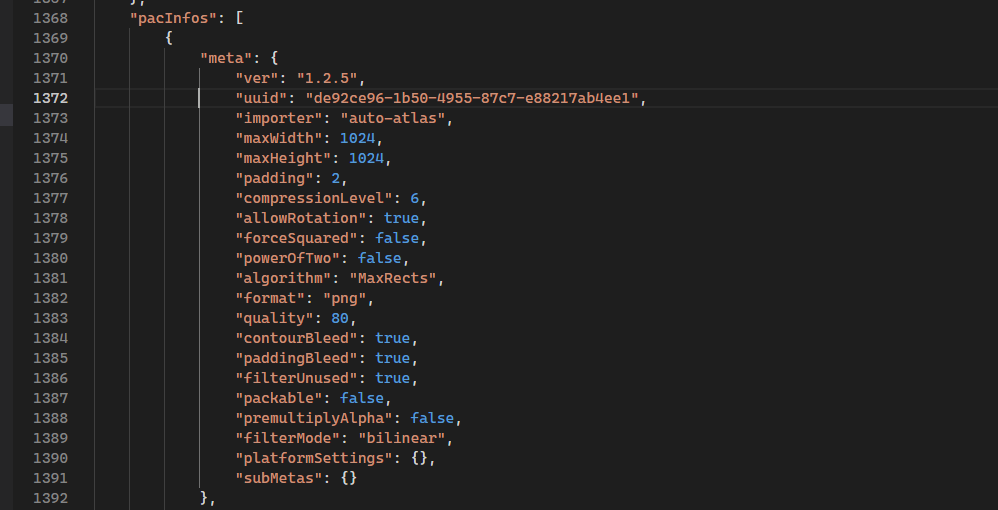
自动图集的uuid是怎么分配的呀。构建后,我的AutoAtlas.pac的uuid是cf41304d-9bb1-4f2c-90ec-5bd54284c8a3

图集的名字16f4956a0.png,分配在16文件夹下。
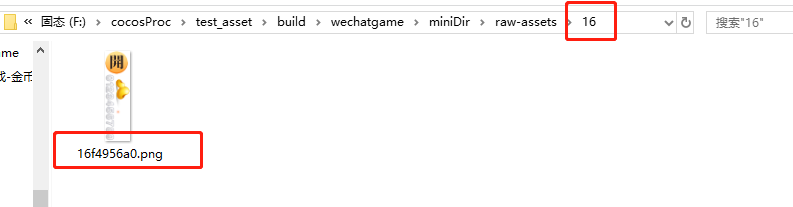
其他的资源都是根据uuid的前两位来创建文件夹的。但是这个自动图集的16,一直找不到来源。求大佬们给我解惑???

大佬们,请教个问题。
我的需求是:将构建后的自动图集资源分类。
疑问:
自动图集的uuid是怎么分配的呀。构建后,我的AutoAtlas.pac的uuid是cf41304d-9bb1-4f2c-90ec-5bd54284c8a3
图集的名字16f4956a0.png,分配在16文件夹下。
其他的资源都是根据uuid的前两位来创建文件夹的。但是这个自动图集的16,一直找不到来源。求大佬们给我解惑???
求大佬们回复下
我也很想知道,这个自动图集打出来的图片的文件名和自动图集.pac之间的对应关系,起码让我知道一个自动图集.pac构建出来后的图片名,这样才好进一步处理。
同求啊~~~~~
同求啊!!
没人回答吗?构建后图集的uuid和AutoAtlas.pac有什么关联呢?想处理构建后的图集资源,怎么找?
我现在用的是2.4.9版本
同向老爷们求转换算法
同求,现在超级麻烦。没有办法通过uuid来获取构建后的自动图集目录。只能找到原始图,然后通过原始图去找他用的纹理的uuid,然后才能找到资源。进行自定义操作。
这个范例有个屁用。
根本没有办法简单的通过自动图集的uuid拿到构建后的资源路径。
你说我用你们内置的压缩工具,结果压出来的资源还更大。然后缓存做的不清不楚的。meta完全没有变化的情况下,就以为git切个分支,合并一下缓存就给清了,你们实际有用过吗?论坛那么多反馈你们关注过吗?
然后自己处理还各种不顺。到处都是卡点。
我们还要自己去分析构建后的各种信息找到自己要的内容。
更可笑的是,论坛有个方案替换掉压缩工具,以实现自己缓存的目标,竟然还推荐别的用户使用。要么别做,要么就做好来。存粹的就是浪费使用者的时间躺坑。
还好意思标为解决方案。
真敷衍。
就问你能简单的通过自动图集的uuid拿到构建后资源的路径吗?不行就不行,没有就没有。
你说没有就行了。答非所问就算了,还能标为解决方案。
           const bundleData = options.bundles[i];
           const config = bundleData.config;
           //......

            const pacInfos = bundleData.pacInfos;
            for (let i = 0; i < pacInfos.length; i++) {
                const pack = pacInfos[i];
                const uuid = pack.info.uuid;

                const pacDestPath = `${bundleData.dest}/${config.importBase}/${uuid.substring(0, 2)}/${uuid}.json`;

                /** @type {ImportAsset.IFileData} */
                const pacImportAsstData = JSON.parse(fs.readFileSync(pacDestPath, BuilderMacro.encoding.utf8));

                const shareUuids = pacImportAsstData[BuilderMacro.ImportAssetIdx.File.SharedUuids];
                Editor.log(shareUuids);

                /** 用第一个uuid来查找对应的纹理资源 */
                const frameUuid = shareUuids[0];
                const frameDecodeUuid = EditorUtil.decompressUuid(frameUuid);
                const frameDestPath = `${bundleData.dest}/${config.importBase}/${frameDecodeUuid.substring(0, 2)}/${frameDecodeUuid}.json`;
                /** @type {ImportAsset.IFileData} */
                const frameImportData = JSON.parse(fs.readFileSync(frameDestPath, BuilderMacro.encoding.utf8));

                const packTextureUuid = frameImportData[BuilderMacro.ImportAssetIdx.File.SharedUuids][0];

                let info = {
                    uuid: uuid,
                    encode: EditorUtil.compressUuid(uuid),
                    pacUuid: packTextureUuid,
                    packed: null,
                    path: `${bundleData.dest}/${config.nativeBase}/${packTextureUuid.substring(0, 2)}/${packTextureUuid}.${pack.meta.format}`,
                    /** 压缩参数 */
                    compressArgs: []
                }
                textureInfos[uuid] = info;
            }
其中使用到的一些定义:
    /** import资源数组索引定义 */
    ImportAssetIdx: {
        File: {
            /**版本信息 */
            Version: 0,
            /** 格式,运行时替换Version */
            Context: 0,

            SharedUuids: 1,
            SharedStrings: 2,
            /** 类型信息 */
            SharedClasses: 3,
            SharedMasks: 4,

            /** 实际内容数组 */
            Instances: 5,

            /** 非合集实例类型  */
            InstanceTypes: 6,

            /** 引用信息 */
            Refs: 7,

            DependObjs: 8,
            DependKeys: 9,
            DependUuidIndices: 10,
            ARRAY_LENGTH: 11,
        },
        Instance: {
            /** 类型索引 */
            CLASS_INDEX: 0,
            /** 名称索引 */
            FILE_NAME: 1,
            /** 数据内容 */
            CONTENT: 2,
        }
    }

    interface Bundle {
        root: string,  // bundle 的根目录
        dest: string,  // bundle 的输出目录
        scriptDest: string, // 脚本的输出目录
        name: string, // bundle 的名称
        priority: number, // bundle 的优先级
        scenes: string[], // bundle 中包含的场景
        compressionType: 'subpackage' | 'normal' | 'none' | 'merge_all_json' | 'zip', // bundle 的压缩类型
        buildResults: BuildResults, // bundle 所构建出来的所有资源
        version: string, // bundle 的版本信息,由 config 生成
        config: BundleConfigDebug, // bundle 的 config.json 文件
        pacInfos: BundlePac[]; // 自动图集信息;
        isRemote: boolean // bundle 是否是远程包
    }

interface BundleConfigDebug {
        // 包内资源列表 <资源uuid, [资源相对路径, 资源类型]>
        paths: Record<string, [string, string]>;
        // 资源uuid数组
        uuids: string[];
        // 场景 <场景url, 场景uuid>
        scenes: Record<string, string>;
        // 重新使用[uuid,重新使用次数]
        redirect: any[];
        // 依赖的bundle资源包名称
        deps: string[];
        // 合并的资源信息 {[合并的uuid] : [被合并的资源uuid,...]}
        packs: Record<string, string[]>;
        // bundle名称
        name: string;
        // 资源前缀 比如cdn链接...
        base: string;
        // json文件夹
        importBase: string;
        // 原生资源信息
        nativeBase: string;
        // 是否是debug模式
        debug: boolean;
        // 是否zip压缩
        isZip: boolean;
        // 脚本是否加密
        encrypted: boolean;
        // 版本信息, 选择md5配置的时候
        versions: {
            // [资源uuid, md5, 资源uuid, md5,...],
            import: string[];
            // [资源uuid, md5, 资源uuid, md5,...]
            native: string[];
        }
    }


// file: engine/ deserialize-compliled.ts
declare module ImportAsset {
    type ICustomObjectDataContent = any;

    const CUSTOM_OBJ_DATA_CLASS = 0;
    const CUSTOM_OBJ_DATA_CONTENT = 1;
    interface ICustomObjectData extends Array<any> {
        // The index of its Class
        [CUSTOM_OBJ_DATA_CLASS]: number;
        // Content
        [CUSTOM_OBJ_DATA_CONTENT]: ICustomObjectDataContent;
    }


    /*@__DROP_PURE_EXPORT__*/
    const enum File {
        Version = 0,
        Context = 0,

        SharedUuids,
        SharedStrings,
        SharedClasses,
        SharedMasks,

        Instances,
        InstanceTypes,

        Refs,

        DependObjs,
        DependKeys,
        DependUuidIndices,

        ARRAY_LENGTH,
    }

    // Main file structure
    interface IFileData extends Array {
        // version
        [File.Version]: number | FileInfo | any;

        // Shared data area, the higher the number of references, the higher the position

        [File.SharedUuids]: string[] | Empty; // Shared uuid strings for dependent assets
        [File.SharedStrings]: string[] | Empty;
        [File.SharedClasses]: (IClass | string | AnyCCClass)[];
        [File.SharedMasks]: IMask[] | Empty;  // Shared Object layouts for IClassObjectData

        // Data area

        // A one-dimensional array to represent object datas, layout is [...IClassObjectData[], ...OtherObjectData[], RootInfo]
        // If the last element is not RootInfo(number), the first element will be the root object to return and it doesn't have native asset
        [File.Instances]: (IClassObjectData | OtherObjectData | RootInfo)[];
        [File.InstanceTypes]: OtherObjectTypeID[] | Empty;
        // Object references infomation
        [File.Refs]: IRefs | Empty;

        // Result area

        // Asset-dependent objects that are deserialized and parsed into object arrays
        [File.DependObjs]: (object | InstanceIndex)[];
        // Asset-dependent key name or array index
        [File.DependKeys]: (StringIndexBnotNumber | string)[];
        // UUID of dependent assets
        [File.DependUuidIndices]: (StringIndex | string)[];
    }

}
    /**
     * 获取自动图集对应的纹理
     * @param {Builder.BundlePacInfo} pacInfo 自动图集信息
     * @param {Builder.BuildResults} buildResults 自动图集构建的资源库
     */
    async getPacPackId(pacInfo, buildResults) {
        // 先拿目录
        const atlasDir = FileUtil.getFileDir(FileUtil.serializePath(pacInfo.info.path)).replace(FileUtil.serializePath(options.project), "db:/");
        // 通过asset db 检索目录下的散图
        const frameuuids = await this._editorUtil.asyncQuertAssets([`${atlasDir}/**/*`], [this._editorUtil.AssetTypeName.CCSpriteFrame]);
        // 通过散图找构建结果后的依赖
        for (let i = 0; i < frameuuids.length; i++) {
            const frameuuid = frameuuids[i]
            if (buildResults.containsAsset(frameuuid)) {
                let depends = buildResults.getDependencies(frameuuid);
                if (depends.length > 0) {
                    return depends[0];
                }
            }
        }
    }
烦请确认一下这个方案,如果确认没有问题的话,请标为解决方案。@jare
我们没有内置 png 压缩工具,目前是计划在 3.9 会支持 png 高级压缩。你说的那些构建问题 3.x 都解决了~~~
楼主的问题是
我的回复里面给出的方案:
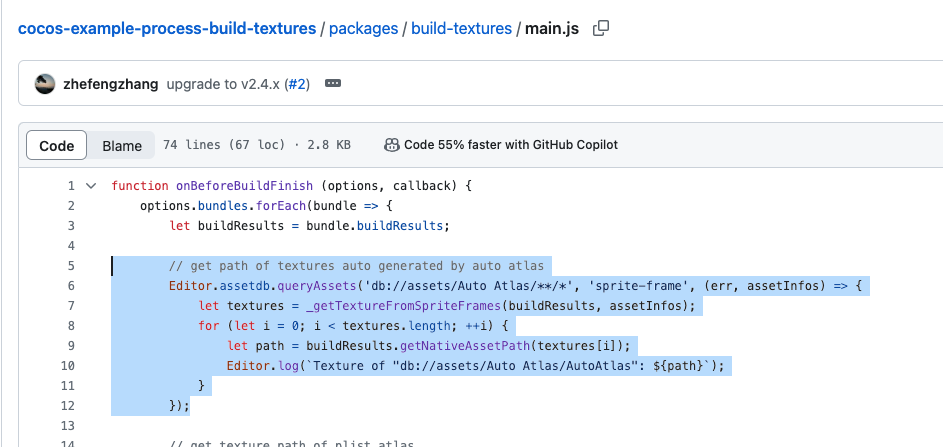
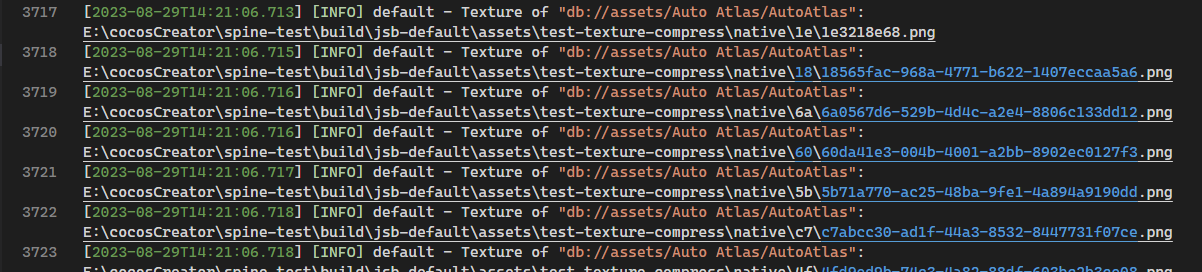
通过调用 getNativeAssetPath,传入任意一个资源的原始 uuid,就能拿到构建后的路径,路径里面自然就包含了新的 uuid。怎么获得原始 uuid,这个案例里面给了 N 种方法,总有一种适合你。
这难道不是解决方案?当然你要说这个方案不够“简单”,那你可以给出更简单的,至少在之前我没看到任何其它回复。
每个人对“做好”的标准并不一样,什么时候做什么功能,做到什么程度叫做做好?
每个人对“浪费使用者的时间”的标准也不一样,浪费几秒、几分钟叫做浪费?多久浪费一次叫做浪费?
在我看来,你说的都是 3.x 已经优化好的东西。