
Animation 怎么修改播放动画

    /**把自身变为绿色 */
    event.target.getComponent(cc.Sprite).spriteFrame = PrefabBase.ins.pngs[1]
    this.index当前使用皮肤索引 = Number(event.target.name)
    cc.sys.localStorage.setItem("pifuIndex", this.index当前使用皮肤索引 + "")
    console.error("更换后的皮肤索引为 " + this.index当前使用皮肤索引)
    /**修改人物动画 */
    let bigPeople = cc.find(Road.ShopPage_People上方大人_预制体下相对路径, shopPage)
    let ani1 = bigPeople.getComponent(cc.Animation)
    let clips = ani1.getClips()
    clips[0] = PrefabBase.ins.aniclipList[this.index当前使用皮肤索引][0]
    ani1.defaultClip = PrefabBase.ins.aniclipList[this.index当前使用皮肤索引][0]
    ani1.play()

点击皮肤 更换皮肤 并修改展示所用的动画 这样写有问题吗???????????
依然是播放原来的动画
真的是头大
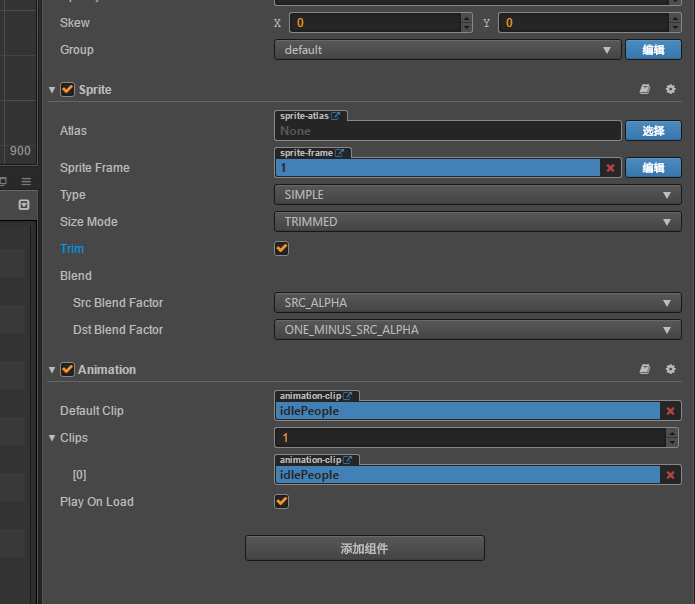
右边赋值过去的 AnimationClip 都是没有问题的 就是不清楚怎么 播放的依然是之前的动画

人物身上默认有个 Idle 动画

更换Clip之前 this.index当前使用皮肤索引 已修改 这点也无问题

@jare

我觉得应该使用ani1.currentClip=PrefabBase.ins.aniclipList[this.index当前使用皮肤索引][0];ani1.play()或者直接ani1.play(“动画名”)可以实现,切换播放动画,我都是使用后者。

    /**把自身变为绿色 */
    event.target.getComponent(cc.Sprite).spriteFrame = PrefabBase.ins.pngs[1]
    this.index当前使用皮肤索引 = Number(event.target.name)
    cc.sys.localStorage.setItem("pifuIndex", this.index当前使用皮肤索引 + "")
    console.error("更换后的皮肤索引为 " + this.index当前使用皮肤索引)
    /**修改人物动画 */
    let bigPeople = cc.find(Road.ShopPage_People上方大人_预制体下相对路径, shopPage)
    let ani1 = bigPeople.getComponent(cc.Animation)
    ani1.stop()
    ani1.removeClip(ani1.defaultClip, true)
    ani1.addClip(PrefabBase.ins.aniclipList[this.index当前使用皮肤索引][0])
    ani1.play("idlePeople")

非常感谢您的回复 通过这样 解决了我的问题