
-
Creator 版本:mac2.0.6/win2.1.0
-
目标平台: 模拟器 /微信小游戏
-
详细报错信息,包含调用堆栈:
-
重现方式:
项目创建于mac cocos creator 2.0.6 ,自定义设计师尺寸1920*1080,项目一开始场景显示正常。
在git中只对assets,settings,project.json进入版本控制,
载下项目,在window cocos creator 2.1.0 进行后续编辑,美术只对场景进入了一些精灵,标签的添加,上传回git,mac环境下重新运行项目,cocos Simulator 就不能完全展示场景,只显示了其中一小部分。对Simulator各种适配都不能解决问题。
将项目打包发布到微信开发者工具上,依然只显示其中一小部分。
将mac的cocos creator 从2.0.6升级到2.0.7 问题依然存在。
-
出现概率: 必出
此问题我认为BUG级别严重! -
编辑器之前是否有其它报错 :
2019-01-10T03:36:46.758Z - normal: Simulator: WORKAREA WIDTH 1440.00, HEIGHT 819.00
2019-01-10T03:36:46.758Z - normal: Simulator: FRAME SCALE = 0.25
2019-01-10T03:36:46.814Z - normal: Simulator: GLFWError #65544 Happen, Cocoa: Failed to retrieve display name
2019-01-10T03:36:46.850Z - normal: Simulator:
2019-01-10T03:36:46.851Z - normal: Simulator: {
2019-01-10T03:36:46.851Z - normal: Simulator: build_type: DEBUG
2019-01-10T03:36:46.851Z - normal: Simulator: gl.vendor: Intel Inc.
2019-01-10T03:36:46.851Z - normal: Simulator: gl.supports_PVRTC: false
2019-01-10T03:36:46.852Z - normal: Simulator: gl.renderer: Intel Iris Pro OpenGL Engine
2019-01-10T03:36:46.852Z - normal: Simulator: gl.supports_ATITC: false
2019-01-10T03:36:46.852Z - normal: Simulator: gl.supports_discard_framebuffer: false
2019-01-10T03:36:46.852Z - normal: Simulator: gl.supports_NPOT: true
2019-01-10T03:36:46.852Z - normal: Simulator: gl.max_texture_units: 16
2019-01-10T03:36:46.853Z - normal: Simulator: gl.supports_ETC1: false
2019-01-10T03:36:46.853Z - normal: Simulator: gl.max_texture_size: 16384
2019-01-10T03:36:46.853Z - normal: Simulator: gl.supports_BGRA8888: false
2019-01-10T03:36:46.853Z - normal: Simulator: gl.supports_vertex_array_object: true
2019-01-10T03:36:46.854Z - normal: Simulator: gl.supports_OES_map_buffer: false
2019-01-10T03:36:46.854Z - normal: Simulator: compiled_with_gl_state_cache: true
2019-01-10T03:36:46.854Z - normal: Simulator: gl.supports_OES_packed_depth_stencil: false
2019-01-10T03:36:46.855Z - normal: Simulator: gl.version: 2.1 INTEL-10.36.19
2019-01-10T03:36:46.855Z - normal: Simulator: gl.supports_S3TC: true
2019-01-10T03:36:46.855Z - normal: Simulator: compiled_with_profiler: false
2019-01-10T03:36:46.855Z - normal: Simulator: gl.supports_OES_depth24: false
2019-01-10T03:36:46.855Z - normal: Simulator: }
2019-01-10T03:36:46.856Z - normal: Simulator: Project Config:
2019-01-10T03:36:46.857Z - normal: Simulator: project dir: /Applications/CocosCreator.app/Contents/Resources/cocos2d-x/simulator/mac/Simulator.app/Contents/Resources/
2019-01-10T03:36:46.857Z - normal: Simulator: writable path: (PROJDIR)/ 2019-01-10T03:36:46.858Z - normal: Simulator: script file: (PROJDIR)/main.js
2019-01-10T03:36:46.858Z - normal: Simulator: frame size: 1080 x 1920
2019-01-10T03:36:46.858Z - normal: Simulator: frame scale: 0.25
2019-01-10T03:36:46.859Z - normal: Simulator: show console: NO
2019-01-10T03:36:46.859Z - normal: Simulator: write debug log: NO ()
2019-01-10T03:36:46.859Z - normal: Simulator: listen:
2019-01-10T03:36:46.859Z - normal: Simulator: debugger: none
2019-01-10T03:36:46.859Z - normal: Simulator: add searching path:
2019-01-10T03:36:46.860Z - normal: Simulator:
2019-01-10T03:36:46.860Z - normal: Simulator:
2019-01-10T03:36:46.860Z - normal: Simulator:
2019-01-10T03:36:46.860Z - normal: Simulator: resetDesignResolution request
2019-01-10T03:36:46.860Z - normal: Simulator: ------------------------------------------------
2019-01-10T03:36:46.862Z - normal: Simulator: LOAD Js FILE: jsb-adapter/jsb-builtin.js
2019-01-10T03:36:46.862Z - normal: Simulator: ------------------------------------------------
2019-01-10T03:36:46.862Z - normal: Simulator: Initializing V8, version: 6.5.254.43
2019-01-10T03:36:46.888Z - normal: Simulator: libuv version: 1.23.1-dev
2019-01-10T03:36:46.888Z - normal: Simulator: Debugger listening…, visit [ chrome-devtools://devtools/bundled/inspector.html?v8only=true&ws=0.0.0.0:5086/00010002-0003-4004-8005-000600070008 ] in chrome browser to debug!
2019-01-10T03:36:46.889Z - normal: Simulator: For help see https://nodejs.org/en/docs/inspector
2019-01-10T03:36:46.930Z - normal: Simulator: JS: Enable batch GL commands optimization!
2019-01-10T03:36:46.931Z - normal: Simulator: resetDesignResolution request
2019-01-10T03:36:46.931Z - normal: Simulator: ------------------------------------------------
2019-01-10T03:36:46.931Z - normal: Simulator: LOAD Js FILE: main.js
2019-01-10T03:36:46.932Z - normal: Simulator: ------------------------------------------------
2019-01-10T03:36:47.254Z - normal: Simulator: iShow!
2019-01-10T03:36:47.364Z - normal: Simulator: glGetIntegerv: pname: 0x8b4c
2019-01-10T03:36:47.372Z - normal: Simulator: JS: Cocos Creator v2.0.7
2019-01-10T03:36:47.494Z - normal: Simulator: JS: ------>>>screenWidth 1080 screenHight 1920
2019-01-10T03:36:47.673Z - normal: Simulator: I/AudioEngine-inl.mm (359): OpenAL was initialized successfully!
2019-01-10T03:36:47.674Z - normal: Simulator: JS: Next scene preloaded
2019-01-10T03:36:50.912Z - normal: Simulator: Debugger attached.
PS:再反馈一个cocos creator很低级错误的问题
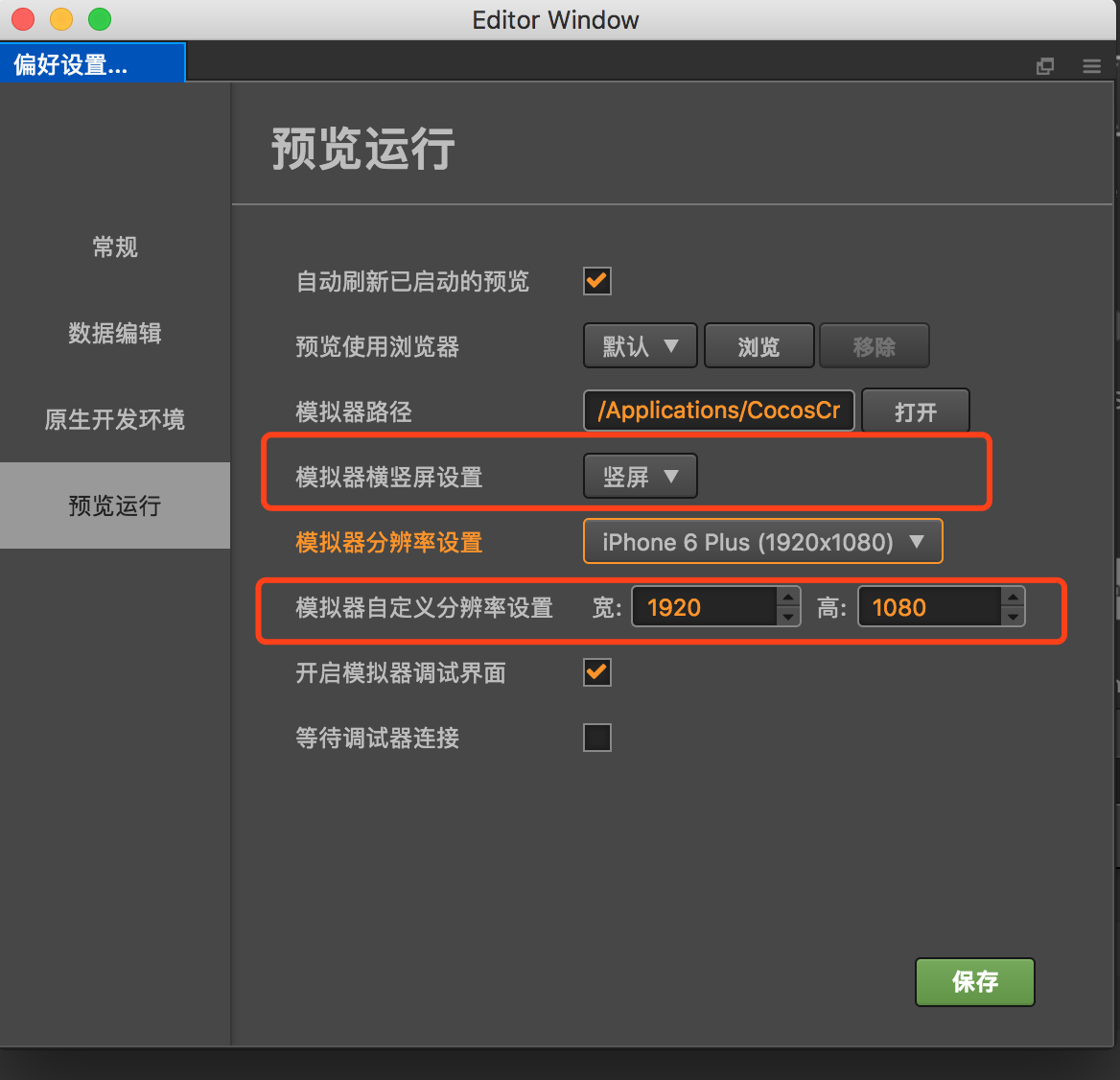
为什么选“竖屏”,对应的模拟器自定义分辨率设置宽比高还高?cocos creator到底是把长的那端叫宽还是叫高??
这个会直接影响设计师宽高的设置,及微信小游戏landscape及portrait的选择问题。