
如下图 我在 lobbyCanvas 的脚本中定义 marquee 属性
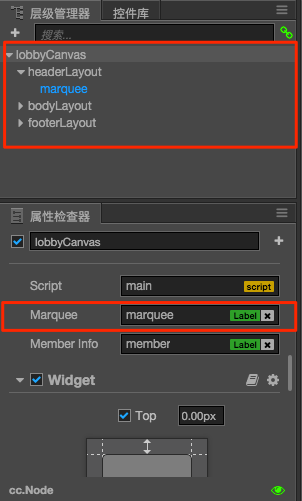
接着 marquee compoent 上也有加上脚本
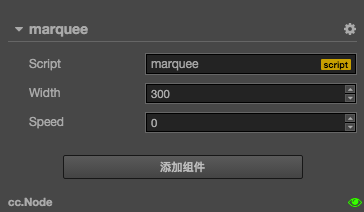
lobbyCanvas 跟 marquee 的腳本如下
// lobbyCanvas.js

cc.Class({
  extends: cc.Component,

  properties: {
    marquee: {
      default: null,
      type: cc.Label
    },

    memberInfo: {
      default: null,
      type: cc.Label
    }
  },

  onLoad: function () {
    console.log(this.marquee.moveAction)  // undefined
  }
})
// marquee.js

cc.Class({
  extends: cc.Component,

  properties: {
    width: {
      default: 300,
      type: cc.Integer
    },
    speed: {
      default: 0,
      type: cc.Integer
    }
  },

  onLoad: function () {
    this.node.runAction(this.moveAction(this.width, this.node.width))
  },

  moveAction: (width, length) => {
    return cc.repeatForever(
      cc.sequence(
        cc.moveTo(5, cc.p(-length)),
        cc.place(cc.p(0))
      )
    )
  }
}
想请教 如何在 lobbyCanvas 的脚本中,调用 marquee 实例的 moveAction 方法??
试了半天都试不出来

 不客气,getComponent就是一个node获取组件的方法,参数可以传组件名,也可以传组件的构造函数(比如:cc.Label)