
-
Creator 版本:2.0.10
-
目标平台: IOS
-
详细报错信息,包含调用堆栈:无
-
重现方式:无
-
之前哪个版本是正常的 :
-
手机型号 : iPhone XR
-
手机浏览器 :微信 和safari
-
编辑器操作系统 :Mac
-
编辑器之前是否有其它报错 :
-
出现概率:百分百
-
额外线索:
在ccc 模仿一个 h5专题 , 然后在 浏览器上是60左右的fps 很正常 但是 一到真机上 就直接降了一半 就在30左右。
代码也不是很复杂就是 两个按钮 长按会让camera 移动 代码我放一下
cc.Class({
  extends: cc.Component,

  properties: {
    forwardButton: {
      default: null,
      type: cc.Node
    },
    backwardButton: {
      default: null,
      type: cc.Node
    },
    camera: {
      default: null,
      type: cc.Node
    },
    sceneContainer: {
      default: null,
      type: cc.Node
    },
    startForward: false,
    startBackward: false,

  },

  // LIFE-CYCLE CALLBACKS:

  // onLoad () {},

  start() {
    this.forwardButton.on('touchstart', function (e) {
      this.startForward = true
    }.bind(this))
    this.forwardButton.on('touchend', function () {
      this.startForward = false
    }.bind(this))
    this.backwardButton.on('touchstart', function (e) {

      this.startBackward = true
    }.bind(this))
    this.backwardButton.on('touchend', function () {
      this.startBackward = false
    }.bind(this))
    this.sceneContainer.getChildByName('Scene1').getChildByName('eagle').on('touchstart', function () {
      // modal.show(`Here is an eagle`, this.cancle, this.confirm)

    }.bind(this))


  },
  confirm() {
    console.info('outside tap')
  },
  cancle() {
    console.info('outside tap')
  },

  update(dt) {
    let vy = 100, zy = .1
    let sy = vy * dt


    if (this.startForward) {
      if (this.camera.y > -750) {
        this.camera.y -= sy
      } else {
        this.camera.y = -750
        // if (this.sceneContainer.children[1].scaleX <= 2) {
        //   const sceneCoordinate = this.sceneContainer.children[1].getChildByName('window-anim').convertToWorldSpace(cc.v2(0, 0))
        //   const alpha = this.sceneContainer.children[1].getChildByName('alpha')
        //   let relativeY = this.node.height / 2 + sceneCoordinate.y
        //   // let anchorX = sceneCoordinate.x - this.camera.x
        //   this.sceneContainer.children[1].y -= (relativeY)
        //   // console.info((1 + this.sceneContainer.children[1].scaleX - 0.5) * this.sceneContainer.children[1].getChildByName('window-anim').width)
        //   // console.info(this.sceneContainer.children[1].getChildByName('window-anim').width)
        //   // this.sceneContainer.children[1].y += (this.node.height / 2 - relativeY)
        //   // this.sceneContainer.children[1].scaleX
        //   // this.sceneContainer.children[1].setAnchorPoint(0.5 - anchorX / this.node.width, 0.5 - anchorY / this.node.height)
        //   this.sceneContainer.children[1].scaleX += (zy * dt * 2)
        //   this.sceneContainer.children[1].scaleY += (zy * dt * 2)
        //   alpha.opacity += dt * 1 * 50
        // }


      }
      if (this.camera.y < -50 & this.camera.y > -250) {

        this.sceneContainer.children[0].getChildByName('front').y += dt * 80 * .15
        this.sceneContainer.children[1].getChildByName('tree').y -= dt * 80 * .1
      }
    }
    if (this.startBackward) {

      if (this.camera.y < 0) {
        this.camera.y += sy
      } else {
        this.camera.y = 0
      }
      if (this.camera.y < -50 & this.camera.y > -250) {

        this.sceneContainer.children[0].getChildByName('front').y -= dt * 100 * .15
        this.sceneContainer.children[1].getChildByName('tree').y += dt * 100 * .1

      }
    }
  },
});
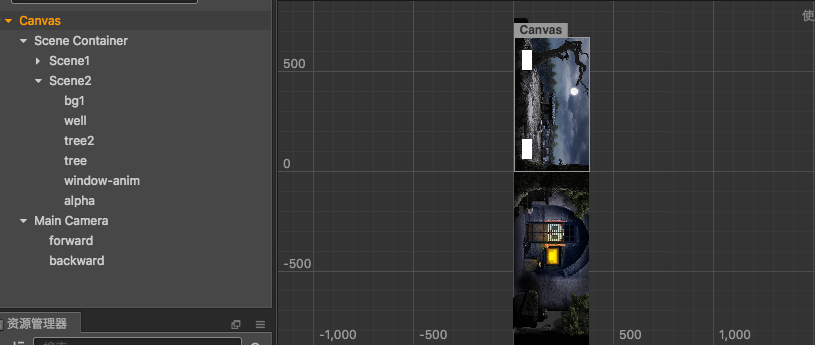
然后我的场景的话 就是基本就是 两个 求求大神们看一下