/**
 * author : 2017/8/7 -- xuao
 * func   : 翻页组件
 * 通过scrollview完成翻页功能,可支持继承,以及外部扩展翻页功能
 */
cc.PageView = cc.Node.extend({
	ctor : function(args){
		this._super();

		// 设置方向参数
		if(!args.direction){
			this.direction = cc.SCROLLVIEW_DIRECTION_HORIZONTAL;
		}
		else {
			this.setPageViewDirection(args.direction);
		}
//
		this.isBounce   = args.isBounce || false;     // boolean 是否回弹
		this.size       = args.size;                  // scrollview 大小
		this.cellSize   = args.cellSize			      // 滚动区域大小
		this.kids       = [];                         // 初始化子节点储存数组
		this.len        = 0;                          // 滑动区域在滚动方向的子节点长度
		this.time       = 1;
		this.boolean    = false;
		this.startClick = 0;
		this.endChilk   = 0;
		this._init();

		this.scheduleUpdate();                       // 监听滚动区域是否滚动指定长度
		this.mouseListener();
		return true;
	},

	// 响应鼠标监听事件
	mouseListener : function(){
		var _self = this;
		if("mouse" in cc.sys.capabilities){
			var listener = cc.EventListener.create({
				event : cc.EventListener.MOUSE,
				onMouseDown : function(event){
//					_self.setContainerPosition(-1000, "x");
				},
				onMouseUp : function(event){
					var result = _self.goToRightPosition(parseInt(_self.container.x));
					_self.setContainerPosition(result, "x");
				}
			});

			cc.eventManager.addListener(listener, this);
		}
	},

	// 初始化可视区域,以及滚动内容区域大小
	_init : function(){
		this.sv = new cc.ScrollView();                       // 创建scrollview对象
		this.sv.setDirection(this.direction);				 // 设置scrollview滑动方向
		this.sv.setTouchEnabled(true);						 // 开始点击事件
		this.sv.setBounceable(this.isBounce);			     // 是否允许回弹
		this.sv.setViewSize(this.size);						 // 设置可视区域的大小
		this.sv.setAnchorPoint(cc.p(0, 0));					 // 设置scrollview的锚点
		this.sv.x = 0;                                       // 初始化scrollview的坐标X
		this.sv.y = 0;                                       // 初始化scrollview的坐标Y
		this.addChild(this.sv);
		this.setContainerSize(this.cellSize);                // 设置滚动区域大小
		this.container  = this.sv.getContainer();            // 获取滑动区域对象
		this._setLen();                                      // 获取每页的大小,在滚动方向
	},

	// 获取每页的大小,在滚动方向
	_setLen : function(){
		if(this.direction == 0){
			this.len = this.size.width;
		}
		else if(this.direction == 1){
			this.len = this.size.height;
		}
	},
	// 添加子节点
	addKid : function(obj){
		this.sv.addChild(obj);
		this.kids.push(obj);
	},

	// 获取子节点
	getKid : function(){
		return this.children;
	},

	// 获取滚动区域的位置
	getContainerPosition : function(){
		return this.sv.getContentOffset();
	},

	// 设置滚动区域的位置
	setContainerPosition : function(pos, isSingle){
		if(isSingle == undefined){
			this.sv.setContentOffset(pos);
		}
		if(isSingle == "x"){
			this.sv.setContentOffset(cc.p(pos, this.getContainerPosition().y));
		}
		if(isSingle == "y"){
			this.sv.setContentOffset(cc.p(this.getContainerPosition().y), pos);
		}
	},

	// 设置scrollview父节点的坐标
	setNodePosition : function(pos){
		this.x = pos.x;
		this.y = pos.y;
	},

	// 返回scrollview父节点的坐标
	getNodePosition : function(){
		return cc.p(this.x, this.y);
	},

	// 设置滚动区域的大小
	setContainerSize : function(cellSize){
		this.sv.setContentSize(cellSize);
	},

	// 获取滚动区域的大小
	getContainerSize : function(){
		return this.sv.getContentSize();
	},

	// 设置可视区域的位置
	setScrollViewPosition : function(pos){
		this.sv.x = pos.x;
		this.sv.y = pos.y;
	},

	// 获取可视区域的位置
	getScrollViewPosition : function(){
		return cc.p(this.sv.x, this.sv.y);
	},

	// 设置PageView的翻页方向(0, 1, 2, 3)
	setPageViewDirection : function(direction){
		switch(direction){
			case 0  : this.direction = cc.SCROLLVIEW_DIRECTION_HORIZONTAL;break;
			case 1  : this.direction = cc.SCROLLVIEW_DIRECTION_VERTICAL;  break;
			case 2  : this.direction = cc.SCROLLVIEW_DIRECTION_BOTH;      break;
			case 3  : this.direction = cc.SCROLLVIEW_DIRECTION_NONE;      break;
			default : this.direction = cc.SCROLLVIEW_DIRECTION_NONE;      break;
		}
	},

	goToRightPosition : function(nowPos){
		// 滑动处理
		if(Math.abs(nowPos) % this.len >= this.len / 2){
			return nowPos - (nowPos % this.len) - this.len;
		}
		else {
			return nowPos - (nowPos % this.len);
		}
	},

	// 判断,若滑动区域没有滑动到指定长度,自动补全
	update : function(dt){
//		this.time += dt
//		if(this.time <= 5){
//			return ;
//		}
//		this.time = 0;
//		cc.log("",this.container.x);
//		cc.log("",this.container.x % this.len, this.boolean);
//		if(this.container.x % this.len != 0 && this.boolean){
//			this.container.x -= this.container.x % this.len;
//			cc.log("【scrollview】xxxxxxxxxx",this.container.x);
//			this.boolean = false;
//		}
//		cc.log("【scrollview】111111111",this.container.x);
	}
});

/*
 * 新建scrollView的入口
 * @param size    :表示可视区域的大小
 * @param cellsize:表示滚动区域大小
 * @param isBounce:表示是否开启回弹
 * @param distance:表示滚动区域可拖动方向 (0:水平拖动,1:竖直拖动,2:水平/竖直均可拖动,3:不允许拖动)
 */
cc.PageView.create = function(args){
	return new cc.PageView(args);
}
var testLayer = cc.Layer.extend({
	ctor : function(){
		this._super();

		this.init();

		return true;
	},

	init : function(){
		var scrollView = cc.PageView.create({
			size     : cc.size(500, 400),
			cellSize : cc.size(5 * 500, 400)
		});
		scrollView.setScrollViewPosition(cc.p(0, 0));
		scrollView.setNodePosition(cc.p((cc.winSize.width / 2) - 250, (cc.winSize.height / 2) - 100));
		this.addChild(scrollView);
		for(var i = 0; i < 5; i++){
			var a = new contentLayer(i);
			a.width  = 500;
			a.height = 400;
			a.x      = i * 500,
			scrollView.addKid(a);
		}
	}
});

var contentLayer = cc.Node.extend({
	index : 0,
	ctor : function(index){
		this._super();
		this.index = index;
		this.init();
		return true;
	},

	init : function(){
		var layer = new cc.LayerColor();
		this.addChild(layer);
		layer.attr({
			x : 0,
			y : 0,
			width   : 500,
			height  : 400,
			color   : colorList[this.index]
		});
	}
});
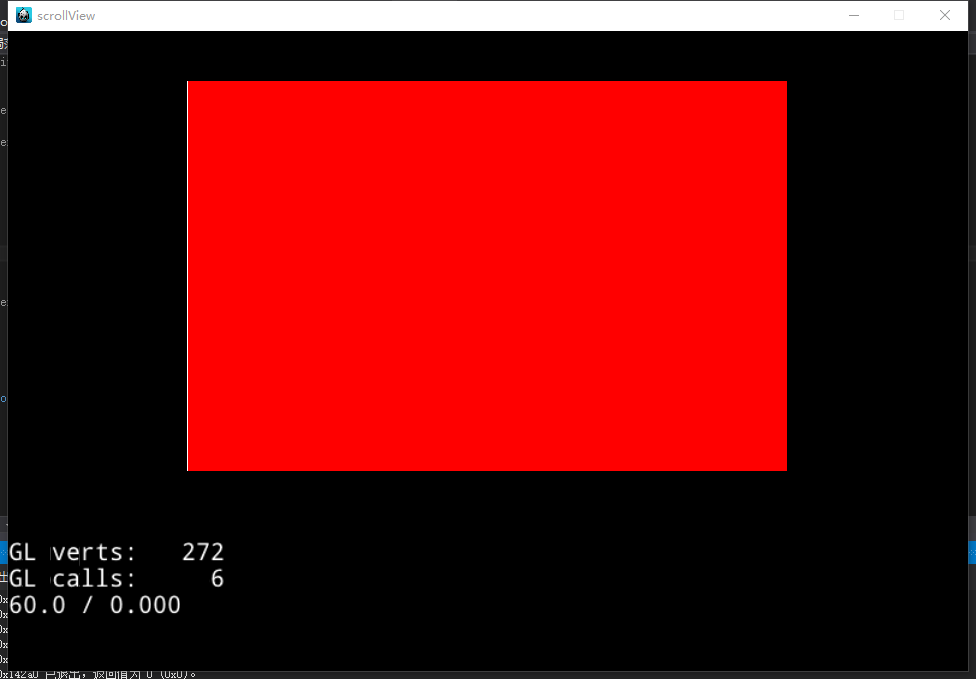
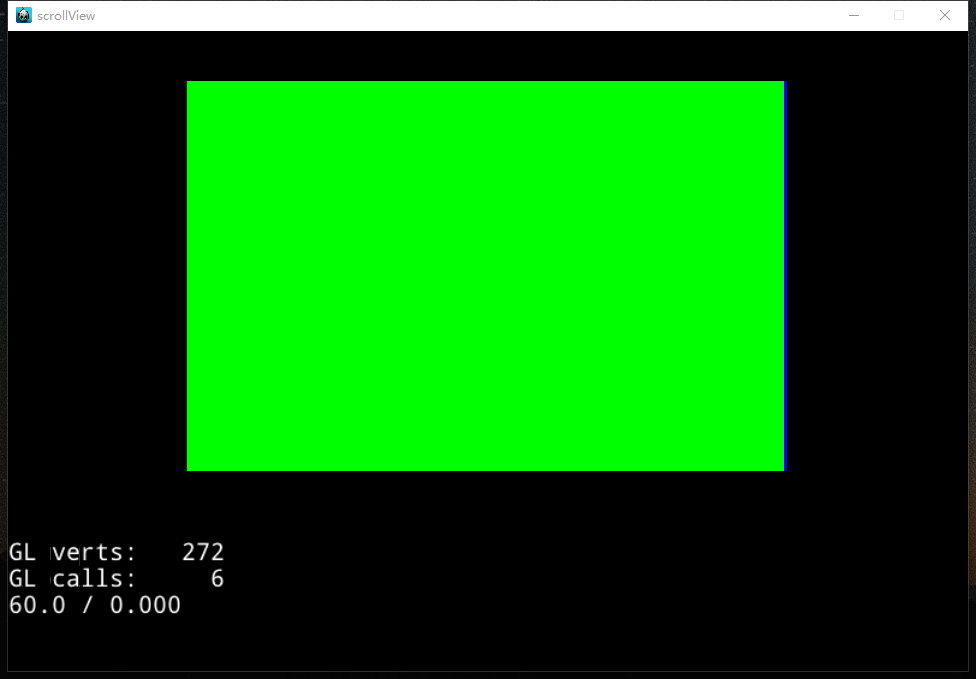
将代码拷入工程,直接调用new testLayer();就可以运行,总是可以看到上一页或者下一页的边,这个是什么问题,该怎么解决