
TypeError: Cannot read property ‘width’ of undefined
at TheClass._fillTextureGrids (D:\dist\resources\engine\cocos2d\tilemap\CCSGTMXLayer.js:133:38)
at TheClass.initWithTilesetInfo (D:\dist\resources\engine\cocos2d\tilemap\CCSGTMXLayer.js:215:22)
at TheClass.ctor (D:\dist\resources\engine\cocos2d\tilemap\CCSGTMXLayer.js:109:18)
at new TheClass (D:\dist\resources\engine\cocos2d\core\platform_CCClass.js:98:34)
at TheClass._parseLayer (D:\dist\resources\engine\cocos2d\tilemap\CCSGTMXTiledMap.js:403:21)
at TheClass._buildWithMapInfo (D:\dist\resources\engine\cocos2d\tilemap\CCSGTMXTiledMap.js:305:34)
at TheClass.initWithXML (D:\dist\resources\engine\cocos2d\tilemap\CCSGTMXTiledMap.js:278:14)
at cc_TiledMap._applyFile (D:\dist\resources\engine\cocos2d\tilemap\CCTiledMap.js:856:30)
at cc_TiledMap.set [as tmxAsset] (D:\dist\resources\engine\cocos2d\tilemap\CCTiledMap.js:256:26)
at cc_TiledMapAsset.cc.Class.createNode (D:\dist\resources\engine\cocos2d\tilemap\CCTiledMapAsset.js:63:27)
这个问题要 beta3 才会修复
刚下了beta2,但是模拟器启动不了,替换了msvcp140d.dll后才可以启动,不清楚这个dll有什么问题

你是如何操作的?用哪个工程?
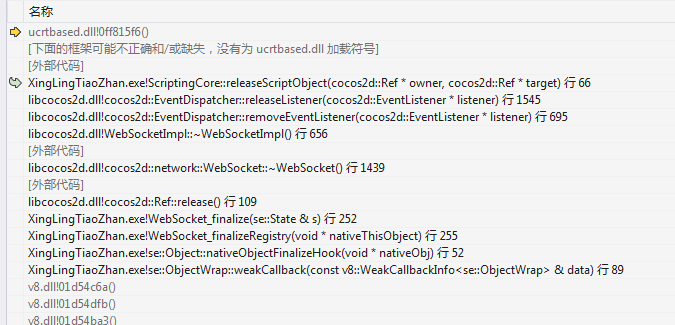
构建一下,用vs编译跑起来,出现这个assert后,点击“重试”,可以看到具体的堆栈信息。然后把堆栈信息发一下。
启动模拟器,然后用chrome调试,随便断点某些js文件,有时候就会崩掉,工程是我自己的项目
mac 版 beta2 ,图片拖揣到编辑器无反应
请提供更多的信息啊。按照我说的:
无法打开“cocos2d-js-for-preview.js”: 找不到文件
chrome浏览器调试都是 无法打开“cocos2d-js-for-preview.js”: 找不到文件 是怎么回事有办法解决吗? 1.7 beta2

animation组件的once事件被干掉了?我用once报这个错。改为on就好了
说清楚一点啊,你是用谷歌浏览器调试web还是谷歌浏览器调试jsb?
感谢@dumganhar http请求超时的问题找到了,把timeout的毫秒单位,理解成了秒 !
!
谷歌浏览器jsb、跳转界面的时候必现、都是找不到cocos2d-js-for-preview.js、
请教原本的 texture.getName() 被移除了的话,
    // shader
    uniform sampler2D u_normalMap;

    //script
    if (cc.sys.isNative)
    {
        var glTexture = texture.getName(); //这边要换成什么?
        let glProgram_state = cc.GLProgramState.getOrCreateWithGLProgram( this._program );
        glProgram_state.setUniformTexture( "u_normalMap", glTexture );
    }
要传入shader的 sampler2D要用什么取代?
用examplecase能复现么?
试了
var glTexture = texture._gl;
var glTexture = texture._glID;
var glTexture = texture.url;
都抛出一样的Error:
Simulator: ERROR (/Users/nantas/fireball-x/cxp/cocos/scripting/js-bindings/auto/jsb_cocos2dx_auto.cpp, 2099): wrong number of arguments: 1, was expecting 0
没有人用到sampler2D吗
谢谢反馈,你先试试 glTexture = CC_JSB ? texture.getName() : texture._glID
新建例子 谷歌浏览器 调试 不设置断点 随便操作几秒就
错误 无法连接到运行中的进程,将在10000毫秒后超时 - (原因:已收到来自目标应用的回应,但未找到目标页面)
闪退了
新建hello world 新建场景断点cc.director.loadScene(’*****’); cocos2d-js-for-preview.js找不到。
vs配置
{
“version”: “1.4.0”,
“configurations”: [
{
“name”: “Creator Debug: Launch Chrome”,
“type”: “chrome”,
“request”: “launch”,
“url”: “http://localhost:7456”,
“sourceMaps”: true,
“userDataDir”: “{workspaceRoot}/.vscode/chrome",
"diagnosticLogging": false,
"pathMapping": {
"/preview-scripts/assets": "{workspaceRoot}/temp/quick-scripts/assets”,
“/”: “${workspaceRoot}”
}
}
]
}
有提示diagnosticLogging已过时。