
问题描述
- cocos2dx-3.6项目接入腾讯X5内核使用其封装的X5WebView打开一个H5游戏链接 在大部分安卓机型(华为,vivo,小米等)上渲染模式为canvas 游戏中有非常明显的卡顿 几乎玩不了 但是 魅族手机上表现流畅 渲染模式为webgl
- IOS设备表现流畅 不存在上述问题
- 链接中的H5游戏的渲染模式是由手机当前运行环境自主选择(canvas or webgl) 游戏内使用canvas渲染的机型统一表现卡顿
- 为了排除是手机的问题 新建了一个android demo 接入x5内核 同样用x5webview打开链接 结果表现为 在cocos项目表现卡顿的机型 安装android demo后统一表现流畅 渲染模式也更新为webgl 。 测试期间找了一个小米8的手机 运行cocos项目同样卡顿 渲染模式为canvas
- 为了排除是我们项目业务逻辑问题 新建一个cocos demo 同样接入X5 打开链接 结果一样卡顿 渲染模式为canvas
- 为了排除引擎版本因素 尝试换过cocos2dx-3.10 、cocos2dx-3.13 同样重写demo 接入x5 打开链接 结果仍旧卡顿 渲染模式为canvas 没有使用webgl渲染
- cocos2dx-3.6 使用的版本信息 NDK版本r10 andorid sdk为20
cocos2dx-3.13 使用的版本信息 NDK版本为r18 android sdk 为23 - 在项目中的cocos2dxActivity中新启一个android原生Activity,在原生Activity中创建x5webview打开链接,卡的问题依旧存在
游戏截图
- 华为荣耀9 cocos demo 主界面部分图标都没有渲染出来
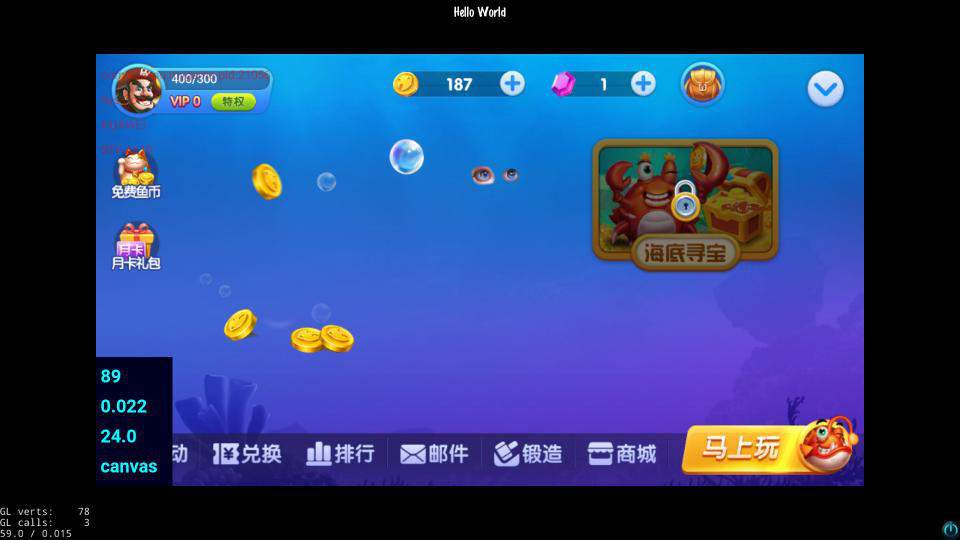
2 华为荣耀9 android demo 流畅

3. 魅族pro5 cocos demo 流畅

cocos demo中的部分代码
- AppDelegate.cpp
    #if(CC_TARGET_PLATFORM == CC_PLATFORM_ANDROID)
    #include "platform/android/jni/JniHelper.h"
    #endif
    ...

    bool AppDelegate::applicationDidFinishLaunching()
    {
    	...
    	...
    	...

   	// create a scene. it's an autorelease object
    auto scene = HelloWorld::createScene();

    // run
    director->runWithScene(scene);

#if(CC_TARGET_PLATFORM == CC_PLATFORM_ANDROID)
	JniMethodInfo info;
	bool ret = JniHelper::getStaticMethodInfo(info, "org/cocos2dx/cpp/AppActivity", "OpenX5WebPage", "()V");
	if (ret)
	{
		info.env->CallStaticVoidMethod(info.classID, info.methodID);
		info.env->DeleteLocalRef(info.classID);
	}
#endif
    }
- android 中添加的代码
/****************************************************************************
Copyright (c) 2008-2010 Ricardo Quesada
Copyright (c) 2010-2012 cocos2d-x.org
Copyright (c) 2011      Zynga Inc.
Copyright (c) 2013-2014 Chukong Technologies Inc.

http://www.cocos2d-x.org

Permission is hereby granted, free of charge, to any person obtaining a copy
of this software and associated documentation files (the "Software"), to deal
in the Software without restriction, including without limitation the rights
to use, copy, modify, merge, publish, distribute, sublicense, and/or sell
copies of the Software, and to permit persons to whom the Software is
furnished to do so, subject to the following conditions:

The above copyright notice and this permission notice shall be included in
all copies or substantial portions of the Software.

THE SOFTWARE IS PROVIDED "AS IS", WITHOUT WARRANTY OF ANY KIND, EXPRESS OR
IMPLIED, INCLUDING BUT NOT LIMITED TO THE WARRANTIES OF MERCHANTABILITY,
FITNESS FOR A PARTICULAR PURPOSE AND NONINFRINGEMENT. IN NO EVENT SHALL THE
AUTHORS OR COPYRIGHT HOLDERS BE LIABLE FOR ANY CLAIM, DAMAGES OR OTHER
LIABILITY, WHETHER IN AN ACTION OF CONTRACT, TORT OR OTHERWISE, ARISING FROM,
OUT OF OR IN CONNECTION WITH THE SOFTWARE OR THE USE OR OTHER DEALINGS IN
THE SOFTWARE.
****************************************************************************/
package org.cocos2dx.cpp;

import org.cocos2dx.lib.Cocos2dxActivity;

import com.tencent.smtt.sdk.CookieSyncManager;
import com.tencent.smtt.sdk.WebSettings;
import com.tencent.smtt.sdk.WebSettings.LayoutAlgorithm;
import com.tencent.smtt.sdk.WebView;
import com.tencent.smtt.sdk.WebViewClient;

import android.app.Activity;
import android.content.Context;
import android.os.Bundle;
import android.util.DisplayMetrics;
import android.view.View;
import android.view.ViewGroup;
import android.widget.FrameLayout;
import com.tencent.smtt.sdk.QbSdk;
public class AppActivity extends Cocos2dxActivity {
	static X5WebView m_WebView;

	static Context m_Context;

	static FrameLayout m_Layout;

	@Override
    protected void onCreate(final Bundle savedInstanceState) {
        super.onCreate(savedInstanceState);
        QbSdk.initX5Environment(getApplicationContext(),  null);
        m_Context = AppActivity.getContext();
        m_Layout = (FrameLayout)findViewById(android.R.id.content).getRootView();
    }

	public static void OpenX5WebPage() {
		((Activity) m_Context).runOnUiThread(new Runnable() {
			@Override
			public void run() {
				m_WebView = new X5WebView(m_Context, null);

				m_WebView.setLayerType(View.LAYER_TYPE_HARDWARE, null);

				WebSettings webSetting = m_WebView.getSettings();
				webSetting.setAllowFileAccess(true);
				webSetting.setLayoutAlgorithm(LayoutAlgorithm.NARROW_COLUMNS);
				webSetting.setSupportZoom(true);
				webSetting.setBuiltInZoomControls(true);
				webSetting.setUseWideViewPort(true);
				webSetting.setSupportMultipleWindows(false);
				webSetting.setAppCacheEnabled(true);
				webSetting.setDomStorageEnabled(true);
				webSetting.setJavaScriptEnabled(true);
				webSetting.setGeolocationEnabled(true);
				webSetting.setAppCacheMaxSize(Long.MAX_VALUE);
				webSetting.setAppCachePath(m_Context.getDir("appcache", 0).getPath());
				webSetting.setDatabasePath(m_Context.getDir("databases", 0).getPath());
				webSetting.setGeolocationDatabasePath(m_Context.getDir("geolocation", 0).getPath());
				webSetting.setPluginState(WebSettings.PluginState.ON_DEMAND);

				CookieSyncManager.createInstance(m_Context);
				CookieSyncManager.getInstance().sync();

				DisplayMetrics dm = new DisplayMetrics();
                dm = m_Context.getResources().getDisplayMetrics();
                int screenwidth = dm.widthPixels;
                int screenheight = dm.heightPixels;

				FrameLayout.LayoutParams webLytp = new FrameLayout.LayoutParams(ViewGroup.LayoutParams.FILL_PARENT, ViewGroup.LayoutParams.WRAP_CONTENT);
				webLytp.width = screenwidth * 8 / 10;
				webLytp.height = screenheight * 8 / 10;
				m_WebView.setX(screenwidth * 1 / 10);
                m_WebView.setY(screenheight * 1 / 10);
				m_WebView.setLayoutParams(webLytp);

				m_WebView.setWebViewClient(new WebViewClient() {
					@Override
					public boolean shouldOverrideUrlLoading(WebView view,
							String url) {
						return true;
					}
				});

				m_WebView.loadUrl("http://mw2dfiu2.weile.com/weile-test/");

				m_Layout.addView(m_WebView);
			}
		});
	}
}
X5接入文档 及 X5WebView.java
参考腾讯x5链接 官方demo中有X5WebView.java文件
图示中的错误是没有导入cocos2dx-lib 自行导入对应版本的cocos2dx-lib库即可
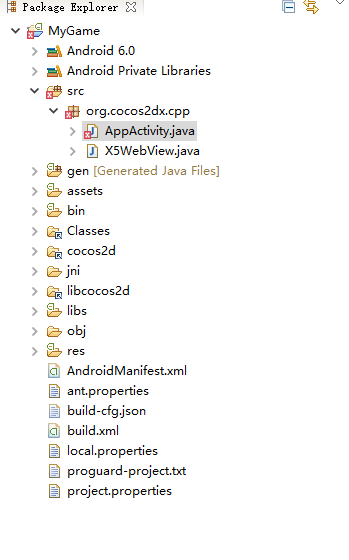
调试及打包 使用的是eclipse
ps: cocos-js 项目接入x5内核 上述卡顿的机型就渲染正常了 使用webgl渲染 游戏流畅
在cocos2dx上求助解决方案