
如题,希望能实现角色受到攻击时屏幕抖动有没有什么方法实现起来效果比较好
同问,一直在找案例,都找不到。希望有个大神能给出个demo~ 拜托啦~
这个,其实蛮简单啊,自定义x,y在很小的时间随机变化就可以了
1赞
自定义曲线函数抖动会比较平滑舒服,不过一般的x,y左右上下平移就差不多了
之前从lua移植过来的,代码能用,代码质量一般,请自行修改
    addShakerEffect( node , time ){
        if (time === null &&  node === null){
            return;
        }
        let actionName = 'ShakerActionName';

        let shaker = {}
        shaker.init_x = 0       //[[初始位置x]]
        shaker.init_y = 0       //[[初始位置y]]
        shaker.diff_x = 0       //[[偏移量x]]
        shaker.diff_y = 0       //[[偏移量y]]
        shaker.diff_max = 10     //[[最大偏移量]]
        shaker.interval = 0.01  //[[震动频率]]
        shaker.totalTime = 0    //[[震动时间]]
        shaker.time = 0         //[[计时器]]

        shaker.target = node
        shaker.init_x = node.getPositionX()
        shaker.init_y = node.getPositionY()
        shaker.totalTime = time

        shaker.target[actionName] = this.schedule(function (){
            if (shaker.time >= shaker.totalTime){
                shaker.target.stopAction(shaker.target[actionName]);
                shaker.target[actionName] = null;
                shaker.target.setPosition(shaker.init_x, shaker.init_y);
                return;
            }
            shaker.time = shaker.time + shaker.interval
            shaker.diff_x = Math.random()*(shaker.diff_max + shaker.diff_max+1)-shaker.diff_max;
            shaker.diff_y = Math.random()*(shaker.diff_max + shaker.diff_max+1)-shaker.diff_max;
            shaker.target.setPosition(shaker.init_x+shaker.diff_x, shaker.init_y+shaker.diff_y);
        },shaker.interval);
    }
2赞
cc.Camera 不是有个官方例子吗
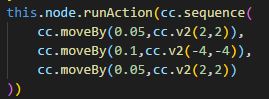
这样能大概实现效果,但是感觉效果不太好
mark
没有找你你说的官方这个例子?