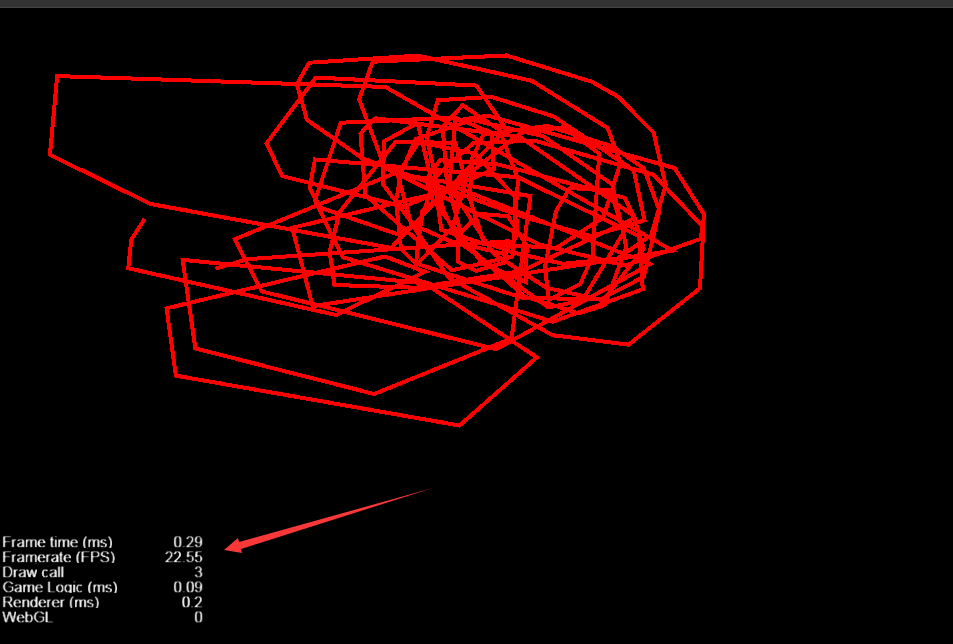
cocos creator 版本: 2.0.5;
描述:
一个简单的demo , 仅用了空节点 挂载 Graphics脚本进行绘制图形.
Draw call 只有3 ,但是帧率掉到了 20左右 .画的越多.掉帧越严重
请问各位大神有啥好的解决方案;`

cocos creator 版本: 2.0.5;
描述:
一个简单的demo , 仅用了空节点 挂载 Graphics脚本进行绘制图形.
Draw call 只有3 ,但是帧率掉到了 20左右 .画的越多.掉帧越严重
请问各位大神有啥好的解决方案;`
提供下demo,看看什么情况!
##代码如下:
cc.Class({
    extends: cc.Component,

    properties: {
        graphics:{
            default:null,
            type:cc.Node
        }
    },

    start () {
        this.ctx = this.graphics.getComponent( cc.Graphics );
        this.ctx .strokeColor = cc.color(255, 0, 0, 255);
        this.ctx .lineWidth = 4;

        this.node.on(cc.Node.EventType.TOUCH_START, this.touchStartHandler,this);
    },

    touchStartHandler( e ){
        this.node.on(cc.Node.EventType.TOUCH_MOVE, this.touchMoveHandler,this);
        this.node.on(cc.Node.EventType.TOUCH_END, this.touchEndHandler,this);

        let touchLoc = event.getLocation();
        touchLoc = this.node.parent.convertToNodeSpaceAR(touchLoc);
        this.ctx .moveTo(touchLoc.x, touchLoc.y);
    },

   touchMoveHandler( e ){
        this.ctx .lineTo(touchLoc.x, touchLoc.y);
        this.ctx .stroke();
    },

   touchEndHandler( e ){
        this.node.off(cc.Node.EventType.TOUCH_MOVE, this.touchMoveHandler,this);
        this.node.off(cc.Node.EventType.TOUCH_END, this.touchEndHandler,this);
    },
});
###只有这些内容.其他说明都没写 graphics 是绑定了 cc.Graphics 的节点.,
end 时取消了。
你不要在move的时候去做lineTo,这样会产生一堆的线段,导致顶点数据负载过高!你可以在move的时候加个两点的距离限制,减少些细小的线段产生。
在 move 的时候改成了.
    touchMoveHandler( e ){
        let touchLoc = event.getLocation();
        touchLoc = this.node.parent.convertToNodeSpaceAR(touchLoc);

        if ( !checkIsCanDraw( this.previousLoc , touchLoc  )){
            return;
        }

        this.previousLoc = touchLoc ;
        this.ctx .lineTo(touchLoc.x, touchLoc.y);
        this.ctx .stroke();
    },

    checkIsCanDraw(lastPoint: cc.Vec2, nowPoint: cc.Vec2) {
        return lastPoint.sub(nowPoint).mag() >= 50;
    }
#####this.previousLoc 是储存上一次的move位置
结果还是一样…比之前掉帧的情况好点.但是仍然出现掉帧情况. fps 20 左右…而且绘画不平滑.
这个组件渲染出来的数据是顶点数据,所以没有更好的优化方法,可以尝试在graphics节点下放置一个精灵,绘制一段时间,就对graphics做一次截图渲染到精灵,然后清空graphics。
我目前的做法是在 touchStart 的时候 克隆一个空节点绑定 Graphics , 在 touchEnd 的时候吧 graphics 截屏到精灵.再把 graphics 的父节点 delete掉… 性能上优化很大…