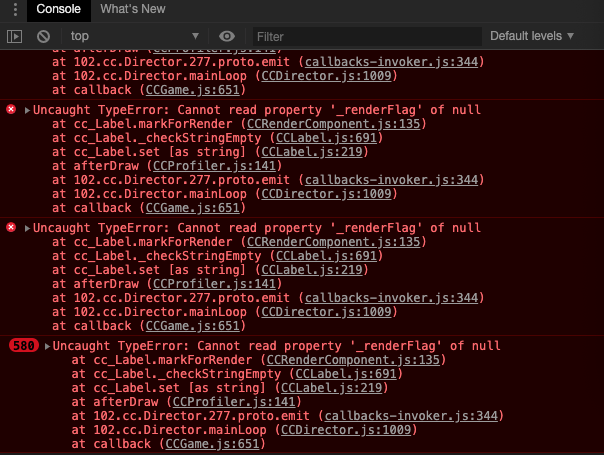
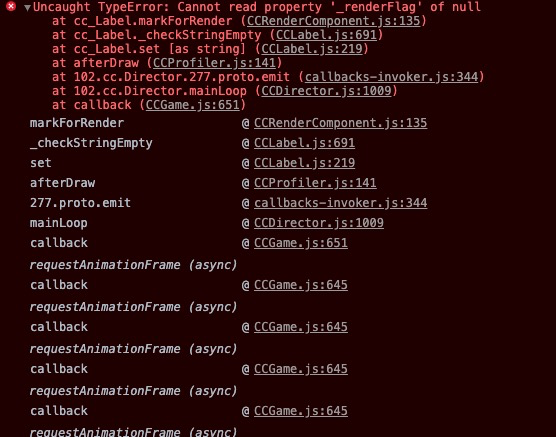
先做一个弹窗功能实现游戏“再来一次”功能,弹窗能正常显示,回调cc.game.restart后,重新加载游戏场景,出现Cannot read property ‘_renderFlag’ of null错误。
HelloWorld.js
var Alert = require("./Alert.js");
cc.Class({
extends: cc.Component,
properties: {

    progressBarspeed: 1,
    progressBarView: {
        type: cc.ProgressBar,
        default: null
    },
    // defaults, set visually when attaching this script to the Canvas
    text: 'Hello, World!'
},
_updateProgressBar: function(progressBar, dt){
    var progress = progressBar.progress;
    if(progress > 0){
        progress -= dt * this.progressBarspeed / 10;
    }
    else {
        this.gameOver();
        progress = 1;
    }
    progressBar.progress = progress;
},
// use this for initialization
onLoad: function () {

},
// called every frame
update: function (dt) {
this._updateProgressBar(this.progressBarView, dt);
},
gameOver: function () {
    cc.director.pause(); //停止 player 节点的跳跃动作

    Alert.show("score:95",function(){
        //cc.director.loadScene('snake');

        cc.game.restart();
        //cc.game.run();
        //cc.game.end();
    })

    //
}
});
Alter.js
var Alert = {
_alert: null, // prefab
_detailLabel: null, // 内容
_cancelButton: null, // 确定按钮
_enterButton: null, // 取消按钮
_enterCallBack: null, // 回调事件
_animSpeed: 0.3, // 动画速度
};
Alert.show = function(detailString, enterCallBack, needCancel, animSpeed) {
var self = this;
// 判断
if (Alert._alert != undefined) return;
Alert._animSpeed = animSpeed ? animSpeed : Alert._animSpeed;
cc.loader.loadRes("alert", cc.Prefab, function (error, prefab) {
    if (error) {
        cc.error(error);
        return;
    }
    var alert = cc.instantiate(prefab);
    Alert._alert = alert;
    // 动画
    var cbFadeOut = cc.callFunc(self.onFadeOutFinish, self);
    var cbFadeIn = cc.callFunc(self.onFadeInFinish, self);
    self.actionFadeIn = cc.sequence(cc.spawn(cc.fadeTo(Alert._animSpeed, 255), cc.scaleTo(Alert._animSpeed, 1.0)), cbFadeIn);
    self.actionFadeOut = cc.sequence(cc.spawn(cc.fadeTo(Alert._animSpeed, 0), cc.scaleTo(Alert._animSpeed, 2.0)), cbFadeOut);
    Alert._detailLabel = cc.find("alertbg/score:", alert).getComponent(cc.Label);
    Alert._cancelButton = cc.find("alertbg/closebtn", alert);
    Alert._enterButton = cc.find("alertbg/oncemore", alert);


    // 添加点击事件
    Alert._enterButton.on(cc.Node.EventType.TOUCH_START, self.onButtonClicked, self);
    Alert._cancelButton.on(cc.Node.EventType.TOUCH_START, self.onButtonClicked, self);
    // 父视图
    Alert._alert.parent = cc.find("Canvas");
    // 展现 alert
    //self.startFadeIn();
    self.configAlert(detailString, enterCallBack, needCancel, animSpeed);

});
// 参数
self.configAlert = function (detailString, enterCallBack, needCancel,  animSpeed) {
    // 回调
    Alert._enterCallBack = enterCallBack;
    // 内容
    Alert._detailLabel.string = detailString;
    // 是否需要取消按钮
    if (needCancel || needCancel == undefined) { // 显示
        Alert._cancelButton.active = true;
    } else {  // 隐藏
        Alert._cancelButton.active = false;
        Alert._enterButton.x = 0;
    }
};
// 按钮点击事件
self.onButtonClicked = function(event){
    if(event.target.name == "oncemore"){
        console.log("确认按钮");
        if(self._enterCallBack){
            self._enterCallBack();
        }
    }
    self.onDestory();
};
// 销毁 alert
self.onDestory = function () {
    Alert._alert.destroy();
    Alert._enterCallBack = null;
    Alert._alert = null;
    Alert._detailLabel = null;
    Alert._cancelButton = null;
    Alert._enterButton = null;
    Alert._animSpeed = 0.3;

};
};
module.exports = Alert;
运行效果:
初始运行没问题:进度条也能正常加载,进度条为零后弹窗;
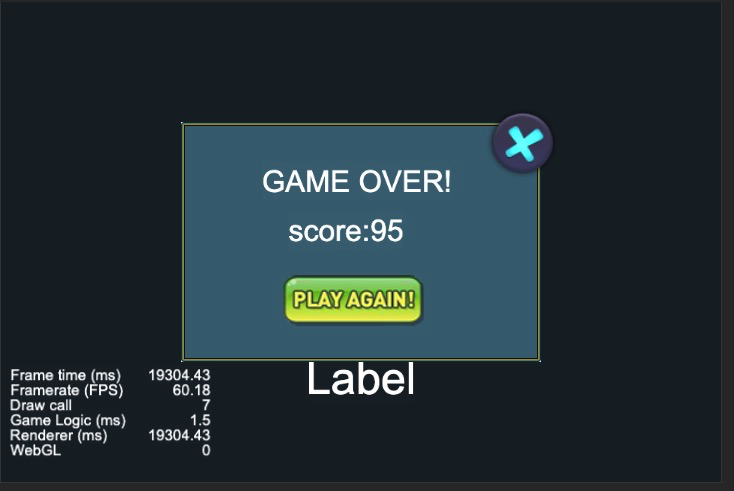
点击再来一次,调用game.restart重新加载资源报错,且不能进入update循环;