最近看到很多帖子讨论怎样在Creator中使用TypeScript,我自己一直也很喜欢TypeScript,因此今天花了一点时间探索怎样使用Creator+TypeScript,结果没有花特别多功夫,就“貌似”成功了。现在跟大家分享一下配置的过程,帖末附上示例工程。我自己也是在探索阶段,如果您阅读后有任何问题或建议,欢迎回帖讨论。
##1、安装cnpm
https://npm.taobao.org/
##2、 全局安装TypeScript
cnpm install typescript -g
##3、 Creator创建HelloWorld工程(下面假设工程目录为project)
##4、 创建TypeScript配置文件project\tsconfig.json,内容为:
{
  "compilerOptions": {
    "module": "es2015",
    "noImplicitAny": true,
    "removeComments": true,
    "preserveConstEnums": true,
    "outDir": "assets/Script/",
    "allowJs": true
  },
  "include": [
    "typescript/**/*"
  ],
  "exclude": [
    "node_modules"
  ]
}
该配置的主要功能是把project\typescript下的所有ts和js文件(包含子文件夹)编译到project\assets\Script目录下。
编译选项说明参见:
http://tslang.cn/docs/handbook/compiler-options.html
##5、 创建project\typescript目录,并创建以下4个测试文件:
####typescript\global.ts:
// 引擎的全局变量,防止编译报错
declare let cc: any;
declare let jsb: any;
declare let sp: any;
declare let js: any;
declare let anysdk: any;
declare let dragonBones: any;
declare let db: any;
####typescript\interfaces\TestInterface.ts:
interface TestInterface {
    text: string
}
export default TestInterface;
####typescript\classes\Test.ts:
import TestInterface from '../interfaces/TestInterface';
class Test implements TestInterface {
    text: string;

    constructor(text: string) {
        this.text = text;
    }

    getText(): string {
        return this.text;
    }
}
export default Test;
####typescript\HelloWorld.ts:
import Test from './classes/Test';
cc.Class({
    extends: cc.Component,
    properties: {
        label: {
            default: null,
            type: cc.Label
        },
        text: "Hello, World!"
    },
    onLoad() {
        let test = new Test(this.text);
        this.label.string = test.getText();
    }
});
##6、 开启自动编译(a、b两种方法任选其一即可)
a. 在project目录下用命令行运行(注意不要停止这个命令行的运行)
tsc -w
TypeScript会监测你的文件改动,并自动编译。
b. 使用WebStorm,打开自动编译选项:

则在WebStorm中对project\typescript目录下的ts与js文件做的修改,会被立刻编译到assets/Script/目录下。
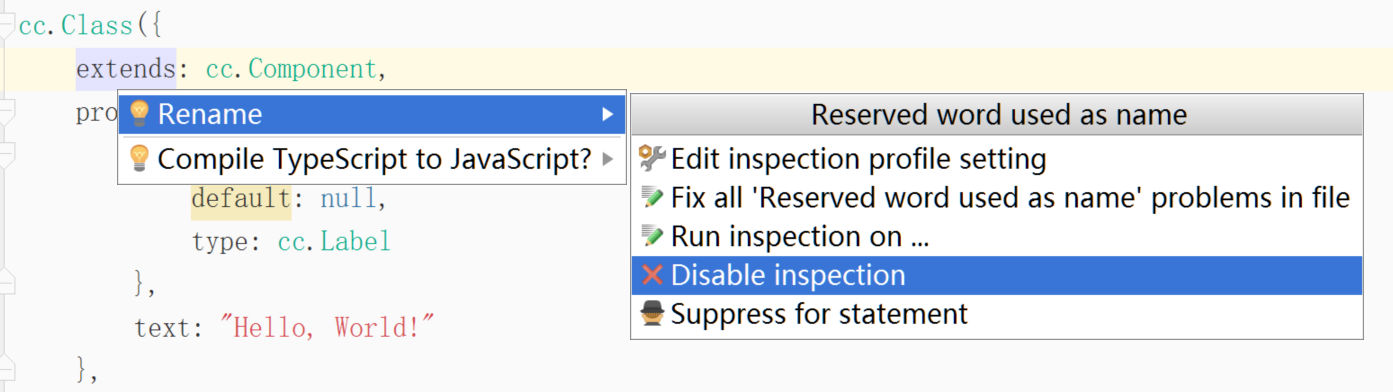
另外WebStorm会对extends, default报保留关键字错误(不影响编译),可以对它们加上引号,或者停止WebStorm对该问题的检查(选中extends后按Alt+Enter出现菜单):
##7、 检验结果
现在,回到Creator中,打开assets\Scene\helloworld场景,运行。如果一切正常,就可以看到HelloWorld!了。现在的工作流程是:
a. 在IDE中修改project\typescript\下的ts、js代码并保存
b. TypeScript检测到改动,自动编译js文件至project\assets\Script\目录下
c. Creator检测到改动,自动编译所有assets下的js文件
d. 等待Creator编译结束,即可运行项目
附样板工程:
Creator-TypeScript-Boilerplate.zip (223.6 KB)