
这个已经咨询了玩一玩官方,这个接口没有支持的计划,qqPlayCore 提供的是空函数。
好的,谢谢
那在玩一玩平台, 使用Canvas 的方式最终也会映射到gl.readPixels 这个接口把?因为我上面测试来看也是行不通的,只在web上可以
所以我需要放弃这种方式?
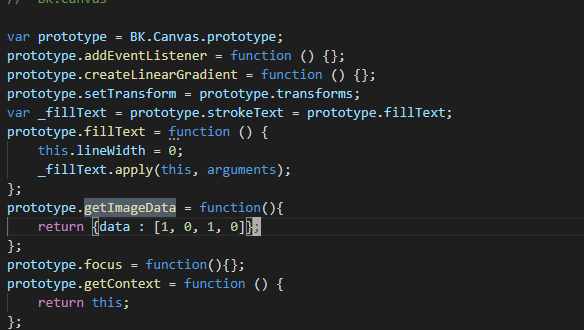
看来canva也是没戏了, 最新的Creator2.05 qq-adapter里面的代码,难怪我读出来都是1, 0, 1, 0
尴尬。。。 这些接口确实没法实现,玩一玩都不给读取纹理的方法。
        var path = "GameRes://" + tex.toString();
        path = cc.loader.md5Pipe.transformURL(path);
        var img = BK.Image.loadImage(path);
        //var img = tex.getHtmlElementObj()
        var buffer = img.buffer;
        cc.log("buffer length", buffer.length);
        var arrayBuffer = BK.Misc.BKBufferToArrayBuffer(buffer);
        var data = void 0;
        if (spriteFrame.isRotated()) {
          var data = new Uint8Array(arrayBuffer, 4 * (rect.x + posInRect.y + (rect.y + posInRect.x) * tex.width), 4);
          cc.log(type + "--", "data", data, rect.x + posInRect.y, rect.y + posInRect.x);
        } else {
          var data = new Uint8Array(arrayBuffer, 4 * (rect.x + posInRect.x + (rect.y + rect.height - posInRect.y) * tex.width), 4);
          cc.log(type + "--", "data", data, rect.x + posInRect.x, rect.y + rect.height - posInRect.y);
        }
@huanxinyin 找到了一种新方法,使用了玩一玩的api, 但是效率太低了,关键就是 var img = BK.Image.loadImage(path);这一句,但事实上,这个image Creator里面应该已经拿到了去创建texture的, 但是我不知道如何获取,我尝试使用var img = tex.getHtmlElementObj()这个方式,但返回的并不是BK.Image的实例,你能再帮我看一下吗,谢谢啦
事实上在我当前的用法里,只要我能拿到图片的像素数据,就可以判断透明区域,确实不需要渲染后,再去gl.readPixels获取

通过跟踪,如图所示,屏蔽掉image._disposeBKImage()后通过 texture.getHtmlElementObj().bkImage是可以拿到image的数据的,相关的逻辑也可以正常跑了,不过这样,对应图片的内存就增加一倍了吧。
是否还有更好的方法可以拿到纹理数据呢,Texture里面可以拿到吗?

通过这样的修改,可以在进入有这个需求的场景时让image不dispose, 总感觉这样做不好,又找不到好方法,最好的办法应该是让特定的image不dispose, 主要是我们打包后的纹理名字都变了,不好根据纹理src来判断是否dispose 求指点
@huanxinyin @panda
@huanxinyin 玩一玩平台我这种方式可行不,有什么隐患
大佬 求救!

用了你的这个案例,我在初始的时候(即1处)对像素点(375,650)调用hitTest函数显示为true,但是在按钮的点击事件中(即2处)对同一个像素点调用hitTest,显示为false.
检测发现为false时此处的data[3]为0

不知是哪里出了问题
你用的是哪种方式?RenderTexture还是Canvas

你这里不需要这样写,直接给这个节点加一个Button组件就可以判断它是否Click了
在start()调用之后,你的节点位置是否发生了变化,另外你传进去的cc.v2(375, 650),这个位置的意思是屏幕坐标(worldPos),这个坐标用来计算当前点击点与你的节点的相对位置,当你的节点位置发生变化后,对应取像素值的位置也发生了变化

跟踪了一下引擎代码
发现跟这里的代码有关,具体要请引擎开发人员来指点一下哦 @huanxinyin @panda 在PCweb平台运行的时候
当你的图片宽高都小于512的时候, 会自动atlas, 最后那里拿到的是altas后的texture 并不是我们原来图片的texture, 所以读出来的数据也不对了。具体应该怎么办,我也再研究一下
目前你要使用我的方法的话,你的图片必须宽高有一个大于512
按理说,自动atlas 也更新了spriteFrame的rect等信息的,但是不明白为什么就不行了
**Update **
-------------------------------------------------------- 分割线 ----------------------------------------------------------------------
终于知道原因了,而且找到了一种方法来同时兼容两种情况,加上框里面的代码应该就可以了,如下图所示

如果图片宽高都小于等于512, 图片纹理被自动atlas, atlas之后的纹理,本身就是RenderTexture 所以当我们把这个tex再drawTextureAt()另外一个RenderTexture的时候,会失败, 所以我们通过instanceOf 来判定当前这个tex 是否就是RenderTexture, 如果是,就直接使用它来readPixels, 如果不是,创建一个RenderTexture来画它,再readPixels
牛逼!  可惜在微信小游戏上获取不到,应该是和 玩一玩 上不支持一样的原因.
可以找一下微信小游戏API
玩一玩最新方式
            let tex = spriteFrame.getTexture()
            var dataContainer = _textureIdMapDataContainer[tex.getId()]
            let data

            if (cc.sys.platform === cc.sys.QQ_PLAY) { // 针对玩一玩的特殊方式
                if (!dataContainer) {
                    dataContainer = tex.getHtmlElementObj().bkImage || tex.getHtmlElementObj()._generateBKImage()
                    _textureIdMapDataContainer[tex.getId()] = dataContainer
                }

                var buffer = dataContainer.buffer
                buffer.rewind()

                if (spriteFrame.isRotated()) {
                    buffer.jumpBytes(((rect.x + posInRect.y) + (rect.y + posInRect.x) * tex.width) * 4)
                    //cc.log(type + "--", "data", data, rect.x + posInRect.y, rect.y + posInRect.x)
                } else {
                    buffer.jumpBytes(((rect.x + posInRect.x) + (rect.y + rect.height - posInRect.y) * tex.width) * 4)
                    //cc.log(type + "--", "data", data, rect.x + posInRect.x, rect.y + rect.height - posInRect.y)
                }

                data = [buffer.readUint8Buffer(), buffer.readUint8Buffer(), buffer.readUint8Buffer(), buffer.readUint8Buffer()]
            }
重点就是这句
dataContainer = tex.getHtmlElementObj().bkImage || tex.getHtmlElementObj()._generateBKImage()
另外BK.Buffer, 本身可以跳到指定位置读取像素数据,所以不需要转成 ArrayBuffer, 之前的var arrayBuffer = BK.Misc.BKBufferToArrayBuffer(buffer)转换相当耗时
在微信上也是可以的,微信打包后把 game.js 里面cc.macro.CLEANUP_IMAGE_CACHE = false;改成这样,就可以了,不过这样所有图片都多保留了一份,所以还要做一些优化或找到创建这个image的方法, 微信上的问题是,Texture里面的image 创建后,会被销毁,因为已经有Texture了,我不明白的是,为什么RenderTexture 里面 updateSubImage 最终又需要用到这个Image 而不是用texture, 微信上我要怎样才能够重新拿到Texture里面的这个image ?

还有一个问题,如果使用Cavans 方式,var cvs = document.createElement(“canvas”) 这个cvs 我该如何销毁, cvs.destory() ?
经过一番探索,qq 微信 web,都可以处理透明点击问题了,还是挺happy的。。
let _textureIdMapDataContainer = {}

cc.Class({
    extends: cc.Component,

    properties: {
    },

    // LIFE-CYCLE CALLBACKS:

    onLoad() {
        let spriteComp = this.node.getComponent(cc.Sprite)
        if (spriteComp.type !== cc.Sprite.Type.SIMPLE || spriteComp.sizeMode !== cc.Sprite.SizeMode.RAW){
            throw "目前仅支持sprite SizeMode 为RAW, type 为SIMPLE的方式"
        }
        this.node._hitTest = this.hitTest.bind(this)
    },

    start() {
    },

    hitTest(location) {
        let spriteFrame = this.node.getComponent(cc.Sprite).spriteFrame
        if (spriteFrame == null) {
            return false
        }
        let posInNode = this.node.convertToNodeSpaceAR(location)
        let rect = spriteFrame.getRect()
        let offset = spriteFrame.getOffset()

        //var type = this.node.getComponent("DecorateItemPrefab").m_type
        // cc.log(type + "--", "xxxxxxxxxxxxxx", type)
        // cc.log(type + "--", "posInNode", posInNode)
        // cc.log(type + "--", "rect", rect)
        // cc.log(type + "--", "offset", offset)
        if ((posInNode.x < offset.x - rect.width / 2) || (posInNode.y < offset.y - rect.height / 2)
            || (posInNode.x > (offset.x + rect.width / 2)) || (posInNode.y > (offset.y + rect.height / 2))) {
            return false
        }
        else {
            let posInRect = cc.v2(parseInt(posInNode.x - offset.x + rect.width / 2), parseInt(posInNode.y - offset.y + rect.height / 2))
            // cc.log(type + "--", "posInRect", posInRect)
            // cc.log(type + "--", "isRotated", spriteFrame.isRotated())

            let tex = spriteFrame.getTexture()
            let data
            if (tex instanceof cc.RenderTexture) { // 细图(width <= 512 && height <= 512) 被引擎自动打包了
                if (cc.sys.platform === cc.sys.QQ_PLAY) { // 玩一玩平台
                    throw "在玩一玩平台,请确保你的SpriteFrame 的宽高至少有一个大于512, 这样不会被Atlas, 不然被引擎自动Atlas之后,因为玩一玩不支持gl.readPixels 或 getImageData这样的接口,像素就读不出来了"
                }

                // data就是这个texture的rgba值数组
                if (spriteFrame.isRotated()) {
                    data = rt.readPixels(null, rect.x + posInRect.y, rect.y + posInRect.x, 1, 1)
                    //cc.log(type + "--", "data", data, rect.x + posInRect.y, rect.y + posInRect.x)
                }
                else {
                    data = rt.readPixels(null, rect.x + posInRect.x, rect.y + rect.height - posInRect.y, 1, 1)
                    //cc.log(type + "--", "data", data, rect.x + posInRect.x, rect.y + rect.height - posInRect.y)
                }
            }
            else {
                var dataContainer = _textureIdMapDataContainer[tex.getId()]

                if (cc.sys.platform === cc.sys.QQ_PLAY) { // 针对玩一玩的特殊方式
                    if (!dataContainer) {
                        tex.getHtmlElementObj().bkImage || tex.getHtmlElementObj()._generateBKImage()
                        dataContainer = tex.getHtmlElementObj().bkImage
                        _textureIdMapDataContainer[tex.getId()] = dataContainer
                    }

                    var buffer = dataContainer.buffer
                    buffer.rewind()

                    if (spriteFrame.isRotated()) {
                        buffer.jumpBytes(((rect.x + posInRect.y) + (rect.y + posInRect.x) * tex.width) * 4)
                        //cc.log(type + "--", "data", data, rect.x + posInRect.y, rect.y + posInRect.x)
                    } else {
                        buffer.jumpBytes(((rect.x + posInRect.x) + (rect.y + rect.height - posInRect.y) * tex.width) * 4)
                        //cc.log(type + "--", "data", data, rect.x + posInRect.x, rect.y + rect.height - posInRect.y)
                    }

                    data = [buffer.readUint8Buffer(), buffer.readUint8Buffer(), buffer.readUint8Buffer(), buffer.readUint8Buffer()]
                }
                else {
                    //Canvas 方式
                    var scale = 8
                    var cvs = dataContainer
                    if (!cvs) {
                        cvs = document.createElement("canvas")
                        var ctx = cvs.getContext('2d')
                        cvs.width = tex.width
                        cvs.height = tex.height
                        ctx.drawImage(tex.getHtmlElementObj(), 0, 0, tex.width, tex.height, 0, 0, tex.width / scale, tex.height / scale)
                        _textureIdMapDataContainer[tex.getId()] = cvs
                    }

                    var ctx = cvs.getContext('2d')
                    if (spriteFrame.isRotated()) {
                        data = ctx.getImageData((rect.x + posInRect.y) / scale, (rect.y + posInRect.x) / scale, 1, 1).data
                        //cc.log(type + "--", "data", data, rect.x + posInRect.y, rect.y + posInRect.x)
                    }
                    else {
                        data = ctx.getImageData((rect.x + posInRect.x) / scale, (rect.y + rect.height - posInRect.y) / scale, 1, 1).data
                        //cc.log(type + "--", "data", data, rect.x + posInRect.x, rect.y + rect.height - posInRect.y)
                    }

                    /*
                    //RenderTexture 方式
                    var rt = dataContainer
                    if (!rt){
                        rt = new cc.RenderTexture()
                        rt.initWithSize(tex.width, tex.height)
                        rt.drawTextureAt(tex, 0, 0)
                        _textureIdMapDataContainer[tex.getId()] = rt
                    }

                    // data就是这个texture的rgba值数组
                    if (spriteFrame.isRotated()) {
                        data = rt.readPixels(null, rect.x + posInRect.y, rect.y + posInRect.x, 1, 1)
                        //cc.log(type + "--", "data", data, rect.x + posInRect.y, rect.y + posInRect.x)
                    }
                    else {
                        data = rt.readPixels(null, rect.x + posInRect.x, rect.y + rect.height - posInRect.y, 1, 1)
                        //cc.log(type + "--", "data", data, rect.x + posInRect.x, rect.y + rect.height - posInRect.y)
                    }
                    */
                }
            }

            if (data[3] <= 0) {
                return false
            }
            else {
                return true
            }
        }
    },

    onDisable() {
        cc.log("DecorateHitTest onDisable")

        let spriteFrame = this.node.getComponent(cc.Sprite).spriteFrame
        if (spriteFrame == null) {
            return false
        }

        var tex = spriteFrame.getTexture()
        if (cc.sys.platform === cc.sys.QQ_PLAY) { // 针对玩一玩的特殊方式
            var img = _textureIdMapDataContainer[tex.getId()]
            if (img) {
                cc.log("DecorateHitTest onDisable QQ bkImage")
                img.dispose()
                _textureIdMapDataContainer[tex.getId()] = null
            }
        }
        else {
            var dataContainer = _textureIdMapDataContainer[tex.getId()]
            if (dataContainer) {
                if (dataContainer instanceof cc.RenderTexture) { // RenderTexture 方式
                    cc.log("DecorateHitTest onDisable renderTexture")
                    dataContainer.destroy()
                }
                else { // Canvas 方式
                    cc.log("DecorateHitTest onDisable canvas")
                    // 暂时不知道如何释放这个引用的Canvas
                }
            }

            _textureIdMapDataContainer[tex.getId()] = null
        }
    }
    // update (dt) {},
});
完善版代码, 玩一玩微信web都可以了
1,微信打包后把 game.js 里面cc.macro.CLEANUP_IMAGE_CACHE = false;不然tex.getHtmlElementObj() 拿到的image 是已经销毁了的, 微信的Image 如何通过Texture拿到? @wangzhe 哲大大可以拉个人过来指导下吗? 这样这个透明点击的问题就算有了个初步的解决方案啦。。
2,QQ玩一玩,使用的SpriteFrame需要width 和 height 有一个大于512, 不然引擎自动atlas 之后,就无法获取到texture对应的Image。。也就无法使用玩一玩Brick引擎自身接口读取像素数据了
Update:
微信里面如果需要透明点击的在特定场景,可以在loading这个场景前cc.macro.CLEANUP_IMAGE_CACHE = false;设置这个,切换其他场景再设置为true,这样,只有这个场景的资源会保留Image 导致多消耗内存
3赞
顶一个 微信如何保留单个texture的image,求解。。。。
mark
大神 我也折腾了几十分钟 好像方法不行啊。。。触碰透明区域和非透明区域都是打印0.。是用法用错了?
标题写的是点击事件,为什么我只看到了触摸事件。。。?????
这里写的点击事件并不是cocos本身的点击或触摸,而是一个物体除去透明区域后的点中判断