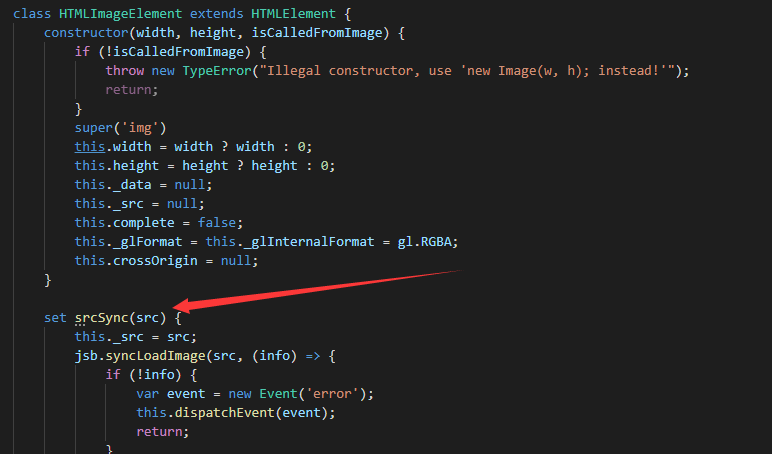
creator同步加载资源的方法
原理:
注意:只在native中有效
native中,即使异步,也始终逃不过要在c++代码中读取文件,然后把文件内容传递给js层,跟踪代码发现,加载图片资源的代码在jsb_global.cpp的jsb_global_load_image函数中
下图中的代码1部分是在线程池中添加一个读取图片资源的任务,代码2是在cocos线程中将内容传递给js层。
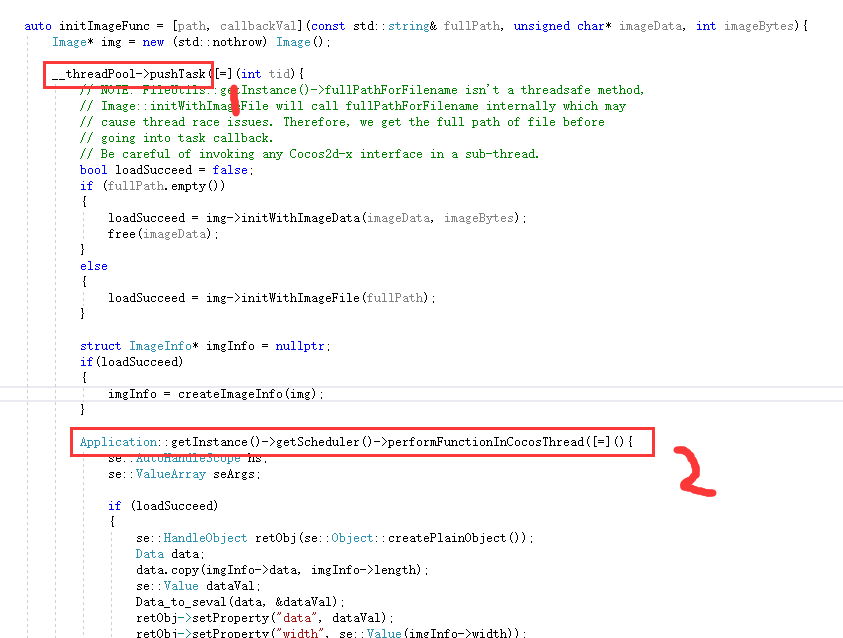
然后就可以改代码了,拷贝一个initImageFunc函数,改名为initImageSyncFunc函数,
将代码调用改为同步的调用
auto initImageSyncFunc = [path, callbackVal](const std::string& fullPath, unsigned char* imageData, int imageBytes) {
	Image* img = new (std::nothrow) Image();
	bool loadSucceed = false;
	if (fullPath.empty())
	{
		loadSucceed = img->initWithImageData(imageData, imageBytes);
		free(imageData);
	}
	else
	{
		loadSucceed = img->initWithImageFile(fullPath);
	}

	struct ImageInfo* imgInfo = nullptr;
	if (loadSucceed)
	{
		imgInfo = createImageInfo(img);
	}

	se::AutoHandleScope hs;
	se::ValueArray seArgs;

	if (loadSucceed)
	{
		se::HandleObject retObj(se::Object::createPlainObject());
		Data data;
		data.copy(imgInfo->data, imgInfo->length);
		se::Value dataVal;
		Data_to_seval(data, &dataVal);
		retObj->setProperty("data", dataVal);
		retObj->setProperty("width", se::Value(imgInfo->width));
		retObj->setProperty("height", se::Value(imgInfo->height));
		retObj->setProperty("premultiplyAlpha", se::Value(imgInfo->hasPremultipliedAlpha));
		retObj->setProperty("bpp", se::Value(imgInfo->bpp));
		retObj->setProperty("hasAlpha", se::Value(imgInfo->hasAlpha));
		retObj->setProperty("compressed", se::Value(imgInfo->compressed));
		retObj->setProperty("numberOfMipmaps", se::Value(imgInfo->numberOfMipmaps));
		if (imgInfo->numberOfMipmaps > 0)
		{
			se::HandleObject mipmapArray(se::Object::createArrayObject(imgInfo->numberOfMipmaps));
			retObj->setProperty("mipmaps", se::Value(mipmapArray));
			auto mipmapInfo = img->getMipmaps();
			for (int i = 0; i < imgInfo->numberOfMipmaps; ++i)
			{
				se::HandleObject info(se::Object::createPlainObject());
				info->setProperty("offset", se::Value(mipmapInfo[i].offset));
				info->setProperty("length", se::Value(mipmapInfo[i].len));
				mipmapArray->setArrayElement(i, se::Value(info));
			}
		}

		retObj->setProperty("glFormat", se::Value(imgInfo->glFormat));
		retObj->setProperty("glInternalFormat", se::Value(imgInfo->glInternalFormat));
		retObj->setProperty("glType", se::Value(imgInfo->type));

		seArgs.push_back(se::Value(retObj));

		delete imgInfo;
	}
	else
	{
		SE_REPORT_ERROR("initWithImageFile: %s failed!", path.c_str());
	}

	callbackVal.toObject()->call(seArgs, nullptr);
	img->release();
};
然后再下面调用initImageFunc的地方添加一个同步调用的方法,如图所示
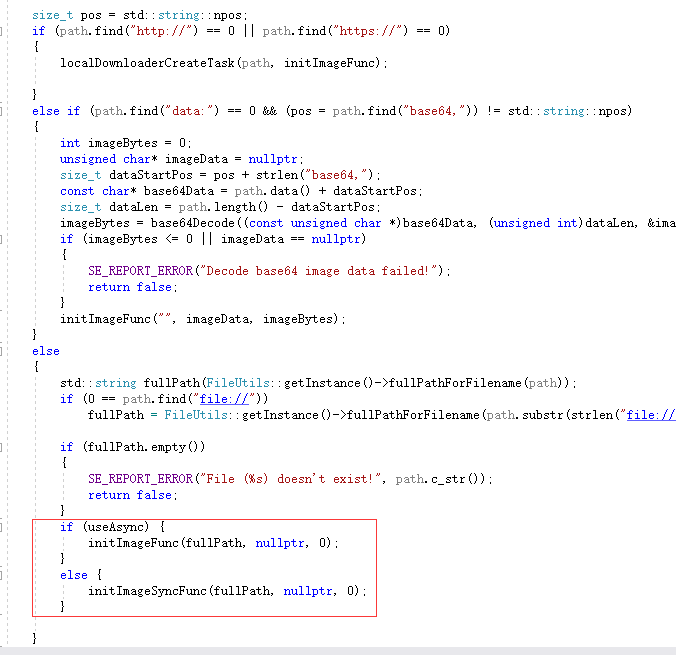
当然,还需要一个变量是控制同步调用还是异步调用,修改变量的方法也要有,还要到处给js层用
//变量控制是否用异步
bool useAsync = true;
void setUseAsync(bool async)
{
	useAsync = async;
}
//js调用接口
static bool js_setUseAsync(se::State& s)
{
	const auto& args = s.args();
	size_t argc = args.size();
	CC_UNUSED bool ok = true;
	if (argc == 1) {
		bool async;
		ok &= seval_to_boolean(args[0], &async);

		SE_PRECONDITION2(ok, false, "js_setUseAsync : Error processing arguments");

		setUseAsync(async);
		return true;
	}
	SE_REPORT_ERROR("wrong number of arguments: %d, was expecting %d", (int)argc, 1);
	return false;
}
SE_BIND_FUNC(js_setUseAsync)
//添加js绑定
__jsbObj->defineFunction("setUseAsync", _SE(js_setUseAsync));
在整个工程里面搜performFunctionInCocosThread,还可以找到其他异步调用的方法,还有个载入音频资源也是用到了异步,有需要的同学可以看看
改了之后,经过我的测试,加载一个prefab,并没有在同一帧里面读取到所有资源,在下一帧才读取到,好像是解析依赖的时候有新的依赖需要解析的话就放到下一帧?这个要再研究下,但是native的加载效果确实好了些,跟cocos2dx很像了,
特别是打开背包的时候,那么多物品,总是会先显示原始的物品icon,过那么几帧才能刷新到正确的icon,现在一打开就是正确的icon了,舒服多了