
使用老版本2.0.10打开 截屏正常
使用2.2.2 运行截屏就全是透明图片了
比对了代码,预制,没有差异,求官方大大帮看看
直接摆在那里截屏是可以的,但是我是用双相机截屏,主相机渲染正常界面,截屏相机只显示截屏层,然后用截屏相机去截屏
把主相机的渲染层加上截屏层,渲染没问题,可以展示出来,一截就透明
 console.log("图片不存在,需要重新截图");
            //图片不存在重新截图保存
            this.shotComplete = ()=>
            {
                console.log("截图全部完成");
                cc.sys.localStorage.setItem("shareBgVersion",HeroGame.Instance.GameConfigInfo.shareBgVersion+1); //更新背景标识
                UIItem.InitList(this.content);
                this.pageView.removeAllPages();
                //读取展示
                for(let i = 0;i<this.picDataList.length;++i)
                {
                    let picData = this.picDataList[i];
                    let texture = new cc.Texture2D();

                    texture.initWithData(picData,32,this.width,this.height);
                    //创建主相机列表展示
                    let sprite = new cc.SpriteFrame(texture);
                    let node = cc.instantiate(this.item);
                    node.setContentSize(this.pageSize);
                    console.log("node size : " + node.getContentSize());
                    node.name = "share_"+i;
                    this.pageView.addPage(node);
                    let Image = node.getComponent(cc.Sprite);
                    Image.spriteFrame = sprite;
                    node.active = true;
                }
                let size = this.content.getContentSize();
                this.content.setContentSize(cc.size(200 + this.shareBgList.length* 534,size.height));
                this.loading.active = false;
            }
            this.isNeedShot = true;
            // if(this.isCanShot)
            // {
            //     console.error("调用截图时 图片已经加载完毕,可以截图");
            //     this.ShotFunc();
            // }
            // else
            // {
            //     console.error("调用截图时 图片未加载完毕,需要等待");
            // }
            this.ShotFunc();

public ShotFunc()
    {
        this.scheduleOnce(()=>
        {
            console.log("开始截图");
            let picData = this.InitImage();
            this.picDataList.push(picData);
            this.SaveFile(picData,this.shotIdx); //保存
            this.shotIdx++;
            if(this.shotIdx<this.shareBgList.length+1)
            {
                console.log("换背景继续截图 : " + this.shotIdx);
                cc.loader.loadRes("UI/Static/texture/share_"+this.shotIdx,cc.SpriteFrame,(err,res)=>
                {
                    if(err)
                    {
                        console.error("load share bg err : " + err);
                    }
                    else
                    {
                        this.bg_shot.spriteFrame = res;
                        this.ShotFunc();
                    }
                })
            }
            else
            {
                if(this.shotComplete)
                {
                    this.shotComplete();
                }
            }
        },0); //等一帧再次截图
    }

 private _width = 0;
    private _height = 0;

    public InitImage() : Uint8Array
    {
        let data = this.texture.readPixels();
        this._width =  this.texture.width;
        this._height = this.texture.height;
        let picData = this.filpYImage(data,this._width,this._height);
        return picData;
    }

    public filpYImage (data:Uint8Array, width:number, height:number) :Uint8Array
    {
        let picData = new Uint8Array(width * height * 4);
        let rowBytes = width * 4;
        for (let row = 0; row < height; row++) {
            let srow = height - 1 - row;
            let start = srow * width * 4;
            let reStart = row * width * 4;
            // save the piexls data
            for (let i = 0; i < rowBytes; i++) {
                picData[reStart + i] = data[start + i];
            }
        }
        return picData;
    }

    public SaveFile(picData:Uint8Array,idx:number)
    {
        if(CC_JSB)
        {
            let filePath = this.prefixPath + 'share_'+idx+'.png';
            let success = jsb.saveImageData(picData, this._width, this._height, filePath)
            if (success)
            {
                cc.log("save image data success, file: " + filePath);
            }
            else
            {
                cc.error("save image data failed!");
            }
        }
    }
    public Init()
    {
        if(!CC_JSB)
        {
            return;
        }
        this.prefixPath = jsb.fileUtils.getWritablePath();
        if(cc.sys.os == cc.sys.OS_ANDROID)
        {
            this.prefixPath = '/sdcard/';
        }
        this.pageSize = this.item.getContentSize();
        this.texture = new cc.RenderTexture();
        let gl = cc.game._renderContext;
        this.texture.initWithSize(this.width,this.height,gl.STENCIL_INDEX8);
        this.camera.targetTexture = this.texture;
        this.UpdateShareInfo();
        this.pageView.setCurrentPageIndex(this.curIdx);
        this.curIdx ++;
    }
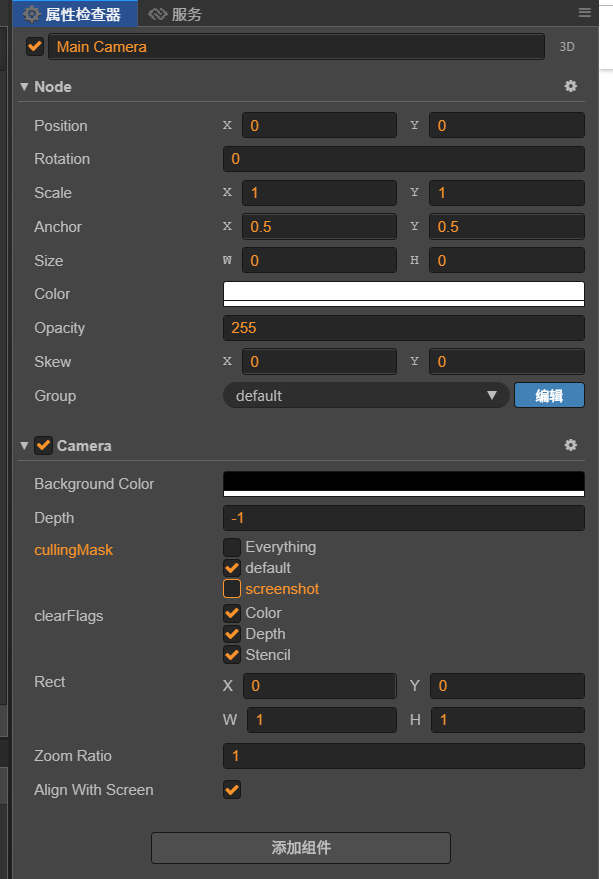
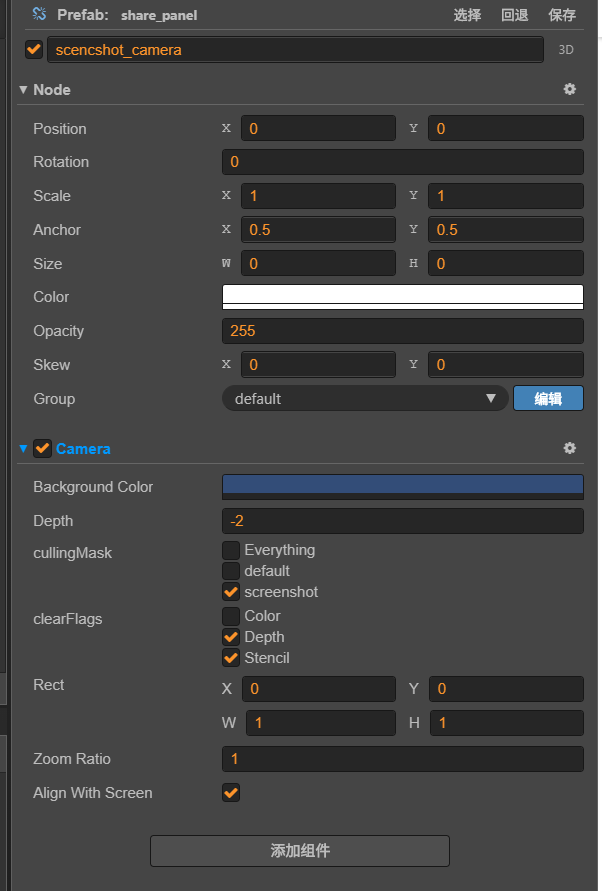
问题在于,预制界面中包含截屏相机组件,要是将这个预制体直接放在场景里面,截屏相机可以渲染出数据,但是我动态加载,从res 目录加载这个预制体进场景 截屏相机就无法渲染数据,分层也是对的,就是动态加载不行,关键是预制体是同一个预制体,相机预制不能后进场景吗,而且在update 中一直用 spriteFrame展示这个截屏相机的渲染内容,一直都是空的
搭了个测试环境,相机动态进场景,也可以显示的,真的奇怪