
快速上手:制作第一个游戏
在制作随机位置生成星星时,出现错误:
Simulator: 44:TypeError: this.player.getComponent(…) is null
at a (F:\Workspace\Cocos2d-JS\Star\start_project\library\bundle.project.js?009:NaN:0)
我的代码Game.js:
cc.Class({
    extends: cc.Component,

    properties: {
        //这个属性引用了星星的预制资源
        starPrefab:{
            default:null,
            type:cc.Prefab
        },
        //星星产生后消失时间的随机范围
        maxStarDuration:0,
        minStarDuration:0,
        //地面节点,用于确定星星生成的高度
        ground:{
            default:null,
            type:cc.Node
        },
        //player 节点,用于获取主角弹跳的高度,和控制主角行动开关
        player:{
            default:null,
            type:cc.Node
        }
    },

    spanwnNewStar:function(){
      //使用给定的模板在场景中生成一个新节点
      var newStar = cc.instantiate(this.starPrefab);
      //将新增的节点添加到Canvas节点下面
      this.node.addChild(newStar);
      //为星星设置一个随机位置
      newStar.setPosition(this.getNewStarPosition());
      //将Game组件的实例传入星星组件
      //newStar.getComponent('Star').game = this;
    },

    getNewStarPosition:function(){
      var randX = 0;
      //根据地面位置和主角跳跃高度,随机得到一个星星的y坐标
       var randY = this.groundY + cc.random0To1() * this.player.getComponent('Player').jumpHeight + 50;
      //根据屏幕宽度,随机得到一个星星x坐标
      var maxX = this.node.width/2;
      randX = cc.randomMinus1To1()*maxX;
      //返回星星坐标
      return cc.p(randX,randY);
    },

    // use this for initialization
    onLoad: function () {
        //获取地面的y坐标
        this.groundY = this.groundY + this.ground.height/2;
        //生成一个新的星星
        this.spanwnNewStar();
    },

    // called every frame, uncomment this function to activate update callback
    // update: function (dt) {

    // },
});
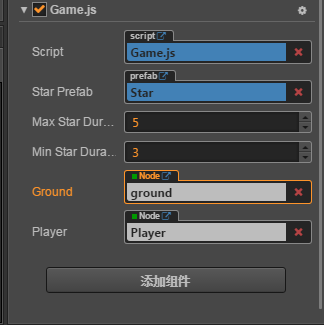
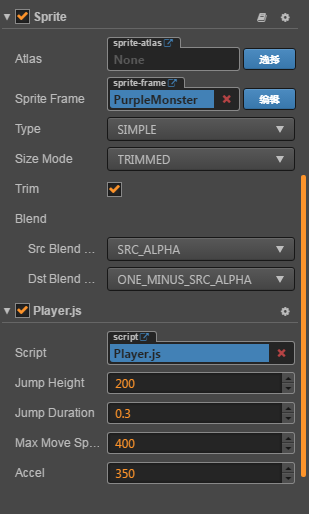
 star双击之后可以在右边的属性检查器里面添加组件(把脚本拖进去就好了)