
Graphics绘制的图形怎么转换到sprite上?
获取已绘制的坐标,重新画一边

你是要把画的线,再画到其他节点?
graphics.moveTo(this.arrPoints[0].x, this.arrPoints[0].y);
for(var i = 0; i < this.arrPoints.length; i++){
graphics.lineTo(this.arrPoints[j].x, this.arrPoints[j].y);
graphics.stroke();
graphics.moveTo(this.arrPoints[j].x, this.arrPoints[j].y);
if (i== this.arrPoints.length - 1) {
graphics.close();
}
}
对对对我就是这个意思
    let node = cc.instantiate(this.linePhysics.node);
    node.x = 0;
    node.y = 0;
    node.setParent(this.ballNode);
    node.getComponent(cc.Graphics).moveTo(this.startPos.x, this.startPos.y);
    for (let i = 0; i < this.arrPoints.length; i++) {
        console.log(this.arrPoints[i].x,this.arrPoints[i].y)
        let pos = this.arrPoints[i];
        node.getComponent(cc.Graphics).lineTo(pos.x, pos.y);
    }
    node.getComponent(cc.Graphics).stroke();
    // this.linePhysics.clear();这是我之前系的

按照你的图来说,我之前有做过。提供一个思路给你。将最小的点平移成v3(0,0,0),所有的点按照这个点平移重新得到一个新数组,最后你将这个数组在你要点节点树下生成即可。(不知道我理解对不对),有空我给你看看参考代码(一定从原点开始)
`
private _touchStart(event: EventTouch) {
    if (this._headMoveTween != null) {
        this._headMoveTween.start();
        this.tips.active = false;
    }
   let endPos = cc.v3(event.getUILocation().x, event.getUILocation().y, 0);
    this.grap.node.getComponent(UITransformComponent).convertToNodeSpaceAR(endPos, endPos);
    this._startPos = endPos;
    this._currentPos = endPos;
    this._initPos = endPos;
    this.grap.lineTo(this._startPos.x, this._startPos.y);
    this.grap.stroke();
    this.grap.moveTo(this._startPos.x, this._startPos.y);
    // this.m_ptOrbit.push(this._currentPos);
}

private _touchMove(event: EventTouch) {
    // this._count++;
    let movePosv3 = cc.v3(event.getUILocation().x, event.getUILocation().y, 0);
    this.grap.node.getComponent(UITransformComponent).convertToNodeSpaceAR(movePosv3, movePosv3);

    // 设置边界
    let max_x = (this.grap.node.getComponent(UITransformComponent).contentSize.width / 2) + this.grap.node.getPosition().x;
    let min_x = this.grap.node.getPosition().x - (this.grap.node.getComponent(UITransformComponent).contentSize.width / 2);
    let max_y = this.grap.node.getComponent(UITransformComponent).contentSize.height + this.grap.node.getPosition().y + 250;
    let min_y = 0;
    if (max_x < movePosv3.x) {
        movePosv3.x = max_x;
    }

    if (min_x > movePosv3.x) {
        movePosv3.x = min_x;
    }

    if (max_y < movePosv3.y) {
        movePosv3.y = max_y;
    }

    if (min_y > movePosv3.y) {
        movePosv3.y = min_y;
    }


    // 记录当前手移动到的点
    this._currentPos = cc.v3(movePosv3.x, movePosv3.y, 0);

    Vec3.lerp(movePosv3, this._startPos, this._currentPos, 0.1);
    if (this._armsCount >= this._armsLen) {
        this._loadProgress();
        this._offEnvent();
        this._loadBg();
        this.updateIcon.active = true;
        // this._iconTween.start();

        const _firstState = Constants.GameControl.getLocalStorage(Constants.StorageName.FIRST_STATE);
        if (Constants.GameControl.getPassId() >= 2 && !_firstState) {
            Constants.GameControl.setLocalStorage({ key: Constants.StorageName.FIRST_STATE, value: true });
            this.onArmsButton();
        }
        return;
    } else {
        this._armsCount++;
        this._loadProgress();
    }
    this.grap.lineTo(movePosv3.x, movePosv3.y);
    this.grap.stroke();
    this.grap.moveTo(movePosv3.x, movePosv3.y);
    this._armsPosList.push(v3((movePosv3.x - this._initPos.x) / 10000, (movePosv3.y - this._initPos.y) / 10000, 0));
    this._startPos = cc.v3(movePosv3.x, movePosv3.y, 0);
    // this._startPos = pos02;
}

private _touchEnd(event) {
    this._offEnvent();
    this._loadBg();
}

private _loadProgress() {
    this.progressBar.fillRange = this._armsCount / this._armsLen;
    this.lenLabel.string = Math.round(this._armsLen - this._armsCount) + '/' + this._armsLen + 'M';
}
// 监听生成武器按钮
onStartButton() {
    Constants.OnFire.emit(Constants.EventName.AUDIO_STATUS, { key: 'button' });
    this.grap.clear();
    if (this._armsPosList.length < 10) {
        Constants.OnFire.emit(Constants.EventName.ADD_MESSAGE, { key: 'TipsMessage', value: { path: 'true', text: '画出你的武器决斗吧' } });
        return;
    }

    // 获取最小值(生成新的数组,存储起来给其他节点使用)
    let min = this._armsPosList[0].y;
    let Index = 1;
    for (var i = 1; i < this._armsPosList.length; i++) {
        var cur = this._armsPosList[i].y;
        cur < min ? (min = cur, Index = i) : null;
    }
  // 所有坐标平移到原点。
    let d = [];
    for (let index = 0; index < this._armsPosList.length; index++) {
        d.push(v3(this._armsPosList[index].x - this._armsPosList[Index].x, this._armsPosList[index].y - this._armsPosList[Index].y, this._armsPosList[index].z))
    }
    this._armsPosList = d;

    Constants.GameControl.setArmsPosList(this._armsPosList);
    Constants.OnFire.emit(Constants.EventName.ADD_VIEW, { key: 'TrySkillView', value: { path: 'true', } });
    Constants.GameControl.setLocalStorage({ key: Constants.StorageName.FIRST_START_GAME, value: true });

    Constants.AldAnalytics.aldSendEvent('加入战斗', '加入战斗');
    Constants.CocosAnalytics.onStarted({ name: '加入战斗', values: { name: '加入战斗' } });
    Constants.TTAnalytics.reportAnalytics('levleCount', { levle: Constants.GameControl.getPassId() });
}
`
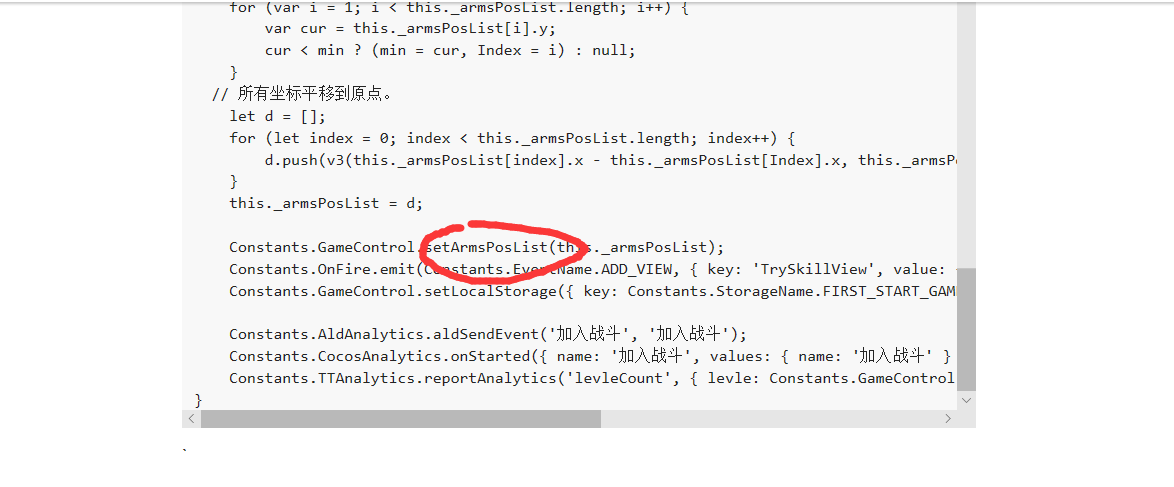
这个_armPosList是以第一个点为cc.vec3(0,0,0)平移之后的点的数组吧 怎么生成图片吗?可以提供一下相应的代码吗 ?或者能否加个微信或者qq 1205385568
不用管那个方法,就一个存储数组的变量而已。我那个不是生成图片的代码,我是按照这些点生成一个个节点(你可以理解成预制体或者节点),这些节点拼接就是你画的图形了。预制体就是一个球体(3D对象)
备注:我的是用C3D做的
监听节点的touch事件,记录下触碰点,然后代码调用graphics的函数画线,那样你想画几个就画几个
graphics是在opengl直接绘制顶点数据填充要色的, sprite是显示照片也就是显示像素数据的,你需要把graphics绘制后的读取成像素数据,可以采用截屏,,,不过太频繁太多的graphics好像有问题
你的设计思路不对,像你这样设计是有问题的
这哥们说的才是正确的
如果你不会,我可以帮你实现
好的,我觉得我想错了