
在安卓平台选择ect1
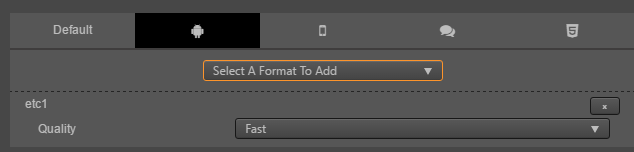
在h5平台选择png
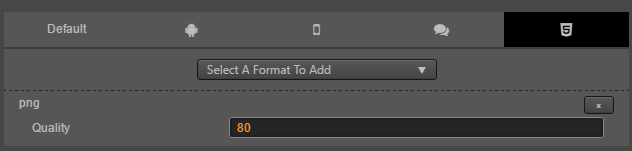
然后选择安卓平台构建,就不会生成这张合图的pkm文件。
现在的处理办法是写个脚本,去个*.pac.meta文件添加安卓平台下的etc1配置。
这个是没用针对平台设置纹理压缩格式的配置
{
  "ver": "1.2.0",
  "uuid": "da2f71fe-3c80-457f-99e5-06133bcd96a7",
  "maxWidth": 1024,
  "maxHeight": 1024,
  "padding": 2,
  "allowRotation": true,
  "forceSquared": true,
  "powerOfTwo": true,
  "algorithm": "MaxRects",
  "format": "png",
  "quality": 80,
  "contourBleed": true,
  "paddingBleed": true,
  "filterUnused": false,
  "platformSettings": {},
  "subMetas": {}
}
这个是设置了安卓平台压缩为etc1格式的配置
{
  "ver": "1.2.0",
  "uuid": "da2f71fe-3c80-457f-99e5-06133bcd96a7",
  "maxWidth": 1024,
  "maxHeight": 1024,
  "padding": 2,
  "allowRotation": true,
  "forceSquared": true,
  "powerOfTwo": true,
  "algorithm": "MaxRects",
  "format": "png",
  "quality": 80,
  "contourBleed": true,
  "paddingBleed": true,
  "filterUnused": false,
  "platformSettings": {
    "android": {
      "formats": [
        {
          "name": "etc1",
          "quality": "fast"
        }
      ]
    }
  },
  "subMetas": {}
}
如果不打包安卓平台,则去掉这个配置。每次修改*.pac.mata都要重启IDE。