
cc.Class({
extends: cc.Component,
properties: {
    loguser: cc.EditBox,
    logpass: cc.EditBox,
},

onLoad: function () {
    if(cc.playstate == null)
    {
        //开机就播放音乐
        cc.audioID = cc.audioEngine.play(cc.url.raw('resources/image/bg2.mp3'), true, 0.5);
        cc.playstate = 1;
    }
    console.log('背景音乐播放状态',cc.playstate);

    window.ws = new WebSocket("ws://www.yifancold.com:3198/users/login");
    window.ws.onmessage = function (event)
    {
        console.log("推送用户信息: " + event.data);
        if(JSON.parse(event.data).target=='login')
        {
            console.log("获取用户信息成功!");
            let userinfo = JSON.parse(event.data).data;
            cc.getuserid = userinfo.id;
            cc.getusername = userinfo.username;
            cc.getscore = userinfo.score;
            //进入主界面
            cc.director.loadScene("Index");
        }
    }
},


// },
XMLhttplogin: function()
{
    //http登陆
    var self = this;
    var xhr = new XMLHttpRequest();
    xhr.open("POST", "http://www.yifancold.com:3198/users/login", true);
    xhr.setRequestHeader("Content-type", "application/x-www-form-urlencoded; charset=utf-8");
    var csc = "username="+this.loguser.string+"&password="+this.logpass.string;
    xhr.send(csc);
    xhr.onreadystatechange = function () {
         if (xhr.readyState == 4 && (xhr.status >= 200 && xhr.status < 400)) {
            var response = xhr.responseText;
            console.log('XMLHttpRequest接收消息是:'+response);
            var code = JSON.parse(response).code;
            if(code==0)
            {//登陆成功
                cc.token = JSON.parse(response).data.token;
                console.log("XMLHttpRequest连接成功");
                //进行websock长连接请求
                self.SendServerinfo();
            }
            else{console.log("登陆失败");}
        }
    };

},


SendServerinfo: function()
{//进行token用户信息请求(首页websocket发送)
     var StrJSON = JSON.stringify({
     "target": "login",
     "data":{
     "token": cc.token,
     }
     })
     console.log('发送长连接请求:'+StrJSON);
     window.ws.send(StrJSON);
},
});
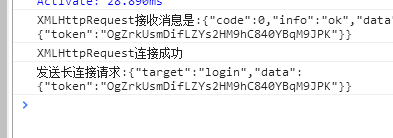
别的就卡在这不走了。