
建立了两个JS文件,一个是全局文件Alert.js,用于预制;一个是background.js
那么有方法在Alert.js调用background的function吗?
const Bg = require(‘background’);
Bg.function();
可以在Alert.js中的properties中引用你的预制资源,然后你就能用了…
反了,我是想在预制中用background.js中的function

这个Alert.js
//全局文件Alter,随时调用prefab(需要在此js属性上勾选为插件,是它成为全局文件)

var Alert = {
    _alert: null,           // prefab
    _closeButton:   null,   // 取消按钮
    _soundButton:   null,   //音量按钮
    _saveButton:    null,   //存档按钮
    _loadButton:    null,   //读取按钮
    _musicButton:   null,   //关闭音乐
    _animSpeed:     0.3,    // 动画速度
    _stopButton:    null,   //禁用按钮
    _audio:         null,   //音频
};
/**
 * animSpeed:        动画速度 default = 0.3.
*/
const Bg = require("StoryBackGroundTouch");

Alert.show = function () {

    // 引用
    var self = this;

    // 判断
    if (Alert._alert != undefined) return;

    // 加载 prefab 创建
    cc.loader.loadRes("Alert", cc.Prefab, function (error, prefab) {

        if (error) {
            cc.error(error);
            return;
        }

        // 实例
        var alert = cc.instantiate(prefab);

        // Alert 持有
        Alert._alert = alert;

        // 动画
        var cbFadeOut = cc.callFunc(self.onFadeOutFinish, self);
        var cbFadeIn = cc.callFunc(self.onFadeInFinish, self);
        self.actionFadeIn = cc.sequence(cc.spawn(cc.fadeTo(Alert._animSpeed, 255), cc.scaleTo(Alert._animSpeed, 1.0)), cbFadeIn);
        self.actionFadeOut = cc.sequence(cc.spawn(cc.fadeTo(Alert._animSpeed, 0), cc.scaleTo(Alert._animSpeed, 2.0)), cbFadeOut);

        //获取按钮结点
        Alert._closeButton = cc.find("Menubackground2/Close", alert);
        Alert._soundButton = cc.find("Menubackground2/Sound", alert);
        Alert._musicButton = cc.find("Menubackground2/Music", alert);
        Alert._saveButton = cc.find("Menubackground2/Save", alert);
        Alert._loadButton = cc.find("Menubackground2/Load", alert);
        Alert._stopButton = cc.find("Menubackground2/CloseSound",alert);

        // 添加点击事件
        Alert._closeButton.on('click', self.onButtonClicked, self);
        Alert._soundButton.on('click', self.onButtonClicked,self);
        Alert._musicButton.on('click', self.onButtonClicked,self);
        Alert._saveButton.on('click', self.onButtonClicked,self);
        Alert._loadButton.on('click', self.onButtonClicked,self);
        Alert._stopButton.on('click', self.onButtonClicked,self);

        // 父视图
        Alert._alert.parent = cc.find("Canvas");

         //初始化按钮
         Alert._stopButton.active = false;
        // 展现 alert
        self.startFadeIn();

    });

    // 执行弹进动画
    self.startFadeIn = function () {
        cc.eventManager.pauseTarget(Alert._alert, true);
        Alert._alert.position = cc.p(0, 0);
        Alert._alert.setScale(2);
        Alert._alert.opacity = 0;
        Alert._alert.runAction(self.actionFadeIn);
    };

    // 执行弹出动画
    self.startFadeOut = function () {
        cc.eventManager.pauseTarget(Alert._alert, true);
        Alert._alert.runAction(self.actionFadeOut);
    };

    // 弹进动画完成回调
    self.onFadeInFinish = function () {
        cc.eventManager.resumeTarget(Alert._alert, true);
    };

    // 弹出动画完成回调
    self.onFadeOutFinish = function () {
        self.onDestory();
    };

    // 按钮点击事件(需要在prefab精灵属性上添加按钮组件)
    self.onButtonClicked = function(event){
    	if(event.target.name == "Close"){
    		 self.startFadeOut();
    	}
        else if (event.target.name == "Music"){
        	Bg.pause();
            Alert._musicButton.active = false;
            Alert._stopButton.active = true;
        }
        else if (event.target.name == "CloseSound"){
            Alert._musicButton.active = true;
            Alert._stopButton.active = false;
        }
        /*
        else if (event.target.name == "Sound"){
        }
        else if (event.target.name == "Save"){

        }
        else if (event.target.name == "Load"){
        }
        */
    };

    // 重置Alert
    self.onDestory = function () {
        Alert._alert.destroy();

        Alert._alert = null;
        Alert._closeButton = null;
    };
};
这个是StoryBackGroundTouch.js
// Learn cc.Class:
//  - [Chinese] http://www.cocos.com/docs/creator/scripting/class.html
//  - [English] http://www.cocos2d-x.org/docs/editors_and_tools/creator-chapters/scripting/class/index.html
// Learn Attribute:
//  - [Chinese] http://www.cocos.com/docs/creator/scripting/reference/attributes.html
//  - [English] http://www.cocos2d-x.org/docs/editors_and_tools/creator-chapters/scripting/reference/attributes/index.html
// Learn life-cycle callbacks:
//  - [Chinese] http://www.cocos.com/docs/creator/scripting/life-cycle-callbacks.html
//  - [English] http://www.cocos2d-x.org/docs/editors_and_tools/creator-chapters/scripting/life-cycle-callbacks/index.html

cc.Class({
    extends: cc.Component,

    properties: {
        i: 0,
        l: 0,     //这里是字母L
        r: 0,
        p: 0,
        q: 0,
        s: 0,

        audioSource: {
            default: null,
            type: cc.AudioSource,
        },


        label: {
            default: null,
            type:cc.Label,
        },

        Aronsprite:{
            default:null,
            type:cc.Sprite,
        },

        Liusprite: {
            default: null,
            type: cc.Sprite,
        },

        Magesprite: {
            default: null,
            type: cc.Sprite,
        },

        aronactive_string: {  //定义一个数组用于操作亚伦精灵是否显示
            default: [],
            type: ["String"]
        },

        liuactive_string: {  //定义一个数组用于操作老刘精灵是否显示
            default: [],
            type: ["String"]
        },

        mageactive_string: {  //定义一个数组用于操作夏末精灵是否显示
            default: [],
            type: ["String"]
        },

        leftname_string: {  //定义一个数组用于存储左边角色昵称
            default: [],
            type: ["String"]
        },

        rightname_string: {  //定义一个数组用于存储右边角色昵称
            default: [],
            type: ["String"]
        },

        story_string: {  //定义一个数组用于存储剧情文字
            default: [],
            type: ["String"]
        }

    },

    onLoad: function () {
        this.i = -1;
        this.l = 0;    //这里是字母L
        this.r = 0;
        this.p = 0;
        this.q = 0;
        this.s = 0;
    },

    // LIFE-CYCLE CALLBACKS:
    Name1: function () {                //左角色名框显示调用函数
        var self = this;
        self.label.string = this.leftname_string[this.l];
        this.l = this.l + 1;
    },

    Name2: function () {                //右角色名框显示调用函数
        var self = this;
        self.label.string = this.rightname_string[this.r];
        this.r = this.r + 1;
    },

    AronActive: function () {
        var self = this;
        if (this.aronactive_string[this.p] == 1) {
            self.Aronsprite.enabled = true;
        }
        else{
            self.Aronsprite.enabled = false;
        }
        this.p = this.p + 1;
    },

    LiuActive: function () {
        var self = this;
        if (this.liuactive_string[this.q] == 1) {
            self.Liusprite.enabled = true;
        }
        else{
            self.Liusprite.enabled = false;
        }
        this.q = this.q + 1;
    },

    MageActive: function () {
        var self = this;
        if (this.mageactive_string[this.s] == 1) {
            self.Magesprite.enabled = true;
        }
        else{
            self.Magesprite.enabled = false;
        }
        this.s = this.s + 1;
    },

    Story: function () {
        var self = this;
        var index = 1;
        self.schedule(function () {
            self.label.string = this.story_string[this.i].substr(0,index);
            index = index + 1;
        }, 0.01, 100);
        this.i = this.i + 1;
        if (this.i == 24) {
            this.node.runAction(cc.sequence(cc.fadeOut(1.0), cc.callFunc(function () {
                cc.director.loadScene("Chess")
            })));
            stop();
        }
    },

    menu_click: function(){
        Alert.show();
    },
//渐入效果,新建JS文件,并且将这个文件添加到场景Story中(添加用户自定义脚本)
  start () {
      this.node.setOpacity(0);
        this.node.runAction(cc.fadeIn(1.0));
    },


     pause: function () {
     this.audioSource.pause();
     },
    resume: function () {
     this.audioSource.resume();
    },
    // update (dt) {},
});
也可以在预制的属性中存你要调用的对象的引用的,不过要在其他地方将background引用传进去
楼主解决了没,我也遇到同样问题,我有一个player.js 里面封装了一个函数用来换头像setHead,然后在game.js里调用player.setHead居然不行,这什么鬼
你的game.js里的player是不是js文件
是预制体,绑定了player.js 在game.js里的属性声明是:
    player: {
        default: null,
        type: cc.Prefab,
    },
然后在game.js里这么用的
var player = cc.instantiate(this.player);
this.node.addChild(player);
player.setHead();
是预制体,绑定了player.js 在game.js里的属性声明是:
player: {
    default: null,
    type: cc.Prefab,
},
然后在game.js里的onload()这么用的
var player = cc.instantiate(this.player);
this.node.addChild(player);
player.setHead();
你的player是一个cc.Node类型,你要获取node下面的js才行,如player.getComponent(‘player’).setHead();
还是不行
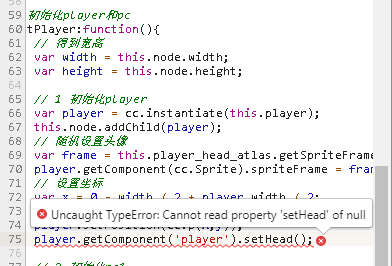
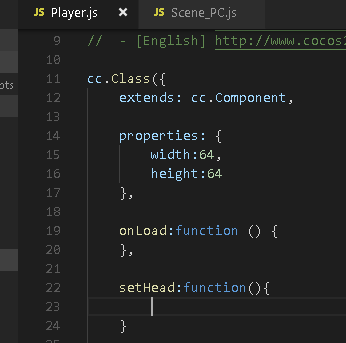
你的js文件名是大写的,注意下大小写

你应该写成这样 player.getComponent(‘Player’).setHead();
你可以把js文件看成一个组件,你现在获取的是这个叫做‘Player’的组件
可以了,多谢多谢