
用scrollview组件和layout组件,这种情况怎样解决?还是只能手动计算添加元素的位置
能否弄一个简单的 demo 传上来,我给你看一下。
这个问题解决了,是因为添加的节点重新计算了一次宽度和高度所以跳了一下。
但是layout里自动添加的元素,在content底部的时候却会跳一下
这个问题一直存在,自动布局的layout刷新时,其挂载内容会闪烁下才能排好,
希望修改下
能否弄一个简单的 demo 给我呢? 这样可以帮助我更快地定位问题,谢谢。
因为你用了很多 resizeContainer 的 Layout 导致的, layout的 size 变化是下一帧生效的,你可以参考我下面的代码:
    addMessage:function(str){
        let _this = this;
        let message = cc.instantiate(_this.message),
            msgNode = message.children[1].children[1].children[0],
            nickNode = message.children[1].children[0],
            msgBac = msgNode.parent;
        msgNode.getComponent(cc.Label).string = str;
        nickNode.getComponent(cc.Label).string = 'GoNtte';
        _this.content.addChild(message);
        msgBac.width = msgNode.width;
        msgBac.height = msgNode.height;

     //下面这一段是我加的,注意 Layout 的更新顺序。
        let itemLayout =  message.getComponent(cc.Layout);
        var node2 = cc.find("New Node", message);
        var node3 = cc.find("New Node/New Sprite(Splash)", message);
        node3.getComponent(cc.Layout)._updateLayout();
        node2.getComponent(cc.Layout)._updateLayout();
        itemLayout._updateLayout();
        _this.content.getComponent(cc.Layout)._updateLayout();


        if(_this.content.height>640){
            _this.content.parent.parent.getComponent(cc.ScrollView).scrollToBottom(0.1);
            // _this.content.parent.parent.getComponent(cc.ScrollView).scrollTo(cc.p(0, 1), 0.1);
            // _this.content.parent.parent.getComponent(cc.ScrollView).scrollToPercentVertical(1,0.1);
        }
        if(this.count<50){
            this.initMsg();
        }
    },
2赞
多谢了 完美解决
多谢,类似的问题,也解决了。
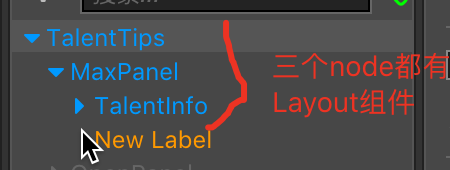
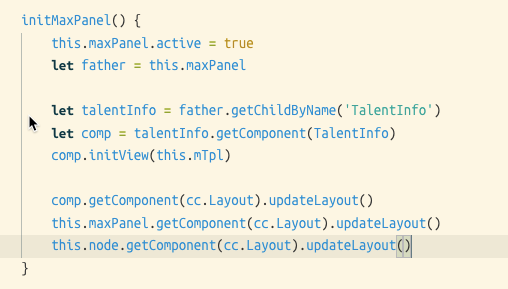
感谢大佬,完美解决了~
也遇到了这个问题, 主要是使用了 Label 和 Layout 组合, 自适应文本框高度, 这种情况下要注意刷新 Label
        for (let stage of book) {

        let node = instantiate(this.item);
        let cmt = node.getComponent(CmtStageItemEdit);
        cmt.init(this, stage);
        node.parent = this.content;
        // 强制刷新, 不然 label 和 layout 组件高度改变时, 会闪一下
        node.getChildByName('content').getComponent(Label).updateRenderData(true);
        cmt.getComponent(Layout).updateLayout();

    }