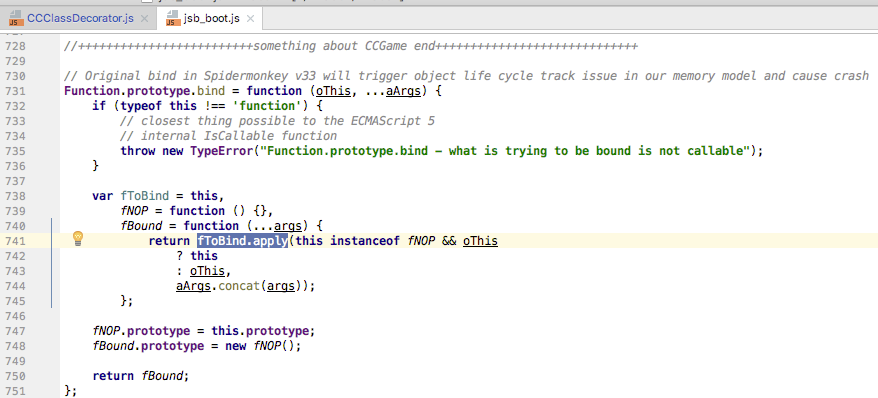
如题,网页调试正常运行,但是使用mac模拟器调试场景不能渲染出来,挂载在场景的脚本逻辑都能正常运行,后台log都在正常跑。log只找到两处error 贴到下面,游戏中使用了dragonBones的换皮,由于工程一直用网页调试,上一版本运行时没问题的,这个版本特别长时间没有使用mac测试,加的东西比较多。日志看不出什么问题,实在不想一个个的排查,求各路大神帮忙看一下可能是什么问题。或是什么情况下可能造成模拟器不渲染场景?不胜感激!
完整日志log.zip (2.8 KB)
------------------------------------------------------------------------------

2017-04-04T12:47:38.745Z - normal: 1.4.2
2017-04-04T12:47:44.938Z - normal: Simulator: WORKAREA WIDTH 1440.00, HEIGHT 798.00
2017-04-04T12:47:44.939Z - normal: Simulator: FRAME SCALE = 1.00
2017-04-04T12:47:44.941Z - normal: Simulator:

## GLFWError #65544 Happen, Cocoa: Failed to retrieve display name

2017-04-04T12:47:45.016Z - normal: Simulator:
2017-04-04T12:47:45.016Z - normal: Simulator: {
2017-04-04T12:47:45.016Z - normal: Simulator: 	gl.supports_OES_map_buffer: false
2017-04-04T12:47:45.016Z - normal: Simulator: 	gl.supports_vertex_array_object: true
2017-04-04T12:47:45.016Z - normal: Simulator: 	cocos2d.x.version: 1.4.1
2017-04-04T12:47:45.017Z - normal: Simulator: 	gl.vendor: NVIDIA Corporation
2017-04-04T12:47:45.017Z - normal: Simulator: 	gl.supports_PVRTC: false
2017-04-04T12:47:45.017Z - normal: Simulator: 	gl.renderer: NVIDIA GeForce GT 750M OpenGL Engine
2017-04-04T12:47:45.017Z - normal: Simulator: 	cocos2d.x.compiled_with_profiler: false
2017-04-04T12:47:45.017Z - normal: Simulator: 	gl.max_texture_size: 16384
2017-04-04T12:47:45.017Z - normal: Simulator: 	gl.supports_ETC1: false
2017-04-04T12:47:45.018Z - normal: Simulator: 	gl.supports_BGRA8888: false
2017-04-04T12:47:45.018Z - normal: Simulator: 	cocos2d.x.build_type: DEBUG
2017-04-04T12:47:45.019Z - normal: Simulator: 	gl.max_texture_units: 16
2017-04-04T12:47:45.019Z - normal: Simulator: 	gl.supports_OES_packed_depth_stencil: false
2017-04-04T12:47:45.019Z - normal: Simulator: 	gl.supports_discard_framebuffer: false
2017-04-04T12:47:45.021Z - normal: Simulator: 	gl.supports_NPOT: true
2017-04-04T12:47:45.021Z - normal: Simulator: 	gl.version: 2.1 NVIDIA-10.14.20 355.10.05.15f03
2017-04-04T12:47:45.021Z - normal: Simulator: 	cocos2d.x.compiled_with_gl_state_cache: true
2017-04-04T12:47:45.022Z - normal: Simulator: 	gl.supports_OES_depth24: false
2017-04-04T12:47:45.022Z - normal: Simulator: }
2017-04-04T12:47:45.022Z - normal: Simulator:
2017-04-04T12:47:45.022Z - normal: Simulator:
2017-04-04T12:47:45.022Z - normal: Simulator:

## cocos2d: warning, Director::setProjection() failed because size is 0
-----------------------------------------------------------------------
2017-04-04T12:47:47.721Z - normal: Simulator: /Applications/CocosCreator.app/Contents/Resources/cocos2d-x/simulator/mac/Simulator.app/Contents/Resources/script/

## jsb_boot.js:741:TypeError: 'prototype' property of fNOP is not an object

-------------------------------------------------------------------------