
如題:
新手想請教一下如何利用touch_move 在一個GameObject (Player) 碰撞到另一物件中,
想 player 碰撞到物件(長方形) 其中一邊, player 會立該停止活動.
我能把程式寫成會停,但如果不停用滑鼠點擊或再次快速上下移動, 兩圖會重疊。
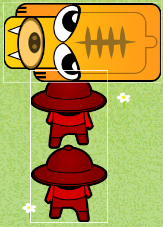
如果慢慢把Player 移近長方形, 便會準確停止活動.
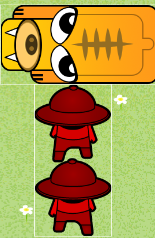
請問我要怎做才可準確控制該碰撞應用? - 感謝.
===========================================
cc.Class({
extends: cc.Component,
properties: {
    canvas: cc.Node,
    buttonLeft: cc.Button,
    buttonRight: cc.Button,
    buttonLogo: cc.Button,
    display: cc.Label,
    exitTop: {
        default: null,
        type: cc.Node
    },
    exitBottom: {
        default: null,
        type: cc.Node
    },
    speed: 2,
    direction: 0,
    up: 0,
    player: {
        default: null,
        type: cc.Node
    },
},

onLoad: function () {
    var self = this;
    cc.director.getCollisionManager().enabled = true;
    cc.director.getCollisionManager().enabledDebugDraw = true;

    self.collisionX = 0;
    self.collisionY = 0;

    self.prePosition = cc.p(self.player.position.x, self.player.position.y);
    self.touchingNumber = 0;


    self.player.on(cc.Node.EventType.TOUCH_START, function (event) {
        var touches = event.getTouches();
        var touchLoc = touches[0].getLocation();

        self.prePosition = self.player.parent.convertToNodeSpaceAR(touchLoc);

        self.oldX = self.prePosition.x;
        self.oldY = self.prePosition.y;
    }, self.node);

    self.player.on(cc.Node.EventType.TOUCH_MOVE, function (event) {
        var touches = event.getTouches();
        var touchLoc = touches[0].getLocation();

        self.newX = self.player.parent.convertToNodeSpaceAR(touchLoc).x;
        self.newY = self.player.parent.convertToNodeSpaceAR(touchLoc).y;

        if (self.newY >= self.oldY) {
            self.up = 1;  // up
        } else {
            self.up = -1; // down
        }
    }, self.node);

    self.player.on(cc.Node.EventType.TOUCH_END, function (event) {
        self.direction = 0;
        self.up = 0;
    }, self.node);

    self.player.on(cc.Node.EventType.TOUCH_CANCEL, function (event) {
        self.direction = 0;
        self.up = 0;
    }, self.node);
},

onDisabled: function () {
    cc.director.getCollisionManager().enabled = false;
    cc.director.getCollisionManager().enabledDebugDraw = false;
},

update: function (dt) {
    var self = this;

    // ********* Y Movement Handler *********
    if (self.collisionY === 0) {
        if (self.up === 1) {
            self.player.setPosition(self.player.x, self.newY);
        } else if (self.up === -1) {
            self.player.setPosition(self.player.x, self.newY);
        }
    } else if (self.collisionY === 1) {
        self.player.setPosition(self.prePosition);

        if (self.up === -1) {
            self.player.setPosition(self.player.x, self.newY);
        }
    } else if (self.collisionY === -1) {
        if (self.up === 1) {
            self.player.setPosition(self.player.x, self.newY);
        }
    }

    self.prePosition = cc.p(self.player.position.x, self.player.position.y);
},

// ***************************************************
// **************Collision Detection *****************
// ***************************************************

onCollisionEnter: function (other, self) {
    this.node.color = cc.Color.RED;

    this.touchingNumber++;

    // 1st step
    // get pre aabb, go back before collision
    var otherAabb = other.world.aabb;
    var otherPreAabb = other.world.preAabb.clone();

    var selfAabb = self.world.aabb;
    var selfPreAabb = self.world.preAabb.clone();

    // 2nd step
    // forward x-axis, check whether collision on x-axis
    selfPreAabb.x = selfAabb.x;
    otherPreAabb.x = otherAabb.x;

    if (cc.Intersection.rectRect(selfPreAabb, otherPreAabb)) {
        if (selfPreAabb.xMax > otherPreAabb.xMax) {
            this.player.x = otherPreAabb.xMax - this.player.parent.x;
            this.collisionX = -1;
        } else if (selfPreAabb.xMin < otherPreAabb.xMin) {
            this.player.x = otherPreAabb.xMin - selfPreAabb.width - this.player.parent.x;
            this.collisionX = 1;
        }
        other.touchingX = true;

        console.log("touch x-axis");
        return;
    }

    // 3rd step
    // forward y-axis, check whether collision on y-axis
    selfPreAabb.y = selfAabb.y;
    otherPreAabb.y = otherAabb.y;

    if (cc.Intersection.rectRect(selfPreAabb, otherPreAabb)) {
        if (selfPreAabb.yMax > otherPreAabb.yMax) {
            this.collisionY = -1;

            console.log("touch y-axis bottom");
        } else if (selfPreAabb.yMin < otherPreAabb.yMin) {
            this.collisionY = 1;

            console.log("touch y-axis top");
        }
        other.touchingY = true;
    }

},

onCollisionStay: function (other, self) {
    // if (this.collisionY === -1) {}
},

onCollisionExit: function (other) {
    this.touchingNumber--;
    if (this.touchingNumber === 0) {
        this.node.color = cc.Color.WHITE;
    }

    if (other.touchingX) {
        this.collisionX = 0;
        other.touchingX = false;
    }
    else if (other.touchingY) {
        other.touchingY = false;
        this.collisionY = 0;
    }
},
});