
##脚本如下:python 3.7.3
####放在对应文件夹就能找出该文件夹下的所有.png格式文件,并且把路径导出以数组的形式写入到指定路径的指定文件中,使用方式简单便捷
# -*- coding: utf-8 -*-
import os
import io
import json

def listdir(path, list_name):
    for file in os.listdir(path):
        file_path = os.path.join(path, file)
        if os.path.isdir(file_path):
            listdir(file_path, list_name)
        elif os.path.splitext(file_path)[1]=='.png':
            text = '\\resources\\'
            text1 = '.png'
            length = len(file_path)
            idx = file_path.find(text)
            if idx != -1 :
                idx = idx + len(text)
                file_path = file_path[idx:(length)]
            idx = file_path.find(text1)
            if idx != -1 :
                file_path = file_path[0:idx]
            file_path = file_path.replace('\\', '/')
            list_name.append(file_path)
            print(text,"+++++",file_path)

if __name__ == '__main__':
    curPath = os.path.dirname(os.path.abspath(__file__))
    name_list = []
    listdir(curPath,name_list)
    # text = '\\assets\\'          #自动导入assets下的脚本目录,不需要的可注释,默认生成到当前目录
    # goalPath = 'scripts\\common\\'
    # length = len(curPath)
    # idx = curPath.find(text)
    # if idx != -1 :
        # idx = idx + len(text)
        # curPath = curPath[0:idx]+goalPath
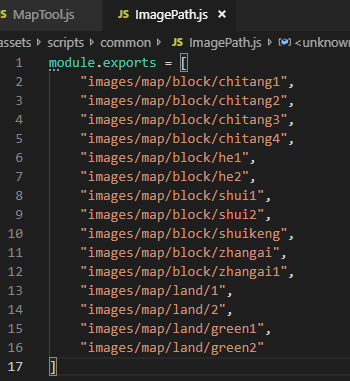
    jsonPath = os.path.join(curPath,"ImagePath.js") #写入路径   使用的时候直接 var imgList = require("ImagePath") 就可以使用了,imgList为数组
    print(jsonPath)
    dirname = os.path.dirname(jsonPath)
    if not os.path.exists(dirname):
        os.makedirs(dirname)
    with io.open(jsonPath, 'w', encoding='utf-8') as f:		#按照对应路径写入
        f.write('module.exports = ')
        f.write(json.dumps(name_list, ensure_ascii=False, indent=4, sort_keys=True))
##使用方法如下( js )
var ResMgr = {}
ResMgr.imgList = {}
ResMgr._loadCompleteNum = 0
ResMgr._loadNum = 0
ResMgr.init = function(){
    var imgList = require("ImagePath")
    for (let k in imgList) {
        let url = imgList[k];

        var self = ResMgr;
        self._loadNum++;
        cc.loader.loadRes(url, cc.SpriteFrame, function (err, spriteFrame) {
            if(spriteFrame._texture){
                spriteFrame.name = url;
                self.imgList[url] = spriteFrame;
            }else{
                console.log("文件不存在:"+url);
            }
            self._loadCompleteNum++;
            self.checkAllLoad();
        })
    }
}
ResMgr.checkAllLoad = function(){
    if (this._loadNum == this._loadCompleteNum) {
        console.log("load All");
        MapToolMgr.initMap(mapDataList)
    }else {
        // console.log(this._loadCompleteNum,"/",this._loadNum)
    }
}
##应用到游戏中
var sp = normalBlockNode.addComponent(cc.Sprite);
sp.spriteFrame = ResMgr.imgList["images/map/land/1"];
 if (!sp.spriteFrame) {
    console.log("---贴图资源缺失images/map/land/1---");
 }
##导出的文件样式
##有问必答,如果需要demo举个手,等有时间就做一个上传