const i18n = require(‘i18n’);
cc.Class({
extends: cc.RichText,
properties: {
    textKey: {
        default: 'TEXT_KEY',
        multiline: true,
        tooltip: 'Enter i18n key here',
        notify: function () {
            if (this._sgNode) {
                this._sgNode.setString(this.string);
                this._updateNodeSize();
            }
        }
    },
    string: {
        override: true,
        tooltip: 'Here shows the localized string of Text Key',
        get: function () {
            return i18n.t(this.textKey);
        },
        set: function (value) {
            this.textKey = value;
            //cc.warn('Please set label text key in Text Key property....'+value);
        }
    }
}
});
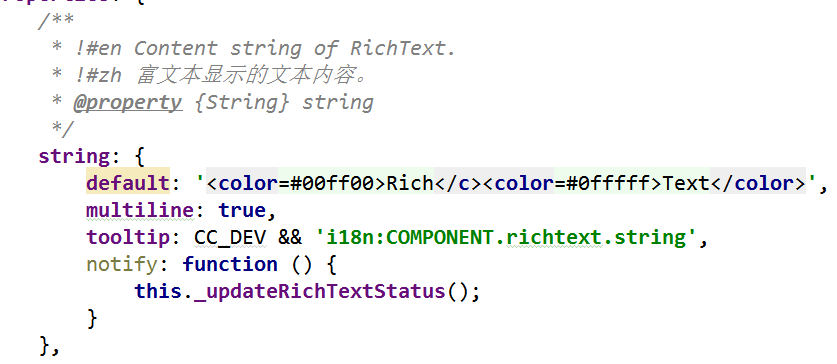
如上图,编辑后提示没有this._sgNode.setString(this.string);和this._updateNodeSize();方法
this._sgNode.setString(this.string);可以改成 this._sgNode.string = this.string;
但是RichText没有_updateNodeSize方法,求用什么方法可以刷新RichText