2.0.5 还有 2.0.6 版本都会出现.
打开一个scene fire文件,
新建一个 js 脚本,按保存。
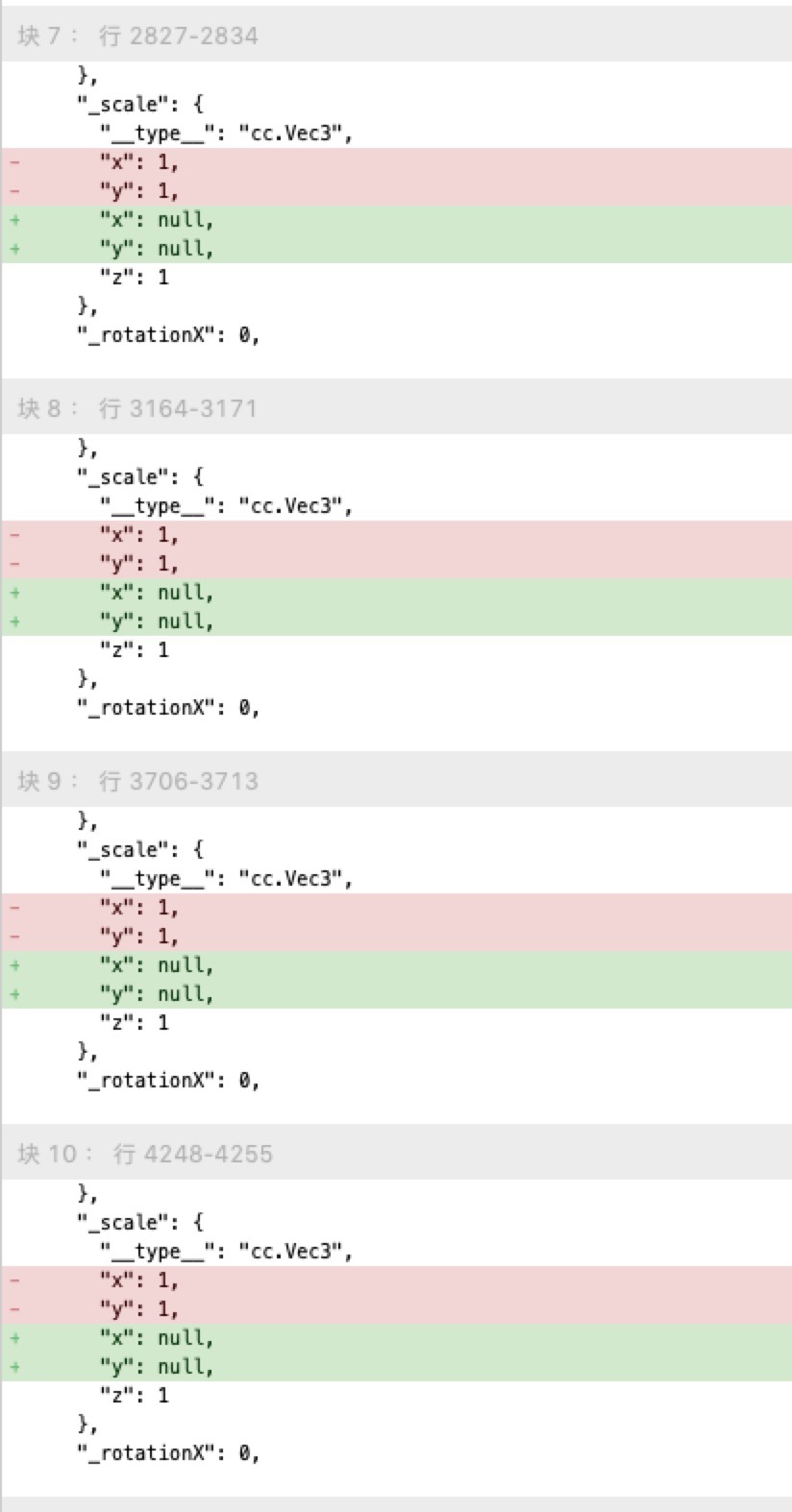
我原来的 fire文件就更改了,如图的并不是我手动改的,是自动保存的。
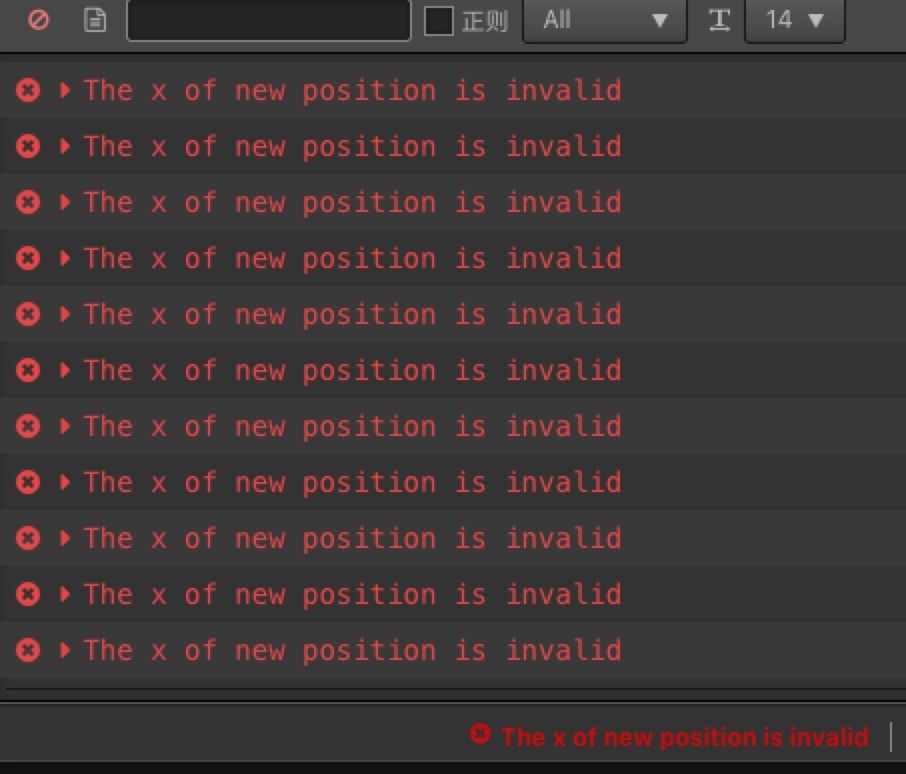
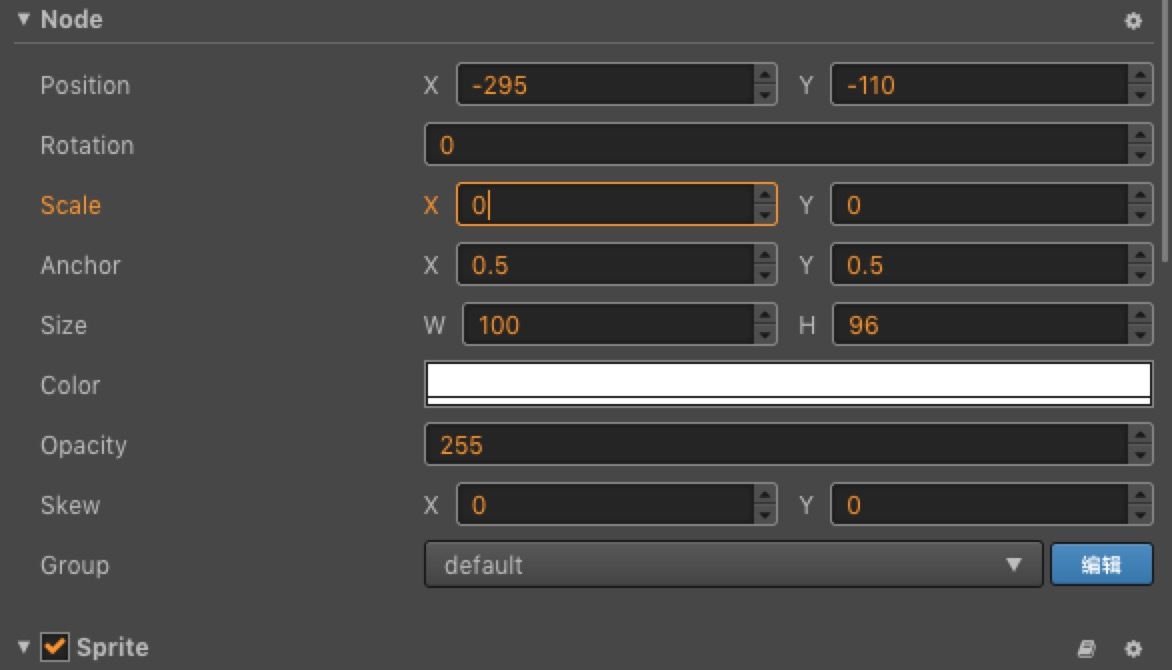
然后就一直报错一直报错。查了相关节点的相关属性在creator编辑页上也不是null。

2.0.5 还有 2.0.6 版本都会出现.
打开一个scene fire文件,
新建一个 js 脚本,按保存。
我原来的 fire文件就更改了,如图的并不是我手动改的,是自动保存的。
然后就一直报错一直报错。查了相关节点的相关属性在creator编辑页上也不是null。
这里面改1还改不了。下面是这个节点的配置json
{
“type”: “cc.Node”,
“_name”: “sideMenuBtn”,
“_objFlags”: 0,
“_parent”: {
“id”: 12
},Ï
“_children”: [],
“_active”: true,
“_level”: 2,
“_components”: [
{
“id”: 44
},
{
“id”: 45
},
{
“id”: 46
}
],
“_prefab”: null,
“_opacity”: 255,
“_color”: {
“type”: “cc.Color”,
“r”: 255,
“g”: 255,
“b”: 255,
“a”: 255
},
“_contentSize”: {
“type”: “cc.Size”,
“width”: 100,
“height”: 96
},
“_anchorPoint”: {
“type”: “cc.Vec2”,
“x”: 0.5,
“y”: 0.5
},
“_position”: {
“type”: “cc.Vec3”,
“x”: -295,
“y”: -110,
“z”: 0
},
“_scale”: {
“type”: “cc.Vec3”,
“x”: null,
“y”: null,
“z”: 1
},
“_rotationX”: 0,
“_rotationY”: 0,
“_quat”: {
“type”: “cc.Quat”,
“x”: 0,
“y”: 0,
“z”: 0,
“w”: 1
},
“_skewX”: 0,
“_skewY”: 0,
“_zIndex”: 0,
“groupIndex”: 0,
“_id”: “bdtt5kwTdGFKxuU3z/F1Ic”
},
{
“type”: “cc.Sprite”,
“_name”: “”,
“_objFlags”: 0,
“node”: {
“id”: 43
},
“_enabled”: true,
“_srcBlendFactor”: 770,
“_dstBlendFactor”: 771,
“_spriteFrame”: {
“uuid”: “3f5d448f-95bc-4da9-925d-1b80c9cb664d”
},
“_type”: 0,
“_sizeMode”: 1,
“_fillType”: 0,
“_fillCenter”: {
“type”: “cc.Vec2”,
“x”: 0,
“y”: 0
},
“_fillStart”: 0,
“_fillRange”: 0,
“_isTrimmedMode”: true,
“_state”: 0,
“_atlas”: null,
“_id”: “b0ETTL7odGLplL0y2tV8fi”
},
{
“type”: “cc.Widget”,
“_name”: “”,
“_objFlags”: 0,
“node”: {
“id”: 43
},
“_enabled”: true,
“alignMode”: 1,
“_target”: null,
“_alignFlags”: 9,
“_left”: 30,
“_right”: 0,
“_top”: 62,
“_bottom”: 0,
“_verticalCenter”: 0,
“_horizontalCenter”: 0,
“_isAbsLeft”: true,
“_isAbsRight”: true,
“_isAbsTop”: true,
“_isAbsBottom”: true,
“_isAbsHorizontalCenter”: true,
“_isAbsVerticalCenter”: true,
“_originalWidth”: 0,
“_originalHeight”: 0,
“_id”: “1dzcu8mkpOl5tJFYftsaH+”
},
{
“type”: “cc.Button”,
“_name”: “”,
“_objFlags”: 0,
“node”: {
“id”: 43
},
“_enabled”: true,
“transition”: 3,
“pressedColor”: {
“type”: “cc.Color”,
“r”: 211,
“g”: 211,
“b”: 211,
“a”: 255
},
“hoverColor”: {
“type”: “cc.Color”,
“r”: 255,
“g”: 255,
“b”: 255,
“a”: 255
},
“duration”: 0.1,
“zoomScale”: 1.1,
“clickEvents”: [
{
“id”: 47
}
],
“_N$interactable”: true,
“_N$enableAutoGrayEffect”: false,
“_N$normalColor”: {
“type”: “cc.Color”,
“r”: 214,
“g”: 214,
“b”: 214,
“a”: 255
},
“_N$disabledColor”: {
“type”: “cc.Color”,
“r”: 124,
“g”: 124,
“b”: 124,
“a”: 255
},
“_N$normalSprite”: null,
“_N$pressedSprite”: null,
“pressedSprite”: null,
“_N$hoverSprite”: null,
“hoverSprite”: null,
“_N$disabledSprite”: null,
“_N$target”: {
“id”: 43
},
“_id”: “558swVDF1I37ggWrSvAjbi”
},
{
“type”: “cc.ClickEvent”,
“target”: {
“id”: 2
},
“component”: “GameScene”,
“handler”: “clickSideMenuBtn”,
“customEventData”: “”
},
你好 你反馈的问题 我们需要确认是否有以下异常,你可以这样做:
排除项目异常 : 请新建一个项目测试下这个问题。
creator配置文件损坏: 配置文件位于系统盘用户目录下的.CocosCreator中,删除它然后重新打开编辑器就能重新生成creator配置。
按钮,
Transition: Scale
Durantion: 0.1
Zoom Scale: 1.1
我把这些组件的 Transition 改成 None 之后就能正常保存了
有可能是版本不兼容,
这些 Transition 是在 2.0.1 版本的时候加的,
加了之后升级成了 2.0.5 问题出现, 今天升级成了 2.0.6问题还在。
于是现在要改回去。
也可能是单纯的有bug。