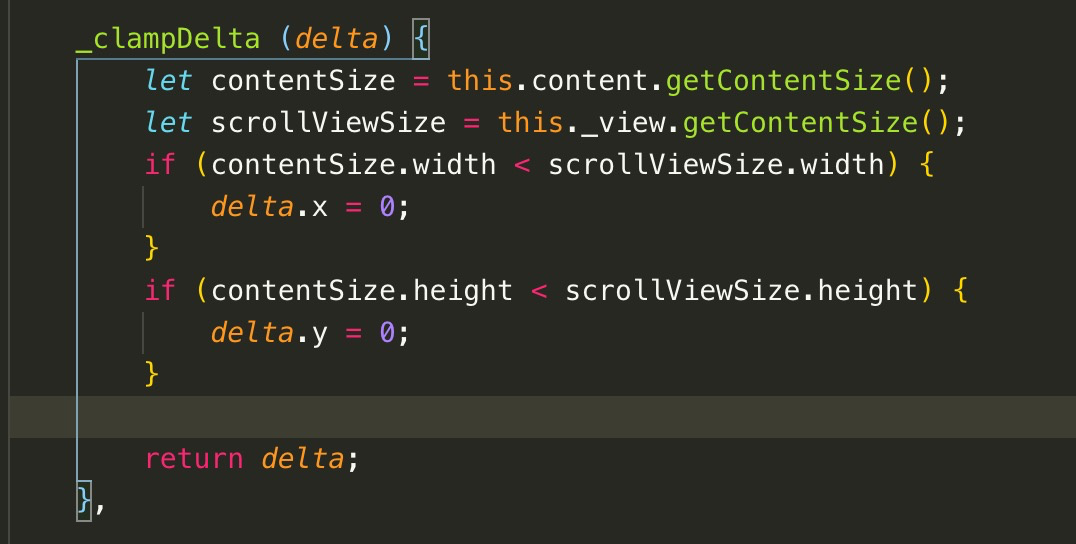
因为内容是不确定的,当content size小于scrollview size,是无法滑动,也不会触发什么事件。
看其他的游戏,只要是可滑动区域,不管content size是否小于scrollview size,都是可以滑动和回滚的。

因为内容是不确定的,当content size小于scrollview size,是无法滑动,也不会触发什么事件。
看其他的游戏,只要是可滑动区域,不管content size是否小于scrollview size,都是可以滑动和回滚的。
设置个最小的viewSize 小于这个viewSize 就把content size设为viewSize
目前游戏有几百个scrollview,content都用了layout
type:vertical resizemode:container
这样设置content size会根据子节点的多少而大小了。
或者判断在里面加东西,让content size大于scrollview size。工作量都是巨大~
最好是能够取消这个设置
但小于viewSize时layout type 设置为None就行了
最新发现, 会导致 scrollview 滚动行为异常, 请谨慎使用
尝试了一下不自定义引擎也可以, 只要加上下面那关键的两行就行了
const {ccclass, property} = cc._decorator;

cc.ScrollView.prototype._clampDelta = (delta) => {
    return delta;
};

@ccclass
export default class Test10 extends cc.Component {
    //
}
你的办法可行。但是下拉后回滚很不自然,有回弹操作。
我后面写代码:
if (this.scr.content.height <= this.node.height) {
            this.scr.content.getComponent(cc.Layout).resizeMode = 0;

            this.scr.content.height = this.node.height + 1;

}怪不得引擎限制滑动,回弹效果的确有点怪
该主题在最后一个回复创建后14天后自动关闭。不再允许新的回复。