
在这里参考 https://blog.csdn.net/discode/article/details/115262165
关于安卓设备上使用串口,谷歌官方在github上有提供代码实例,里面有JNI的代码和串口API的java文件,工程的地址如下:
https://github.com/cepr/android-serialport-api
在这用的creator版本为1.9x
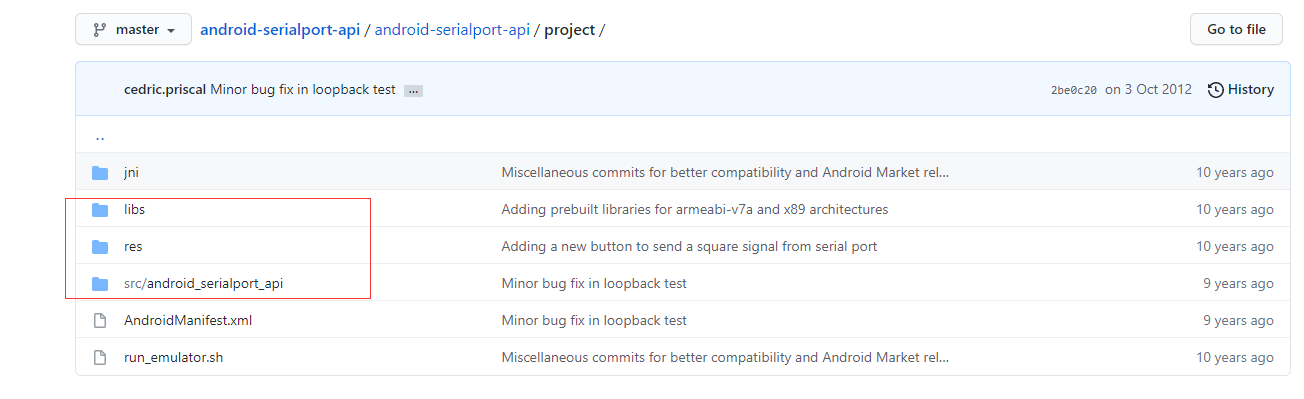
1.下载这3个可以直接拖入 proj.android-studio 下
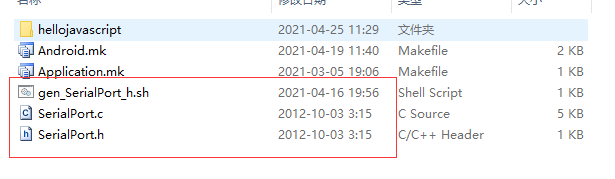
2.proj.android-studio\app\jni 加入这3个
3.proj.android-studio\app\jni\Android.mk 修改

4. build.gradle修改
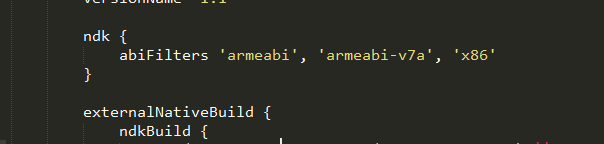
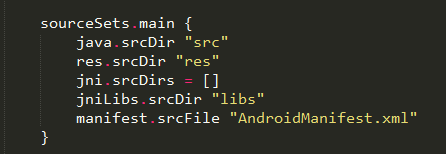
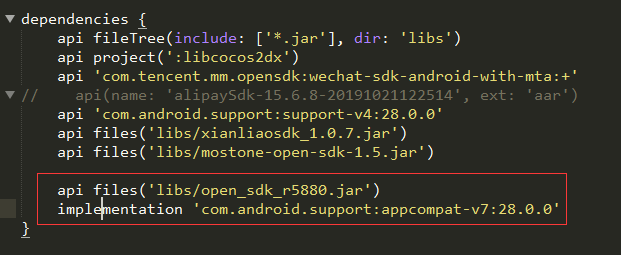
5.做完以上就可以写代码调用了
///**
// * 标记当前串口状态(true:打开,false:关闭)
// **/
public static boolean isFlagSerial = false;
public static SerialPort serialPort = null;
public static InputStream inputStream = null;
public static OutputStream outputStream = null;
public static Thread receiveThread = null;
public static String strData = "";

/**
 * 打开串口 我这里写的可以传串口
 */

public static void open(String data) {
    boolean isopen = false;
    if (isFlagSerial) {
        Log.i("1111111", "串口已经打开,打开失败");
        return ;
    }
    try {
        serialPort = new SerialPort(new File(data), 9600, 0);
        inputStream = serialPort.getInputStream();
        outputStream = serialPort.getOutputStream();
        receive();
        isopen = true;
        isFlagSerial = true;
    } catch (IOException e) {
        e.printStackTrace();
        isopen = false;
    }
};
/**
 * 关闭串口
 */
public static void close() {
    if (isFlagSerial) {
        Log.i("1111111", "串口关闭失败");
        return ;
    }
    boolean isClose = false;
    Log.i("1111111", "关闭串口");
    try {
        if (inputStream != null) {
            inputStream.close();
        }
        if (outputStream != null) {
            outputStream.close();
        }
        isClose = true;
        isFlagSerial = false;//关闭串口时,连接状态标记为false
    } catch (IOException e) {
        e.printStackTrace();
        isClose = false;
    }
};
public static byte hexToByte(String inHex){
return (byte)Integer.parseInt(inHex,16);
}
/**
- hex字符串转byte数组
- inHex 待转换的Hex字符串
- 转换后的byte数组结果
*/
public static byte[] hexToByteArray(String inHex){
int hexlen = inHex.length();
byte[] result;
if (hexlen % 2 == 1){
//奇数
hexlen++;
result = new byte[(hexlen/2)];
inHex=“0”+inHex;
}else {
//偶数
result = new byte[(hexlen/2)];
}
int j=0;
for (int i = 0; i < hexlen; i+=2){
result[j]=hexToByte(inHex.substring(i,i+2));
j++;
}
return result;
}
/**
 * 发送串口指令
 */
public static void sendString(String data) {
    if (!isFlagSerial) {

        Log.i("1111111", "串口未打开,发送失败" + data);
        return;
    }
    try {

        // byte[] sendData = data.getBytes();
        byte[] sendData = NativeApi.hexToByteArray(data) ;//这里是转成16进制 js传过来时 小于16自己加个0
        outputStream.write(sendData); //ByteUtil.toByte(data)
        outputStream.flush();
        Log.i("1111111", "sendSerialData:" + data);
    } catch (IOException e) {
        e.printStackTrace();
        Log.i("1111111", "发送指令出现异常");
    }
};
/**
 * 接收串口数据的方法
 */
public static void receive() {
    if (receiveThread != null && !isFlagSerial) {
        return;
    }
    receiveThread = new Thread() {
        @Override
        public void run() {
            while (isFlagSerial) {
                try {
                    byte[] readData = new byte[32];
                    if (inputStream == null) {
                        return;
                    }
                    int size = inputStream.read(readData);
                    if (size > 0 && isFlagSerial) {
                        strData = ByteUtil.toBinary(readData); //
                        Message msg = new Message();
                        msg.what = 0x10;
                        msg.obj = strData;
                        Log.i("1111111", "readSerialData:" + strData);
                    }
                } catch (IOException e) {
                    e.printStackTrace();
                }
            }
        }
    };
    receiveThread.start();
};
////////////////////////////////////
这安卓28或者以上还有修改 gradle.properties 加上(这个是取消一个什么判断 防止 打包就报错)
android.enableAapt2=false