
-
Creator 版本: 2.4.4
-
目标平台: Chrome浏览器预览 / 微信小游戏开发工具
-
重现方式:见下具体描述
-
首个报错:
-
重现概率: 100%
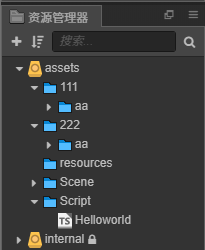
使用Cocos Creator 2.4.4创建hello-world模板项目,在assets目录下创建文件夹111,222,两个文件夹下创建同名子目录aa如下图:
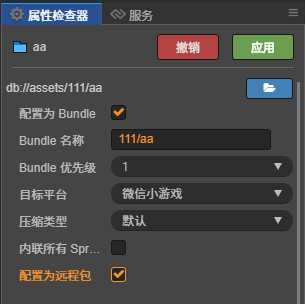
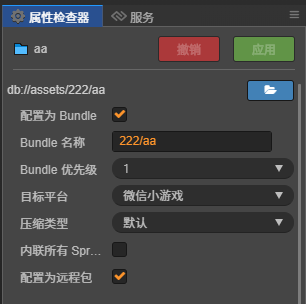
分别将两个子目录aa设置为bundle,并命名为111/aa,222/aa:
在HelloWorld.ts中加载这两个bundle:
const {ccclass} = cc._decorator;

@ccclass
export default class Helloworld extends cc.Component {

    public onLoad(): void {
        cc.log("on load.");
    }

    public start(): void {
        cc.log("start.");
        cc.assetManager.loadBundle("111/aa", (err, bundle) => {
            if (!!err) {
                cc.error(err);
                return;
            }
            cc.log("load 111/aa success.");
        });
    }

}
在Chrome浏览器中预览此项目,错误如下:
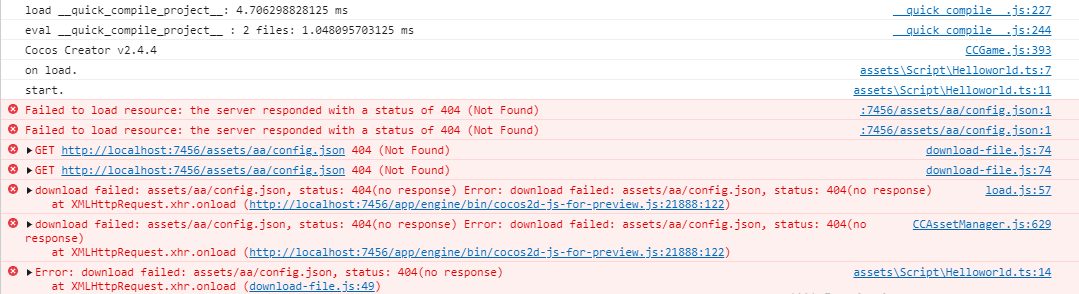
从日志的描述看,加载bundle配置文件的路径是错误的,
应该是
assets/111/aa/config.json而不是
assets/aa/config.json
如果直接访问地址http://localhost:7456/assets/111/aa/config.json
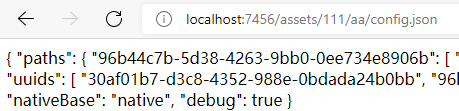
说明该bundle的配置文件是存在的,且构建为微信小游戏后,remote目录下的文件结构是111/aa、222/aa。
如果将Bundle名称修改为111_aa,则同样构建为微信小游戏后,remote目录下的文件则是111_aa、222/aa。此时加载111_aa则不会出现错误。项目需要在111目录下设置较多的子目录,不知为何无法使用111/aa格式的bundle命名。