
求问:左中右,人物默认在中间,在move的时候不知道怎么判断中间了,end的时候,是可以的。
TouchMove(touch: Touch,event: EventTouch) {
if(!this.isActive){
return;
}
let endX=event.getLocation().x;
let dis =this.touchX-endX
//滑动距离
if (dis > 30) { //左边
this.currentX-=50;
}else if (dis < -0) { //右边
this.currentX+=50;
}
}
update(deltaTime: number) {
let pos = this.player.node.position.clone();
this.currentZ -= this.speed;
if(this.currentX<=-50){
this.currentX=-50
}else if(this.localX>=50){
this.currentX=50
}
pos.x = math.lerp(pos.x,this.currentX, 0.1);
this.player.node.setPosition(pos);
}
1赞
加变量啊控制啊,中间0,左边-1,右边1不就行了。
设定3个向量代表左中右,如cc.v2(-1, 0), cc.v2(0, 1), cc.v2(1, 0)
手指滑动的向量和这三个向量做点积,点积结果哪个最大就表示往这个方向移动。
2赞
不好意思,我刚学这个,点积是说dot吗?我试了一下,都是中间的最大 
是不是我理解错了
点积是向量的点积 百度一下 你就知道
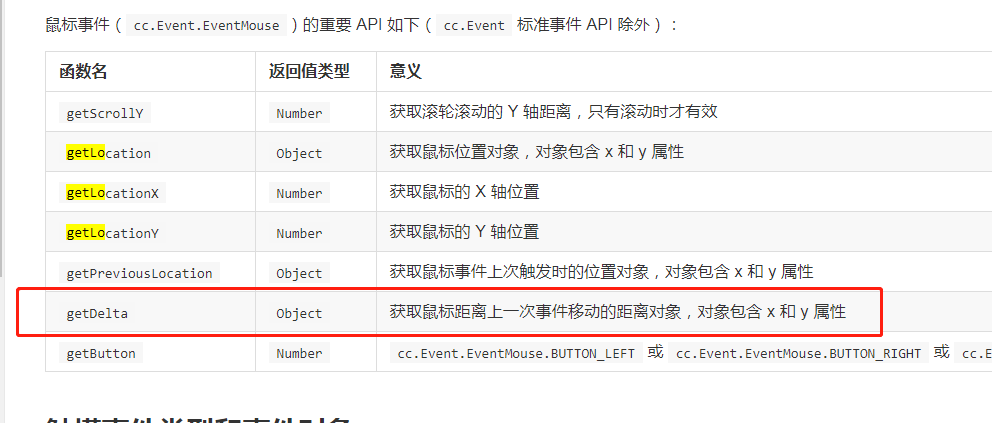

不知道你要怎么位移,判断y>0就是向上,y<0就是向下。move上下左右都能随便位移.
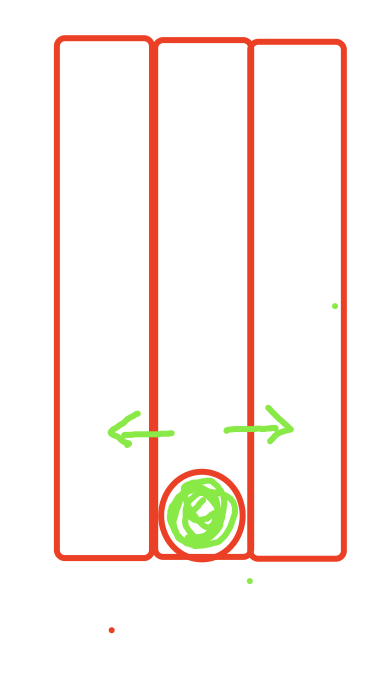
move方法删了,就用end就行。x>0右移,x<0左移。
 哈哈哈哈哈哈,那不行,end要松开才知道结果,会有"延迟"的。。
你这个是只有在三个跑道跑还是会在任意X值跑?
你这个不是没有中间,是因为move触发的次数太多,导致你这里看起来是直接从左跳到了右或者从右跳到了左
你在touch_move加个打印就会发现,move会一直触发的
不是很明白你这个currentX是想表达什么意思?是不是手指移动50px就换一格?
对,手指移动50px就换一格,我打印出来0左,1中,2右,是会走到中间的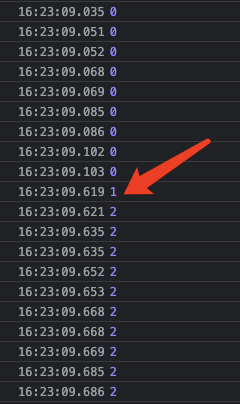
但是我不知道怎么在updata里停下来=。=!
只有3个跑道,左中右
加一个变量,变成1了就return,只有touchend了变量改变状态。
顺便问一句,看头像,目测是妹子,猜的对吗
那你不能用update,应该用tween。还是用touchend
    //调用该方法,英雄可以断续滑动移动
    _bindHeroMoveEvent() {
        this.node.on(cc.Node.EventType.TOUCH_END, e => {
            const _dPos = e.getLocation().sub(e.getStartLocation());
            const _isHori = Math.abs(_dPos.x / _dPos.y) > 1;
            if (_isHori) {
                if (Math.abs(_dPos.x) > TOUCH_THRESHOLD) return this._hroiMoveHero(_dPos.x > 0);
            } else {
                if (Math.abs(_dPos.y) > TOUCH_THRESHOLD) return this._vertMoveHero(_dPos.y > 0);
            }
        })
    },
    //英雄断续水平移动
    _hroiMoveHero(isToRight) {
        if (this._heroHoriMoveLock) return;
        let _targetXScale = this._heroHoriXScale + (isToRight ? 1 : -1);
        if (_targetXScale > 0) _targetXScale = 1;
        else if (_targetXScale < 0) _targetXScale = -1;
        this._heroHoriXScale = _targetXScale;
        this._heroHoriMoveLock = true;
        cc.tween(this._hero).to(0.1, { x: _targetXScale * this._heroHoriStepSize })
            .call(() => this._heroHoriMoveLock = false)
            .start();
    },
你这个阈值设的有问题。从代码中看,往左是30像素就跳转一格,往右是0像素就跳转?这个阈值可以调整试一下。然后就是再加个逻辑,在跳转之后,将touchX重置为当前点的坐标(这个应该是你存的初始点击的x坐标吧?)
TouchMove(touch: Touch,event: EventTouch) {
if(!this.isActive){
return;
}
let endX=event.getLocation().x;
let dis =this.touchX-endX
let checkX = 60; // 阈值,自己调整试下
//滑动距离
if (dis > checkX) { //左边
this.currentX-=50;
this.touchX = endX;
}else if (dis < -checkX) { //右边
this.currentX+=50;
this.touchX = endX;
}
}
稍微改了下你试试