在Cocos Creator中使用solana web3js

请问怎样正确导入 solana web3js

能够正常导入并使用。

我现在想在 Cocos Creator 这个游戏引擎中使用这个文件。我通过下面的语句引入这个文件
import { PublicKey } from “./index.iife.js”;
但出现了下面的错误:
Failed to resolve buffer from pack:///mods/fs/0/assets/index.iife.js.

下面的文件详细说明了 Cocos Creator 引用外部模块的规则。上面的错误应该与此有关
https://docs.cocos.com/creator/3.0/manual/zh/scripting/modules/example.html

有没有解决该问题的思路呀?

没有3d需求就用2.x吧,2.x是可以的用的

Solana资料好少啊,全网就几篇教程 :sweat_smile:

web3 React App (cocos-creator.github.io)

1赞

希望有个大佬能出个web3js的教程

有点震惊,这链接404了

太感谢了,2.x 的确可以使用 salana 的 index.iife.min.js。

将文件拖进项目,作为插件脚本导入后
$LPR66TD{)EPP`W81ZL%KG
便可以在 ts 文件中通过 globalThis.solanaWeb3 来使用。

同样的做法在 3.x 中却行不通。即便设置为插件脚本也会一直提示
Failed to resolve buffer from pack:///mods/fs/0/assets/index.iife.js

不知道是什么原因。

用browserify打包一下就能用了

我尝试下 browserify,但没有成功。下面是我的具体操作,使用 borsh.js 为例

  1. 通过 browserify 打包 borsh

通过 npm init 新生成一个 project,
通过 npm i borsh 下载 borsh
新建 index.js,在其中写入
require (‘borsh’);
通过
browserify index.js -o bundle.js
将 borsh 打包成了 bundle.js

  1. 在 Cocos Creator 3.3 中尝试导入第一步中生成的 bundle.js

2.1 作为普通脚本导入
将 bundle.js 复制进 Cocos Creator 3.3 生成的项目中,刚复制进去就发生比如
Failed to resolve safe-buffer
之类的 Failed to resolve XXX 错误。

2.2 作为插件脚本导入
将导入的 bundle.js 通过下面的方式设置为插件脚本后,控制台中的错误会消失

但如果在其他非插件 ts 脚本中使用下面的语句来引用 bundle.js,则错误会重新在控制台中出现
import * as borsh from ‘./bundle.js’;

console.log(borsh);

  1. 在 Cocos Creator 2.4.6 中尝试导入第一步中生成的 bundle.js

3.1 尝试以普通脚本导入

将 bundle.js 复制进 Cocos Creator 2.4.6 生成的项目中,
在 ts 脚本中通过
import * as borsh from ‘./bundle.js’;
导入,但此后
console.log(borsh);
输出的结果为 undefined

3.2 尝试以插件脚本导入

修改为通过插件脚本方式导入后

在 globalThis 中找不到 bundle.js 中定义的任何变量。

请问browserify的正确使用方法是怎样的呢?

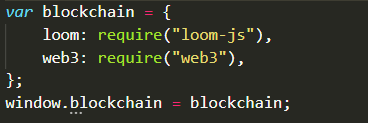
你的main.js需要这么写
1636333442(1)
然后导入插件就好了,不过一般第一次导入会报错,重启下编辑器就不会了

1赞

终于正常导入了,太感谢了!您介绍的方法在 Cocos Creator 2.x 与 3.x 中都能用。

该主题在最后一个回复创建后14天后自动关闭。不再允许新的回复。