-
Creator 版本:
-
目标平台:
-
重现方式:
-
首个报错:
-
之前哪个版本是正常的:
-
手机型号:
-
手机浏览器:
-
编辑器操作系统:
-
重现概率:
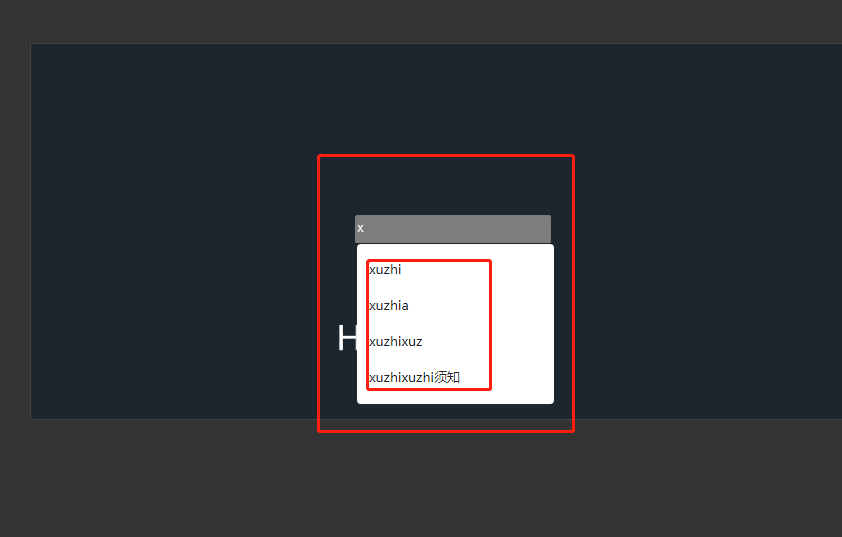
web版本时候,输入时总是有这样的提示,这个框怎么去掉尼,请大神指点下!!!

Creator 版本:
目标平台:
重现方式:
首个报错:
之前哪个版本是正常的:
手机型号:
手机浏览器:
编辑器操作系统:
重现概率:
关闭所有 input 的 autocomplete:
// 为 input 关闭 autocomplete
if (cc.sys.isBrowser && cc.EditBox["_ImplClass"]) {
    const proto = cc.EditBox["_ImplClass"].prototype;
    proto._createInputOld = proto._createInput;
    proto._createInput = function () {
        this._createInputOld();
        this._elem.autocomplete = "off";
    }
}
如果只想针对这个 input,可以这样:
const editbox: cc.EditBox;
editbox["_impl"]._elem.autocomplete = "off";
Creator 3.6.1 可用的代码如下:
<script>
	(function () {
		var hd = setInterval(function () {
			if (typeof (cc) === 'undefined') return;
			clearInterval(hd);

			// 为 input 关闭 autocomplete
			if (cc.sys.isBrowser && cc.EditBoxComponent["_EditBoxImpl"]) {
				const proto = cc.EditBoxComponent["_EditBoxImpl"].prototype;
				proto._createInputOld = proto._createInput;
				proto._createInput = function () {
					this._createInputOld();
					this._edTxt.autocomplete = "off";
				}
			}
		}, 100);
	})();
</script>