WebGL: CONTEXT_LOST_WEBGL: loseContext: context lost

  • Creator 版本: 2.3.4 2.4.3 2.4.6 2.4.9(个人可以认为全版本都会出现)
    电脑配置:E3-1230v3 内存:16gb双通道 性能肯定够开的

  • 目标平台: 傲游6.1.3.1000-6.1.3.2020 谷歌浏览器102.0.5005.63

  • 重现方式:个人推测的原因:
    1.使用引擎打开一个至少有5000-2w个数量的文件的项目,由于其会有很长的载入时间,平时使用时也会因为失去焦点而导致重新读取所有的文件导致程序无响应,在无响应的时候再点一下编辑器任意位置弹出 系统自带的是否结束/等待恢复 的弹窗时 选 强制结束,此时会关闭所有的cocos进程,从此以后再次打开任意2.x版本的引擎都会导致webgl上面的错误,具体表现就是编辑器里面场景编辑器的左上角位置和浏览器预览窗口的左上角出现这个标记:image
    我尝试过卸载所有的cocos引擎版本重新安装,重装显卡驱动都没办法修复这个问题(虽然可以用ctrl+r重启编辑器进程,但是这个出现的频率太高了,而且出现是时机随机化),所以我想请教一下开发组,这个webgl方面的问题应该怎么处理的?

在浏览器里面能看到的警告是WebGL: CONTEXT_LOST_WEBGL: loseContext: context lost
在编辑器log会出现的报错:
以下是其中一个出现的报错,不一定每次都是这个,我会慢慢补上其他的报错。
TypeError: Cannot read property ‘vue’ of null
at Object.findRootVue (E:\programs\CocosDashboard\resources.editors\Creator\2.4.6\resources\app.asar\editor\builtin\inspector\utils\utils.ccc:1:2740)
at ShadowRoot. (E:\programs\CocosDashboard\resources.editors\Creator\2.4.6\resources\app.asar\editor\builtin\inspector\panel\index.ccc:1:5062)
at Object.fire (E:\programs\CocosDashboard\resources.editors\Creator\2.4.6\resources\app.asar\editor-framework\lib\renderer\ui\utils\dom-utils.ccc:1:1642)
at HTMLElement._emitConfirm (E:\programs\CocosDashboard\resources.editors\Creator\2.4.6\resources\app.asar\editor-framework\lib\renderer\ui\elements\prop.ccc:1:6696)
at HTMLElement. (E:\programs\CocosDashboard\resources.editors\Creator\2.4.6\resources\app.asar\editor-framework\lib\renderer\ui\elements\prop.ccc:1:5887)
at Object.fire (E:\programs\CocosDashboard\resources.editors\Creator\2.4.6\resources\app.asar\editor-framework\lib\renderer\ui\utils\dom-utils.ccc:1:1642)
at HTMLElement._onInputConfirm (E:\programs\CocosDashboard\resources.editors\Creator\2.4.6\resources\app.asar\editor-framework\lib\renderer\ui\elements\num-input.ccc:1:10084)
at HTMLInputElement. (E:\programs\CocosDashboard\resources.editors\Creator\2.4.6\resources\app.asar\editor-framework\lib\renderer\ui\behaviors\input-state.ccc:1:751)
at Object.clear (E:\programs\CocosDashboard\resources.editors\Creator\2.4.6\resources\app.asar\editor-framework\lib\renderer\ui\utils\dom-utils.ccc:1:805)
at HTMLElement._clear (E:\programs\CocosDashboard\resources.editors\Creator\2.4.6\resources\app.asar\editor\builtin\inspector\panel\index.ccc:1:6238)
1赞

补充一个报错
TypeError: Failed to execute ‘shaderSource’ on ‘WebGLRenderingContext’: parameter 1 is not of type ‘WebGLShader’.
at _createShader (E:\programs\CocosDashboard\resources.editors\Creator\2.4.6\resources\engine\bin.cache\dev\cocos2d\renderer\gfx\program.js:208:6)
at Program.link (E:\programs\CocosDashboard\resources.editors\Creator\2.4.6\resources\engine\bin.cache\dev\cocos2d\renderer\gfx\program.js:98:22)
at ProgramLib.getProgram (E:\programs\CocosDashboard\resources.editors\Creator\2.4.6\resources\engine\bin.cache\dev\cocos2d\renderer\core\program-lib.js:275:26)
at ForwardRenderer._draw (E:\programs\CocosDashboard\resources.editors\Creator\2.4.6\resources\engine\bin.cache\dev\cocos2d\renderer\core\base-renderer.js:352:32)
at ForwardRenderer._drawItems (E:\programs\CocosDashboard\resources.editors\Creator\2.4.6\resources\engine\bin.cache\dev\cocos2d\renderer\renderers\forward-renderer.js:330:14)
at ForwardRenderer._opaqueStage (E:\programs\CocosDashboard\resources.editors\Creator\2.4.6\resources\engine\bin.cache\dev\cocos2d\renderer\renderers\forward-renderer.js:363:10)
at ForwardRenderer._render (E:\programs\CocosDashboard\resources.editors\Creator\2.4.6\resources\engine\bin.cache\dev\cocos2d\renderer\core\base-renderer.js:239:7)
at ForwardRenderer.render (E:\programs\CocosDashboard\resources.editors\Creator\2.4.6\resources\engine\bin.cache\dev\cocos2d\renderer\renderers\forward-renderer.js:126:12)
at Function.render (E:\programs\CocosDashboard\resources.editors\Creator\2.4.6\resources\engine\bin.cache\dev\cocos2d\core\renderer\render-flow.js:286:12)
at Object.render (E:\programs\CocosDashboard\resources.editors\Creator\2.4.6\resources\engine\bin.cache\dev\cocos2d\core\renderer\index.js:209:18)

由于上海三个月的疫情,我使用家里的电脑办公,也遇到了这个问题,大概花了一晚上查资料解决。
1、这个情况我一开始以为是驱动问题,所以我升级了驱动,然并软,还是崩溃
2、后来查到说是系统兼容问题,我win7的,可能要升级win10,暂时不想折腾
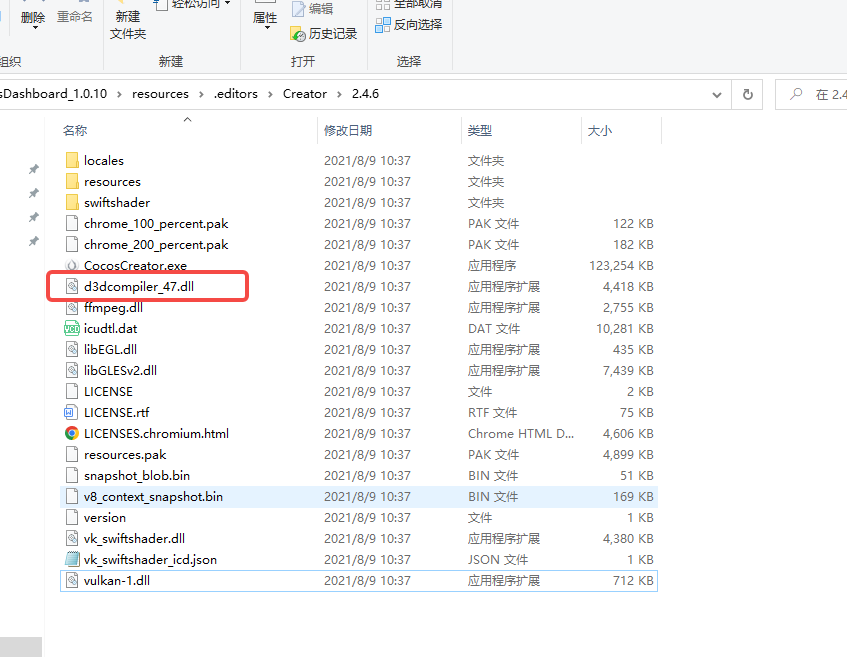
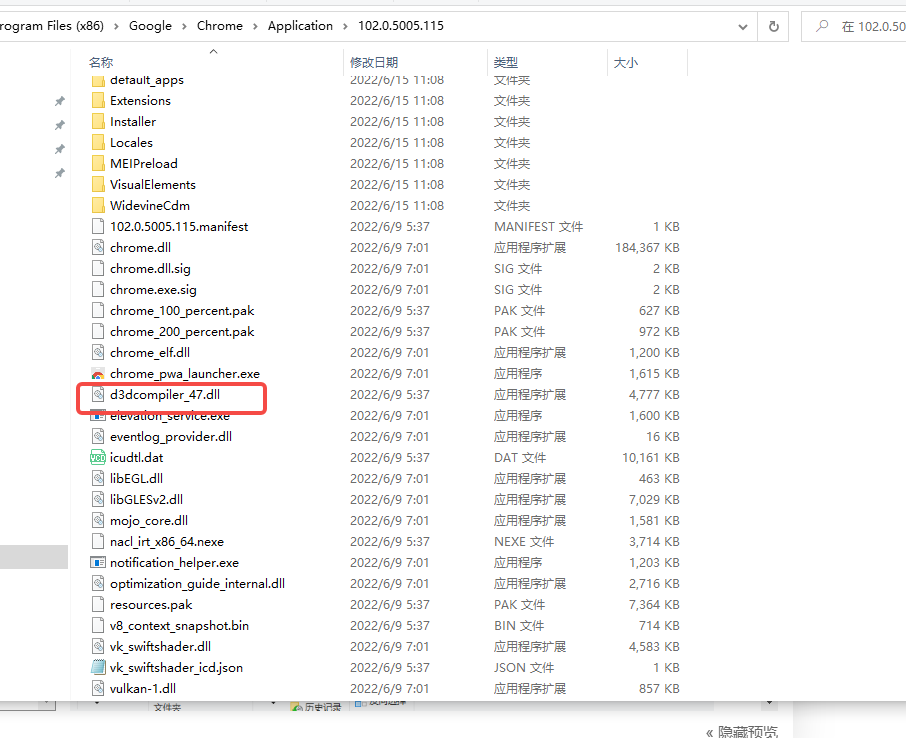
3、反向思考下,为什么我在chrome上开很多的webgl页游,也不崩,在creator里会崩?所以结论来了,当前安装的chrome里的动态链接库,兼容性比你当前creator里的动态链接库兼容性高
解决方案:找到chrome的安装目录。把里面关于调用显卡相关dll拷贝替换至creator的编辑器目录,重启creator,搞定。
4、居家第二个月,我升级到了win10,重新下载了creator,同样也没崩溃过了,说明creator没打算兼容win7了。


image

对乐府有兴趣的,可以找我内推

2赞

非常感谢,用了半小时没出这个webgl的错误了。
乐府之前投过简历,聊过了,不行呢。
谢谢

好评如潮!!

该主题在最后一个回复创建后14天后自动关闭。不再允许新的回复。