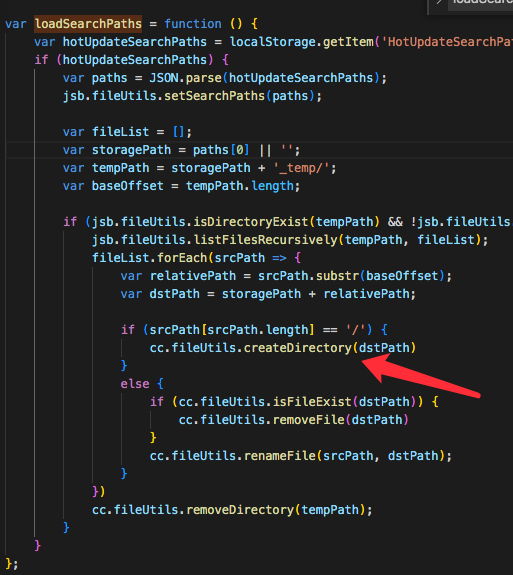
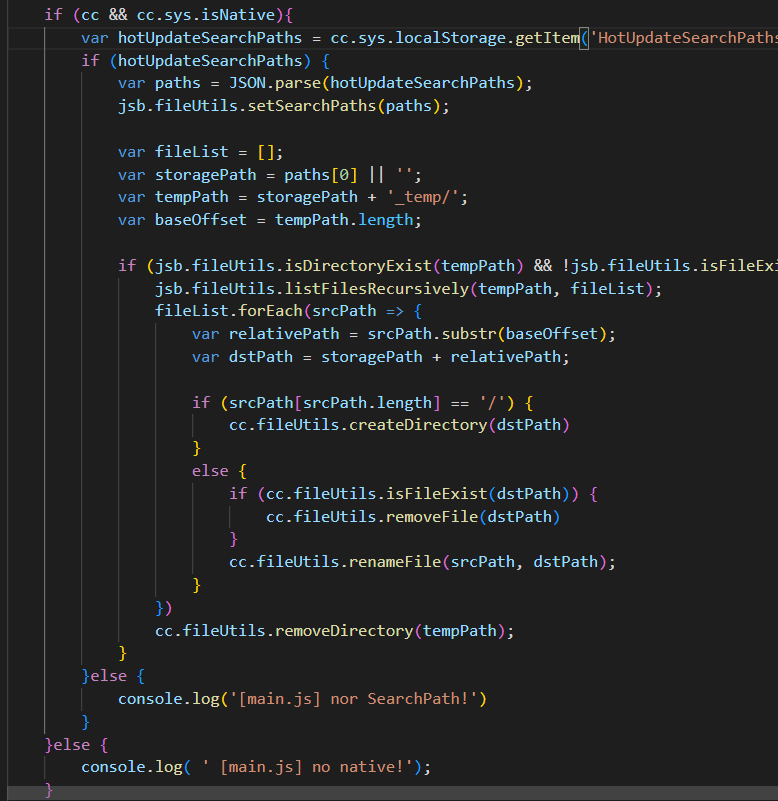
已经设置了搜索路径
this._am.setEventCallback(null!);
this._updateListener = null;
// Prepend the manifest’s search path
var searchPaths = jsb.fileUtils.getSearchPaths();
var newPaths = this._am.getLocalManifest().getSearchPaths();
console.log(JSON.stringify(newPaths));
Array.prototype.unshift.apply(searchPaths, newPaths);
// This value will be retrieved and appended to the default search path during game startup,
// please refer to samples/js-tests/main.js for detailed usage.
// !!! Re-add the search paths in main.js is very important, otherwise, new scripts won’t take effect.
localStorage.setItem(‘HotUpdateSearchPaths’, JSON.stringify(searchPaths));
jsb.fileUtils.setSearchPaths(searchPaths);
main.js:
window.boot = function () {
var settings = window._CCSettings;
window._CCSettings = undefined;
var onProgress = null;
var RESOURCES = cc.AssetManager.BuiltinBundleName.RESOURCES;
var INTERNAL = cc.AssetManager.BuiltinBundleName.INTERNAL;
var MAIN = cc.AssetManager.BuiltinBundleName.MAIN;
function setLoadingDisplay () {
// Loading splash scene
var splash = document.getElementById(‘splash’);
var progressBar = splash.querySelector(’.progress-bar span’);
onProgress = function (finish, total) {
var percent = 100 * finish / total;
if (progressBar) {
progressBar.style.width = percent.toFixed(2) + ‘';
}
};
splash.style.display = 'block';
progressBar.style.width = '0’;
cc.director.once(cc.Director.EVENT_AFTER_SCENE_LAUNCH, function () {
splash.style.display = ‘none’;
});
}
var onStart = function () {
cc.view.enableRetina(true);
cc.view.resizeWithBrowserSize(true);
if (cc.sys.isBrowser) {
setLoadingDisplay();
}
if (cc.sys.isMobile) {
if (settings.orientation === ‘landscape’) {
cc.view.setOrientation(cc.macro.ORIENTATION_LANDSCAPE);
}
else if (settings.orientation === ‘portrait’) {
cc.view.setOrientation(cc.macro.ORIENTATION_PORTRAIT);
}
cc.view.enableAutoFullScreen([
cc.sys.BROWSER_TYPE_BAIDU,
cc.sys.BROWSER_TYPE_BAIDU_APP,
cc.sys.BROWSER_TYPE_WECHAT,
cc.sys.BROWSER_TYPE_MOBILE_QQ,
cc.sys.BROWSER_TYPE_MIUI,
cc.sys.BROWSER_TYPE_HUAWEI,
cc.sys.BROWSER_TYPE_UC,
].indexOf(cc.sys.browserType) < 0);
}
// Limit downloading max concurrent task to 2,
// more tasks simultaneously may cause performance draw back on some android system / browsers.
// You can adjust the number based on your own test result, you have to set it before any loading process to take effect.
if (cc.sys.isBrowser && cc.sys.os === cc.sys.OS_ANDROID) {
cc.assetManager.downloader.maxConcurrency = 2;
cc.assetManager.downloader.maxRequestsPerFrame = 2;
}
var launchScene = settings.launchScene;
var bundle = cc.assetManager.bundles.find(function (b) {
return b.getSceneInfo(launchScene);
});
bundle.loadScene(launchScene, null, onProgress,
function (err, scene) {
if (!err) {
cc.director.runSceneImmediate(scene);
if (cc.sys.isBrowser) {
// show canvas
var canvas = document.getElementById(‘GameCanvas’);
canvas.style.visibility = ‘’;
var div = document.getElementById(‘GameDiv’);
if (div) {
div.style.backgroundImage = ‘’;
}
console.log('Success to load scene: ’ + launchScene);
}
}
}
);
};
var option = {
id: ‘GameCanvas’,
debugMode: settings.debug ? cc.debug.DebugMode.INFO : cc.debug.DebugMode.ERROR,
showFPS: settings.debug,
frameRate: 60,
groupList: settings.groupList,
collisionMatrix: settings.collisionMatrix,
};
cc.assetManager.init({
bundleVers: settings.bundleVers,
remoteBundles: settings.remoteBundles,
server: settings.server
});
var bundleRoot = [INTERNAL];
settings.hasResourcesBundle && bundleRoot.push(RESOURCES);
var count = 0;
function cb (err) {
if (err) return console.error(err.message, err.stack);
count++;
if (count === bundleRoot.length + 1) {
cc.assetManager.loadBundle(MAIN, function (err) {
if (!err) cc.game.run(option, onStart);
});
}
}
cc.assetManager.loadScript(settings.jsList.map(function (x) { return ‘src/’ + x;}), cb);
for (var i = 0; i < bundleRoot.length; i++) {
cc.assetManager.loadBundle(bundleRoot[i], cb);
}
};
if (window.jsb) {
let hotUpdateVersion = ‘27759576’
let _hotUpdateVersion = localStorage.getItem(‘kHotUpdateVersion’);
if (!_hotUpdateVersion || parseInt(_hotUpdateVersion) < parseInt(hotUpdateVersion)) {
var hotUpdateSearchPaths = localStorage.getItem(‘HotUpdateSearchPaths’);
if (hotUpdateSearchPaths) {
JSON.parse(hotUpdateSearchPaths).forEach(path => {
console.log(‘删除资源路径:’,path)
jsb.fileUtils.removeDirectory(path);
});
}
localStorage.removeItem(‘HotUpdateSearchPaths’);
localStorage.setItem(‘kHotUpdateVersion’, hotUpdateVersion);
}
var hotUpdateSearchPaths = localStorage.getItem(‘HotUpdateSearchPaths’);
if (hotUpdateSearchPaths) {
console.log(‘设置资源路径:’,JSON.parse(hotUpdateSearchPaths))
jsb.fileUtils.setSearchPaths(JSON.parse(hotUpdateSearchPaths));
}
var isRuntime = (typeof loadRuntime === ‘function’);
if (isRuntime) {
require(‘src/settings.js’);
require(‘src/cocos2d-runtime.js’);
if (CC_PHYSICS_BUILTIN || CC_PHYSICS_CANNON) {
require(‘src/physics.js’);
}
require(‘jsb-adapter/engine/index.js’);
}
else {
require(‘src/settings.js’);
require(‘src/cocos2d-jsb.js’);
if (CC_PHYSICS_BUILTIN || CC_PHYSICS_CANNON) {
require(‘src/physics.js’);
}
require(‘jsb-adapter/jsb-engine.js’);
}
cc.macro.CLEANUP_IMAGE_CACHE = true;
window.boot();
}
cocos官方的写法也试过 放在main.js的第一行重启后也是旧资源
禁用md5cache、使用了加密脚本密钥和zip压缩
LOG:
10-12 20:05:13.042 1068 1193 D jswrapper: JS: 当前进度: 1 当前字节数: 1
10-12 20:05:13.042 1068 1193 D jswrapper: JS: 1380 / 1380
10-12 20:05:13.042 1068 1193 D jswrapper: JS: 137987751 / 137987752
10-12 20:05:13.042 1068 1193 D jswrapper: JS: updateCb:=> 6
10-12 20:05:13.163 1068 1193 D jswrapper: JS: updateCb:=> 8
10-12 20:05:13.164 1068 1193 D jswrapper: JS: Update finished.
10-12 20:05:13.164 1068 1193 D jswrapper: JS: ["/data/user/0/com.arithmet.hero/files/remote-asset/"]
10-12 20:05:14.306 1068 1193 D jswrapper: JS: LoadScene LoginScene: 85.9210000000021ms
10-12 20:05:14.410 1068 1193 D jswrapper: JS: 重启游戏
10-12 20:05:14.494 1068 1193 D jswrapper: JS: Enable batch GL commands optimization!
10-12 20:05:14.496 1068 1193 D jswrapper: JS: 设置资源路径: /data/user/0/com.arithmet.hero/files/remote-asset/,/data/user/0/com.arithmet.hero/files/remote-asset/,@assets/assets/resources/native/a4/,@assets/
10-12 20:05:14.917 1068 1193 D jswrapper: JS: Cocos Creator v2.4.9
10-12 20:05:14.944 1068 1193 D jswrapper: JS: 初始化
10-12 20:05:14.944 1068 1193 D jswrapper: JS: Storage path for remote asset : /data/user/0/com.arithmet.hero/files/remote-asset/
10-12 20:05:14.945 1068 1193 D jswrapper: JS: Hot update is ready, please check or directly update.