
注意2.x版本的编辑器才能使用,3.x版本官方已经开放了编辑器右键菜单扩展的能力。
直接看效果
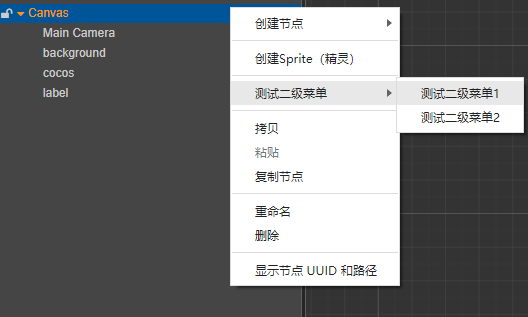
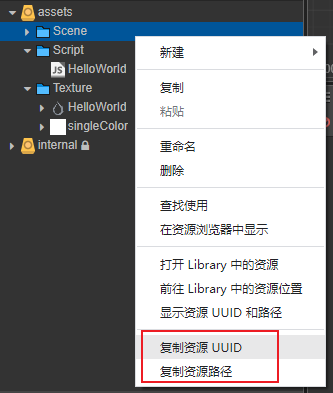
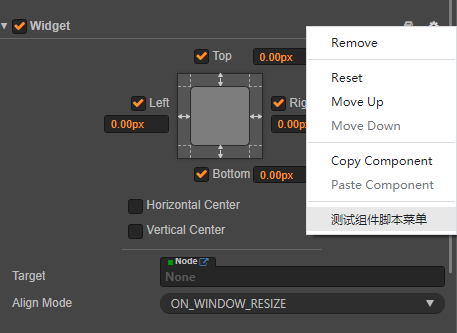
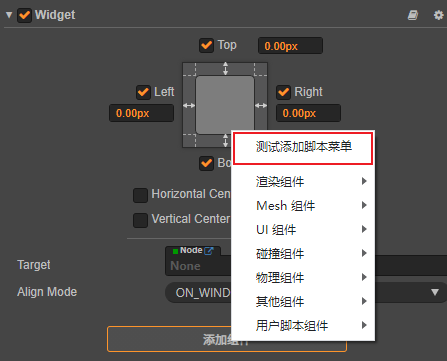
直接贴插件main.js代码
'use strict';

//在重写Editor.Menu之前,先持有其引用,在必要的时候可以还原回去
//并且这一行必须写在文件前面,因为CustomMenu需要继承Editor.Menu,
//但是又不能直接extends Editor.Menu,因为Editor.Menu本身会被CustomMenu覆盖
if (!Editor.__Menu__) {
Editor.__Menu__ = Editor.Menu;
};


module.exports = {
load() {
// execute when package loaded
Editor.Menu = CustomMenu;//应用自定义菜单
},

unload() {
// execute when package unloaded
Editor.Menu = Editor.__Menu__;//恢复原来的菜单逻辑
},

// register your ipc messages here
messages: {
'active'() {
  Editor.Menu = CustomMenu;
   	  Editor.log("已启用自定义上下文菜单");

 },
'disactive'() {
  Editor.Menu = Editor.__Menu__;
  Editor.log("已停用自定义上下文菜单");
  },
 },
};


//template菜单模版
//https://docs.cocos.com/creator/2.4/api/zh/editor/main/menu.html
class CustomMenu extends Editor.__Menu__ {
constructor(template, webContent) {
//打印编辑器默认菜单数据
// Editor.log(template);

let menuLocation;//菜单所在区域

//判断是哪种菜单,暂时没有找到很优雅的办法
//构造函数的template是编辑器自带的菜单配置数组,
//可以添加/删除/重写template的元素实现自定义菜单功能
if (template.length > 0) {
  let first = template[0];
  if (first.label == "创建节点")//场景节点右键菜单
	menuLocation = "node";
  else if (first.label == "新建")//asset右键菜单
	menuLocation = "asset";
  else if (first.label == "Remove")//脚本组件菜单
	menuLocation = "component";
  else if (first.path && first.path.startsWith("渲染组件"))//添加组件菜单
	menuLocation = "addcomponent";
  //还有其他区域的菜单比如控制台面板菜单,就不再列举了
}

if (menuLocation == "asset") {
  //TODO 在这里插入asset右键菜单
  let assetInfo = getSelectedFirstAssetInfo();

  //Editor.log(assetInfo);

  template.push({ type: "separator" });
  template.push({
	label: '复制资源 UUID', click: () => {
	  const clipboard = Editor.require('electron').clipboard;
	  clipboard.writeText(assetInfo.uuid);
	  Editor.log(assetInfo.uuid);
	}
  });
  template.push({
	label: '复制资源路径', click: () => {
	  const clipboard = Editor.require('electron').clipboard;
	  clipboard.writeText(assetInfo.url);
	  Editor.log(assetInfo.url);
	}
  });

}
else if (menuLocation == "node") {
  //在这里插入场景节点右键菜单
  let node_selection = Editor.Selection.curSelection("node");
  let insertIndex = 1;

  template.splice(insertIndex++, 0, { type: "separator" });
  template.splice(insertIndex++, 0, { label: "创建Sprite(精灵)", click: template[0].submenu[1].submenu[0].click });
  template.splice(insertIndex++, 0, { type: "separator" });

  let groupMenuEnable = true;
  let groupMenu = { label: "测试二级菜单", enabled: true, submenu: [] };

  template.splice(insertIndex++, 0, groupMenu);

  groupMenu.submenu.push({
	label: "测试二级菜单1", enabled: groupMenuEnable, click: () => {
	  Editor.log("测试二级菜单1");
	}
  });
  groupMenu.submenu.push({
	label: "测试二级菜单2", enabled: groupMenuEnable, click: () => {
	  Editor.log("测试二级菜单2");
	}
  });

}
else if (menuLocation == "component") {
  //在这里插入组件菜单,可传递节点uuid,
  let params = template[0].params;
  //Editor.log(params);
  template.push({ type: "separator" });
  template.push({
	label: '测试组件脚本菜单', enabled: true, click: () => {
	  Editor.log("测试组件脚本菜单");
	}
  });
}
else if (menuLocation == "addcomponent") {
  //在这里插入添加组件菜单,可传递节点uuid
  let params = template[0].params;
  let nodeUuid = params[0];

  //添加选中节点的同名脚本
  template.unshift({ type: "separator" });
  template.unshift({
	label: '测试添加脚本菜单', enabled: true, click: () => {
	  Editor.log("测试添加脚本菜单");
	}
  });
}

super(template, webContent);
}

}

/**
* 获取资源管理器中选中的第一个资源
* @returns
*/
function getSelectedFirstAssetInfo() {
let asset_selection = Editor.Selection.curSelection("asset");
if (asset_selection == null || asset_selection.length == 0) {
 	return null;
}

let info = Editor.assetdb.assetInfoByUuid(asset_selection[0]);

return info;
}
使用方式:
自己手动创建一个插件,将上面的代码替换main.js的代码即可,重载插件看效果
有需要的朋友去试试看吧

 mark
mark 哇
哇