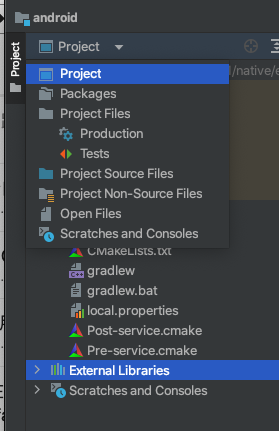
用android studio 打开没有android视图选项
在cocos 直接出包 也报错
2023-2-16 10:36:16-debug: // ---- builder:run-build-stage-make ----
2023-2-16 10:36:16-log: [task:make]: native:(make) start..., 10%
2023-2-16 10:36:16-debug: native:(make) start...
2023-2-16 10:36:16-debug: // ---- build task native:make ----
2023-2-16 10:36:16-debug: init options success
2023-2-16 10:36:16-debug: Use build file cocos.compile.config.json in root(/Users/mac/me/NewProject_1/build/android)
2023-2-16 10:36:16-log: [task:make]: init options success, 10%
2023-2-16 10:36:16-log: [runCmd]: ./gradlew NewProject_1:assembleRelease
2023-2-16 10:36:16-log: [runCmd ./gradlew - error]
FAILURE: Build failed with an exception.


2023-2-16 10:36:16-log: [runCmd ./gradlew - error]
* What went wrong:
Could not open settings generic class cache for settings file '/Users/mac/me/NewProject_1/build/android/proj/settings.gradle' (/Users/mac/.gradle/caches/6.5.1/scripts/6pwbw7yqmzrqi0meey1b4wq89).
> BUG! exception in phase 'semantic analysis' in source unit '_BuildScript_' Unsupported class file major version 61

* Try:
Run with --stacktrace option to get the stack trace. Run with --info or --debug

2023-2-16 10:36:16-log: [runCmd ./gradlew - error]  option to get more log output. Run with --scan to get full insights.

* Get more help at https://help.gradle.org

2023-2-16 10:36:16-log: [runCmd ./gradlew - error]

BUILD FAILED in 411ms


2023-2-16 10:36:17-warn: failed to exec ./gradlew NewProject_1:assembleRelease
2023-2-16 10:36:17-error: make package /Users/mac/me/NewProject_1/build/android failed!
2023-2-16 10:36:17-log: [task:make]: failed!
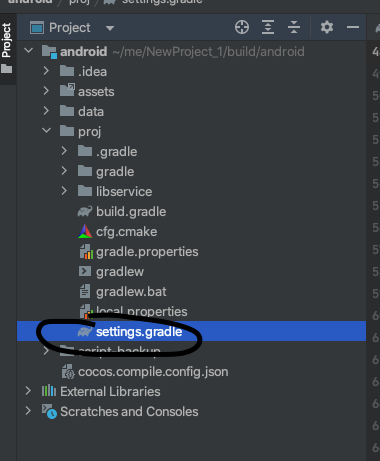
其实是有这个settings.gradle文件的