
-
Creator 版本:2.4.11
-
目标平台: creator编辑器
-
重现方式:必现,附件的类当作组件使用就出现
-
重现概率: 必现
- 详细描述:
(这是铺垫可跳过,看下一段)刚使用cocosCretor没多久,在布局项目ui的时候有个需求,有一个节点的宽度是会变的,另一个节点设计是需要一直挨着他,随着宽度的变化而变化,加上这需求是后加的,所以不想改ui的结构,于是打算重新写一个组件实现一下完事,然后就有了附件的类。
我是使用ts写的组件,然后用寄存器设置了变量,在编辑器里赋值,然后功能都实现了,可是编辑器设置的值并没有被序列化,没有保存的场景的文件里。
*目前的解决方法:因为寄存器对象无法实例化,没办法我只能在用装饰器写了另外一个变量,然后设置在编辑器不可见,于是乎我的组件变成了,编辑器设置寄存器变量,寄存器设置另一个可序列化的变量,初始化也是,在onload的时候,将可序列化的变量设置给寄存器,然后寄存器在同步给编辑器。
大概长这样子
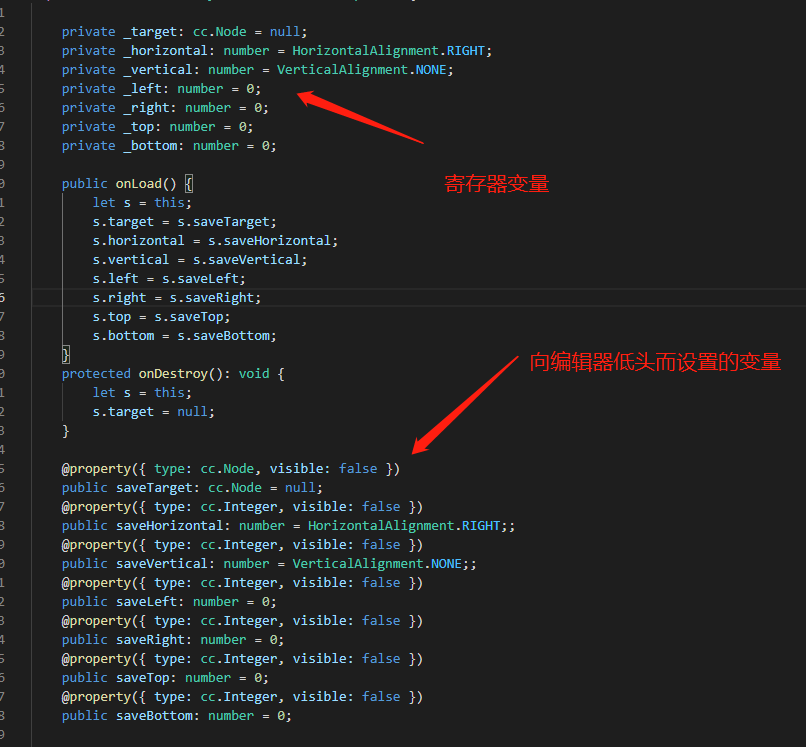
这咋还不然我上传附件,那我代码贴在这了,希望论坛的巨佬们,看看是不是我姿势不对导致的,还是说有更简单的方法我不知道。
代码:
const { ccclass, property, executeInEditMode, menu } = cc._decorator;
export enum HorizontalAlignment {
/**

 * @zh 左对齐。

 */

LEFT = 0,

/**

 * @zh 不对齐

 */

NONE = 1,

/**

 * @zh 右对齐。

 */

RIGHT = 2,
}
cc.Enum(HorizontalAlignment)
export enum VerticalAlignment {
/**

 * @zh 上对齐。

 */

TOP = 0,

/**

 * @zh 不对齐

 */

NONE = 1,

/**

 * @zh 下对齐。

 */

BOTTOM = 2,
}
cc.Enum(VerticalAlignment)
/** 相对布局组件 */
@ccclass
@executeInEditMode
@menu(“pluginComponent/RelativeLayout”)
export class RelativeLayout extends cc.Component {
private _target: cc.Node = null;

private _horizontal: number = HorizontalAlignment.RIGHT;

private _vertical: number = VerticalAlignment.NONE;

private _left: number = 0;

private _right: number = 0;

private _top: number = 0;

private _bottom: number = 0;

public onLoad() {

    let s = this;

    s.target = s.saveTarget;

    s.horizontal = s.saveHorizontal;

    s.vertical = s.saveVertical;

    s.left = s.saveLeft;

    s.right = s.saveRight;

    s.top = s.saveTop;

    s.bottom = s.saveBottom;

}

protected onDestroy(): void {

    let s = this;

    s.target = null;

}

@property({ type: cc.Node, visible: false })

public saveTarget: cc.Node = null;

@property({ type: cc.Integer, visible: false })

public saveHorizontal: number = HorizontalAlignment.RIGHT;;

@property({ type: cc.Integer, visible: false })

public saveVertical: number = VerticalAlignment.NONE;;

@property({ type: cc.Integer, visible: false })

public saveLeft: number = 0;

@property({ type: cc.Integer, visible: false })

public saveRight: number = 0;

@property({ type: cc.Integer, visible: false })

public saveTop: number = 0;

@property({ type: cc.Integer, visible: false })

public saveBottom: number = 0;

/***目标节点改变,刷新自己位置 */

public onChangePosition() {

    let s = this;

    if (!s._target) {

        return;

    }

    let targetX = s.node.x;

    let targetY = s.node.y;

    if (s._horizontal == HorizontalAlignment.RIGHT) {

        targetX = s._target.x + (s._target.width * (1 - s._target.anchorX)) + (s.node.width * s.node.anchorX) + s.right;

    } else if (s._horizontal == HorizontalAlignment.LEFT) {

        targetX = s._target.x - (s._target.width * s._target.anchorX) - (s.node.width * (1 - s.node.anchorX)) - s.left;

    }

    if (s._vertical == VerticalAlignment.TOP) {

        targetY = s._target.y + (s._target.height * (1 - s._target.anchorY)) + (s.node.height * s.node.anchorY) + s.top;

    } else if (s._vertical == VerticalAlignment.BOTTOM) {

        targetY = s._target.y - (s._target.height * s._target.anchorY) - (s.node.height * (1 - s.node.anchorY)) - s.bottom;

    }

    s.node.setPosition(targetX, targetY);

}

@property({ type: cc.Node, tooltip: "跟随的目标节点", serializable: true })

public set target(v: cc.Node) {

    let s = this;

    if (s._target) {

        s._target.off(cc.Node.EventType.POSITION_CHANGED, s.onChangePosition, this);

        s._target.off(cc.Node.EventType.SIZE_CHANGED, s.onChangePosition, this);

    }

    s._target = v;

    s.saveTarget = v;

    if (v) {

        s._target.on(cc.Node.EventType.POSITION_CHANGED, s.onChangePosition, this);

        s._target.on(cc.Node.EventType.SIZE_CHANGED, s.onChangePosition, this);

        s.onChangePosition();

    }

}

@property({ type: HorizontalAlignment, tooltip: "水平方向", serializable: true })

public set horizontal(value: HorizontalAlignment) {

    let s = this;

    s._horizontal = value;

    s.saveHorizontal = value;

    s.onChangePosition();

}

@property({ type: VerticalAlignment, tooltip: "垂直方向" })

public set vertical(value: VerticalAlignment) {

    let s = this;

    s._vertical = value;

    s.saveVertical = value;

    s.onChangePosition();

}

@property({ type: cc.Integer, tooltip: "相对目标节点左边距离 和right属性互斥" })

public set left(value: number) {

    let s = this;

    s._left = value;

    s.saveLeft = value;

    s._right = 0;

    s.onChangePosition();

}

@property({ type: cc.Integer, tooltip: "相对目标节点右边距离 和left属性互斥" })

public set right(value: number) {

    let s = this;

    s._right = value;

    s.saveRight = value;

    s._left = 0;

    s.onChangePosition();

}

@property({ type: cc.Integer, tooltip: "相对目标节点上边距离 和bottom属性互斥" })

public set top(value: number) {

    let s = this;

    s._top = value;

    s.saveTop = value;

    s._bottom = 0;

    s.onChangePosition();

}

@property({ type: cc.Integer, tooltip: "相对目标节点下边距离 和top属性互斥" })

public set bottom(value: number) {

    let s = this;

    s._bottom = value;

    s.saveBottom = value;

    s._top = 0;

    s.onChangePosition();

}

public get target(): cc.Node { return this._target }

public get left(): number { return this._left; }

public get right(): number { return this._right; }

public get top(): number { return this._top; }

public get bottom(): number { return this._bottom; }

public get horizontal(): HorizontalAlignment { let s = this; return s._horizontal }

public get vertical(): VerticalAlignment { let s = this; return s._vertical }
}