
一篇ts调用原生c再回调的事件系统教程,踩坑总结!

这里展示的是基于反射机制的事件系统,具体文件档链接及示例代码(链接最下面有源码):
https://docs.cocos.com/creator/manual/zh/advanced-topics/jsb-bridge-wrapper.html

举例1:ios平台

1.在发布出来的xcode工程中,新建脚本JsbBridgeTest.h ,JsbBridgeTest.m
其中JsbBridgeTest.h的代码为:

    #import <Foundation/Foundation.h>
    @interface JsbBridgeTest:NSObject
    @end

其中JsbBridgeTest.m的代码为:

    #include "JsbBridgeTest.h"
    #import <Foundation/Foundation.h>
    #import "cocos/platform/apple/JsbBridgeWrapper.h"
    @implementation JsbBridgeTest{
    }

    -(id)init{
    self = [super init];
    JsbBridgeWrapper* m = [JsbBridgeWrapper sharedInstance];
    OnScriptEventListener nativeChangeLabelContent = ^void(NSString* arg){
        JsbBridgeWrapper* m = [JsbBridgeWrapper sharedInstance];
        [m dispatchEventToScript:@"nativeChangeLabelContent" arg:@"Charlotte"];
    };
    OnScriptEventListener requestLabelColor = ^void(NSString* arg){
        JsbBridgeWrapper* m = [JsbBridgeWrapper sharedInstance];
        [m dispatchEventToScript:@"changeLabelColor"];
    };
    OnScriptEventListener requestBtnColor = ^void(NSString* arg){
        JsbBridgeWrapper* m = [JsbBridgeWrapper sharedInstance];
        [m dispatchEventToScript:@"changeLightColor"];
    };
    [m addScriptEventListener:@"nativeChangeLabelContent" listener:nativeChangeLabelContent];
    [m addScriptEventListener:@"requestLabelColor" listener:requestLabelColor];
    [m addScriptEventListener:@"requestBtnColor" listener:requestBtnColor];

    [m addScriptEventListener:@"removeJSCallback" listener:^void(NSString* arg){
        JsbBridgeWrapper * m = [JsbBridgeWrapper sharedInstance];
        [m removeAllListenersForEvent:@"requestBtnColor"];
    }];
    return self;
    }


    @end

2.构建好项目在任意一个入口文件添加头文件
这里举例:AppDelegate.m中添加如下代码

 #import "JsbBridgeTest.h"

在didFinishLaunchingWithOptions方法中添加如下代码

     JsbBridgeTest* jsbBridgeTest{nullptr};
     jsbBridgeTest = [JsbBridgeTest new];

初始化jsbBridgeTest的类

3.在ts脚本中添加事件绑定及调用
先添加事件(这里为了好理解全部使用nativeChangeLabelContent的event的key来表示)

native.jsbBridgeWrapper.addNativeEventListener("nativeChangeLabelContent", (usr: string) => {
            console.log("收到了c的回调:"+usr);
        });

再绑定按钮写派发到c中的事件:

native.jsbBridgeWrapper.dispatchEventToNative({
            "eventName": "nativeChangeLabelContent",
            "arg": "5000"
        })

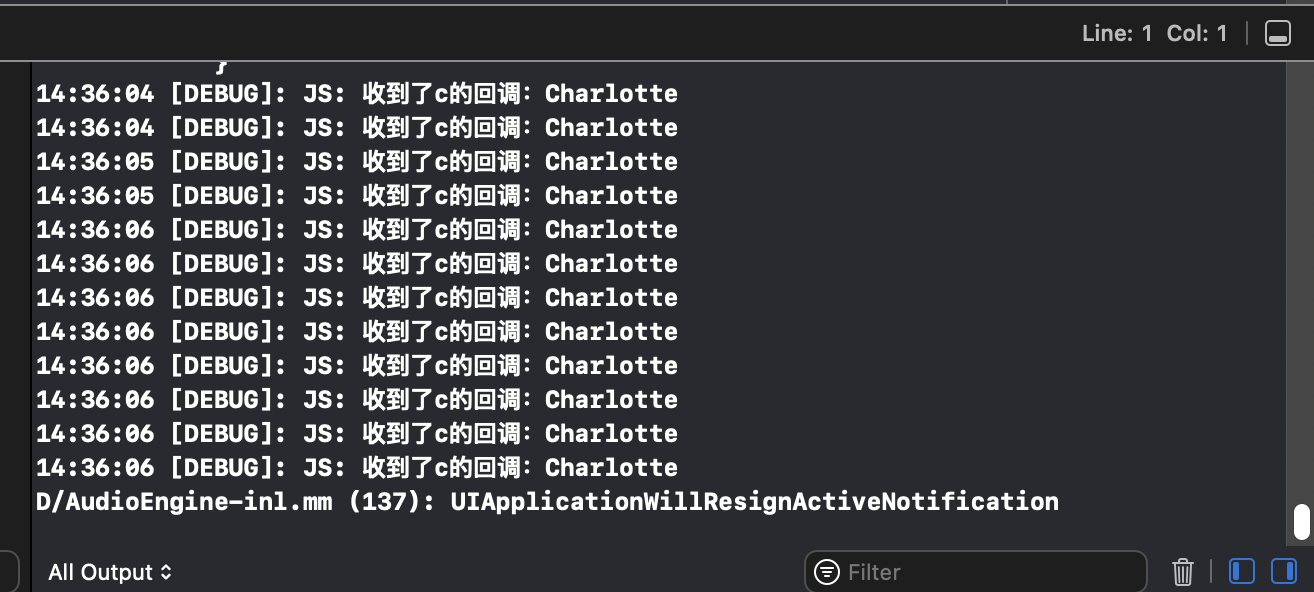
结合上面代码意思为:ts调用c中nativeChangeLabelContent事件传了arg为5000的参数,然后c处理5000后以Charlotte为参数再次调用ts中的nativeChangeLabelContent绑定回调

4.成功截图
最后保证每次构建项目时JsbBridgeTest.h ,JsbBridgeTest.m的文件不会被删除教程:自己写的c脚本在哪里不会被构建删掉且能发出在项目中?

无奈sdkbox倒闭,只能自己手写分享及iap后续更上。

不觉明厉,顶一个

再追加一篇简单的:Cocos Creator 3.8 手册 - JsbBridge JS 与 Objective-C 通信

1.AppDelegate.mm中添加

#include "platform/apple/JsbBridge.h"

头文件引用

在didFinishLaunchingWithOptions方法中添加如下代码:

     static ICallback cb = ^void (NSString* _arg0, NSString* _arg1){
        if([_arg0 isEqual:@"open_ad"]){
           //open Ad
        
        JsbBridge* m = [JsbBridge sharedInstance];
        [m sendToScript:@"ad_close" arg1:@"finished"];
    }
};

JsbBridge* m = [JsbBridge sharedInstance];
[m setCallback:cb];

2.ts中调用
调用native

native.bridge.sendToNative('open_ad', "testURL arg2");

c中再回调ts

 native.bridge.onNative = (arg0:string, arg1: string):void=>{
            if(arg0 == 'ad_close'){
                if(arg1 == "finished") {
                    console.log("通过ts调用open_ad到c,在从c中调用ad_close调用ts成功,参数为arg1:" + arg0+" arg2:"+arg1);
                }
                else{
                    //ad cancel.
                }
            }
            return;
        }

这个简单,不用写c的脚本,都封装好的

[m dispatchEventToScript:@“changeLabelColor”]; 有试过@"changeLabelColor"这个参数传一个block外部定义的局部变量么?必然崩溃

我的可以,用的swift,并且在对话框的确定按钮上向js调用:

    @objc static func Alert(_ title: String, withContent content: String) {
        print ("@Alert", title, content)
        let alertController = UIAlertController(title: title, message: content, preferredStyle: .alert)
        let okAction = UIAlertAction(title: "确定", style: .default) { (action) in
            alertController.dismiss(animated: true, completion: nil)
            
            SwiftBridge.callJS("DeviceManager.instance.AlertCallback({a: 99})")
            
            let dictionary: [String: Any] = ["a": 98, "b": 3.14, "name": "John"]
            SwiftBridge.dispatchEvent(toJS: "DeviceManager.AlertEventCallback", arg: dictionary)
        }
        alertController.addAction(okAction)
        instance?.viewController?.present(alertController, animated: true, completion: nil)
    }
+ (void)DispatchEventToJS:(NSString *)eventName
                      arg:(NSDictionary *)dictionary
{
    NSLog(@"DispatchEventToJS %@ %@", eventName, dictionary);
    [[JsbBridgeWrapper sharedInstance] dispatchEventToScript:eventName arg:[self DicToJsonStr:dictionary]];
}

但是,我的addScriptEventListener有你说的问题

    OnScriptEventListener scriptEventListener = ^void(NSString* arg) {
        // 这里调用外部的变量就会 EXC_BAD_ACCESS
        NSLog(@"AddEvent called %@", arg);
    };
    [[JsbBridgeWrapper sharedInstance] addScriptEventListener:eventName listener:scriptEventListener];

EXC_BAD_ACCESS 最后这个怎么处理的?我也遇到了