
小弟正在自学cocos,正在写一段游戏DEMO,希望实现如下功能:
1、点击屏幕某一个点,角色朝该点转向并同时移动。(移动轨迹是一条曲线)
2、当角色指向该点时则停止转向,并持续朝延伸方向移动。
效果如下图
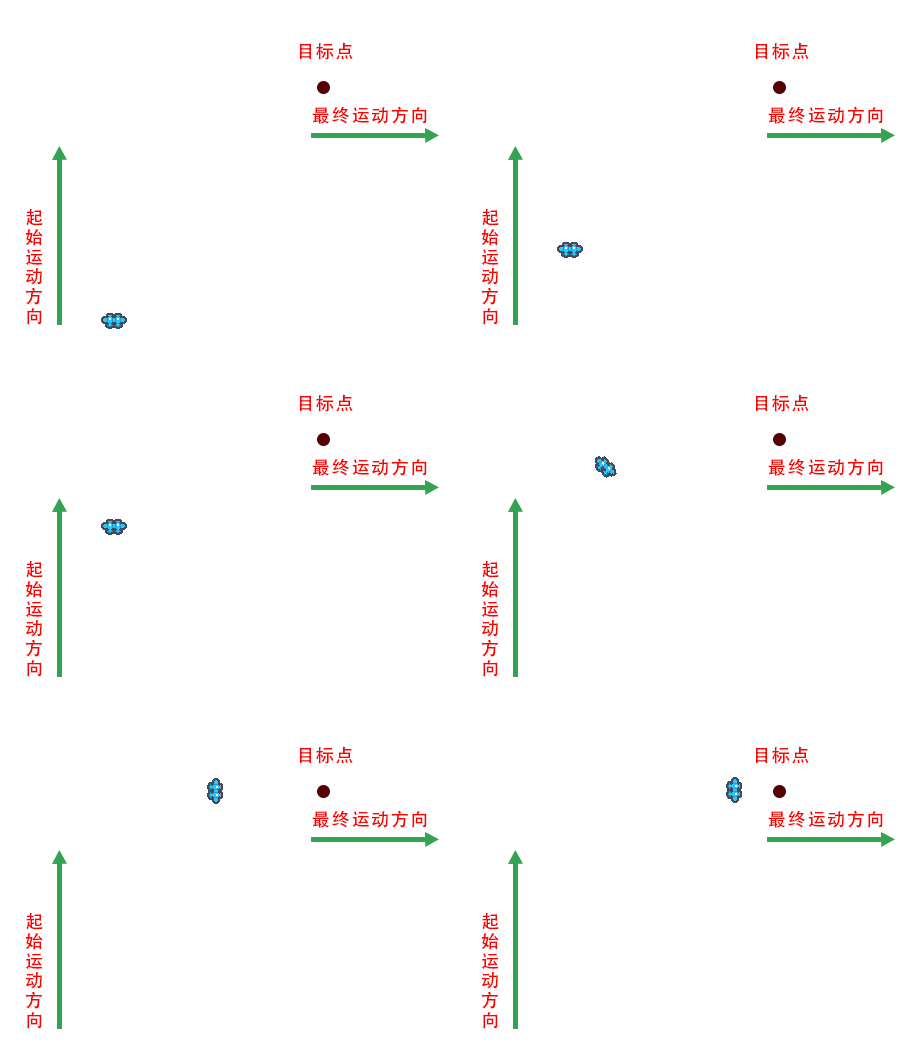
目前代码如下(COCOS版本:2.4.9;脚本语言:typescript):
const {ccclass, property} = cc._decorator;
@ccclass
export default class mapControl extends cc.Component {
@property(cc.Node)
player: cc.Node; // 玩家节点
playerAngle: number = null; // 玩家当前角度
flySpeed: number = null; // 飞行速度
turningSpeed: number = null; // 转角速度
xSpeed: number = null; // x轴速度
ySpeed: number = null; // y轴速度
start () {

    this.flySpeed = 100;
    this.turningSpeed = 2;
    this.node.on(cc.Node.EventType.TOUCH_START, this.onTouchTurning, this);

}

 触点移动方法
onTouchMove (degree: number) {
    const radian = degree * (Math.PI / 180);
    let x = 0;
    let y = 0;
    let resArr: number[] = null;
    x = Math.sin(radian);
    y = Math.cos(radian);
    resArr = [x,y];
    return resArr;
}


onTouchTurning (event) {

     // 获取触点位置
    let position = event.touch.getLocation();
    let worldPosition = this.node.convertToNodeSpaceAR(position);   //  触点坐标转换成世界坐标
    let targetPosition = new cc.Vec2(worldPosition.x, worldPosition.y);

    let angle = Math.atan2(targetPosition.x, targetPosition.y); // 计算角度
    this.playerAngle = angle * (180 / Math.PI);

    let turning = cc.rotateTo(this.turningSpeed , this.playerAngle);
    this.player.runAction(turning);

}

update (dt) {
    this.xSpeed = this.onTouchMove(this.playerAngle)[0];
    this.ySpeed = this.onTouchMove(this.playerAngle)[1];

    // 根据方向向量移动位置
    this.player.x += dt * this.xSpeed * this.flySpeed;
    this.player.y += dt * this.ySpeed * this.flySpeed;

    cc.Camera.main.node.x = this.player.x;
    cc.Camera.main.node.y = this.player.y;

}
}
现在的问题是,精灵只转向,没有实现在转向中移动。请教各位大佬如何改进,或者有别的思路还望不吝赐教。
以上,感谢!