-
Creator 版本:Cocos Creator 3.6.2
-
目标平台: 微信开发者工具
-
重现方式:必现
*问题:
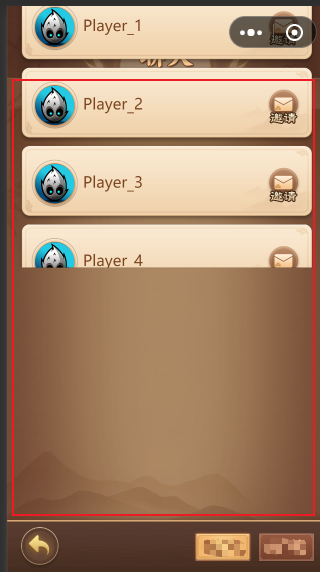
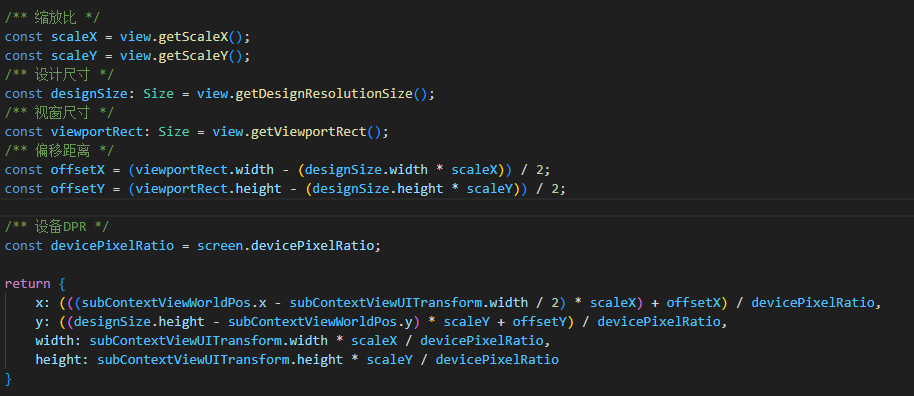
图中红框为开放数据域正确渲染位置。但是目前渲染位置偏上,且不能滑动。请诸位大佬指导下如何设置开放数据域的渲染位置,以及滑动列表。
*开放数据域:
-
template如下:
<view class="informationList" id="informationList"> <scrollview class="informationsScrollview" id="informationsScrollview" scrollY="true"> {{~it.data :item:index}} <view class="SocialSystemItem"> <image class="background" src="openDataContext/render/Background.png"></image> <view class="head"> <image class="headBackground" src="openDataContext/render/HeadBackground.png"></image> <image class="headIcon" src="{{= item.avatarUrl }}"></image> </view> <text class="name" value="{{= item.nickname}}"></text> <view class="inviteButton" data-openId="{{= item.openId}}"> <image class="buttonIcon" src="openDataContext/render/ButtonIcon.png"></image> <image class="buttonName" src="openDataContext/render/ButtonName.png"></image> </view> </view> {{~}} </scrollview> </view> -
style如下:
informationList: { width: '100%', height: '100%', borderRadius: '1%', backgroundColor: 'rgba(0,0,0,0)', flexDirection: "column", alignItems: 'center', }, informationsScrollview: { width: '100%', height: '90%', flexDirection: "column", alignItems: "center", }, SocialSystemItem: { width: '1055', height: 273, display: "flex", position: "relative", flexDirection: "row", alignItems: 'center', justifyContent: 'space-between', marginBottom: 5, }, background: { position: "absolute", left: 0, right: 0, top: 0, bottom: 0 }, head: { flexGrow: 0, width: 179, height: 182, left: 40, position: "relative", display: "flex", justifyContent: "center", alignItems: "center", }, headBackground: { width: 179, height: 182, }, headIcon: { width: 140, height: 140, borderRadius: 70, position: 'absolute', top: 21, left: 19, }, name: { width: 600, fontSize: 54, height: 273, lineHeight: 273, color: '#7D4622', textAlign: 'left', textOverflow: 'ellipsis', }, inviteButton: { flexGrow: 0, width: 126, height: 128, justifyContent: "center", position: "relative", marginRight: 50 }, buttonIcon: { width: 124, height: 124, position: 'absolute', left: 1, top: 0, }, buttonName: { position: 'absolute', width: 105, height: 47, bottom: -4.5, left: 10, }, -
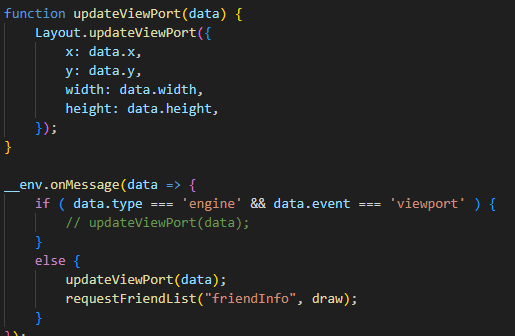
index.js如下:
-
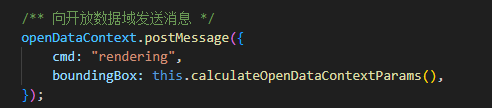
主域传递消息: