
类似 如何在 Android 平台上使用 JavaScript 直接调用 Java 方法
如何在 Android 平台上使用 JavaScript 直接调用 Java 方法 | Cocos Creator
如何实现:在 Android 平台上使用 JavaScript 直接调用 kotlin方法
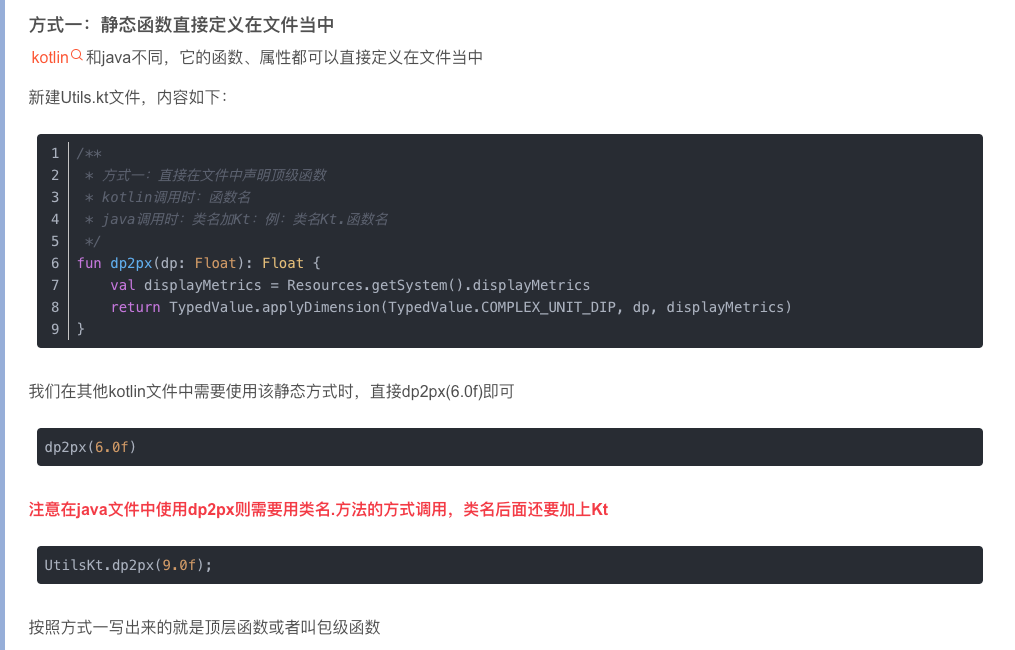
今天刚好第一次研究这个,顺手写了个例子,测试功能都可用,cocoscreator版本3.7.4。
HuioneService.kt
import android.annotation.SuppressLint
import android.app.Activity
import android.app.AlertDialog
import android.content.Context
import android.util.Log
import android.widget.Toast
import com.cocos.lib.CocosHelper
import com.cocos.lib.CocosJavascriptJavaBridge
import com.cocos.lib.JsbBridgeWrapper
import com.cocos.service.SDKWrapper.SDKInterface
import org.json.JSONObject

class HuioneService : SDKInterface {

    companion object {
        @SuppressLint("StaticFieldLeak")
        var instance: HuioneService? = null
        private const val TAG = "HuioneService"

// 写这里不行:
//        fun add(a: Int, b: Int): Int = instance!!.add(a, b)
//        fun addFloat(a: Float, b: Float): Float = instance!!.addFloat(a, b)
//        fun logStr(str: String) = instance!!.logStr(str)
//        fun nativeDialog(str: String) = instance!!.nativeDialog(str)
    }

    var activity: Activity? = null

    override fun init(context: Context) {
        this.activity = context as Activity
        Log.i(TAG, "init: $TAG")
        instance = this
    }

    fun add(a: Int, b: Int): Int {
        Log.i(TAG, "add: $a, $b")
        return a + b
    }

    fun addFloat(a: Float, b: Float): Float {
        Log.i(TAG, "addFloat: $a, $b")
        return a + b
    }

    fun logStr(str: String) {
        Log.i(TAG, "logStr: $str")
    }

    fun nativeDialog(str: String) {
        Log.i(TAG, "nativeDialog: $str")
        this.activity!!.runOnUiThread {
            val builder = AlertDialog.Builder(this.activity)
            builder.setTitle("提示")
            builder.setMessage(str)
            builder.setPositiveButton("确定") { dialog, _ ->
                // 点击确定按钮的逻辑
                Toast.makeText(this.activity, "点击了确定按钮", Toast.LENGTH_SHORT).show()
                // kt调用js方式1(dispatchEventToScript):
                val data = JSONObject();
                data.put("param0", "HelloWorld!");
                data.put("param1", 99);
                JsbBridgeWrapper.getInstance()
                    .dispatchEventToScript("Huione_onTestEvent", data.toString());
                dialog.dismiss()
            }
            builder.setNegativeButton("取消") { dialog, _ ->
                // 点击取消按钮的逻辑
                Toast.makeText(this.activity, "点击了取消按钮", Toast.LENGTH_SHORT).show()
                // kt调用js方式2(evalString):(这种方式一定要使用runOnGameThread回到游戏线程,否则程序崩溃)
                CocosHelper.runOnGameThread {
                    CocosJavascriptJavaBridge.evalString("HuioneManager.instance.ktCallJS({a: 99, b: 'Hello World!'})");
                }

                dialog.dismiss()
            }
            val dialog = builder.create()
            dialog.show()
        }
    }
}

// 写在这里就好:
fun add(a: Int, b: Int): Int = HuioneService.instance!!.add(a, b)
fun addFloat(a: Float, b: Float): Float = HuioneService.instance!!.addFloat(a, b)
fun logStr(str: String) = HuioneService.instance!!.logStr(str)
fun nativeDialog(str: String) = HuioneService.instance!!.nativeDialog(str)
HuioneManager.ts
import { BaseManager } from '../libs/rxjs/cc3/BaseManager';
import { _decorator, director, color, System, sys, native } from 'cc';
const { ccclass, property } = _decorator;

@ccclass('HuioneManager')
class HuioneManager extends BaseManager {

    public static instance: HuioneManager;
    static ID = 'huione_service';
    get logColorOverride() { return color().fromHEX('#EEDDCC') };

    static registerSystem() {
        director.unregisterSystem(director.getSystem(HuioneManager.ID));
        director.registerSystem(HuioneManager.ID, huionem, System.Priority.MEDIUM);
        huionem.init();
    }

    static unregisterSystem() {
        huionem.destroy();
        director.unregisterSystem(director.getSystem(HuioneManager.ID));
    }

    onInitManager(): void {
        this.test();
        if (sys.isNative) {
            native.jsbBridgeWrapper.addNativeEventListener("Huione_onTestEvent", this.onTestEvent.bind(this));
        }
    }

    onDestroyManager(): void {
        if (sys.isNative) {
            native.jsbBridgeWrapper.removeAllListenersForEvent("Huione_onTestEvent");
        }
    }

    // TEST:
    test() {
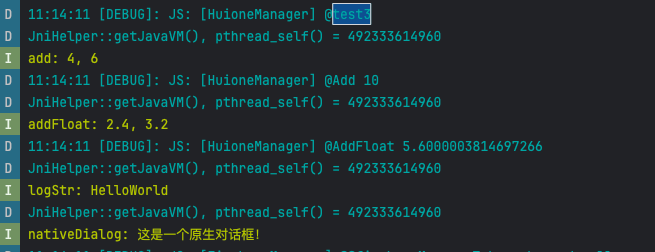
        this.log('@test3');
        this.Add(4, 6);
        this.AddFloat(2.4, 3.2);
        this.LogStr('HelloWorld');
        this.nativeDialog('这是一个原生对话框!');
    }

    Add(a: number, b: number) {
        if (sys.isNative) {
            if (sys.platform == sys.Platform.ANDROID) {
                let result = native.reflection.callStaticMethod("com/cocos/game/HuioneServiceKt", "add", "(II)I", a, b);
                this.log("@Add", result);
                return result;
            }
        }
    }

    AddFloat(a: number, b: number) {
        if (sys.isNative) {
            if (sys.platform == sys.Platform.ANDROID) {
                let result = native.reflection.callStaticMethod("com/cocos/game/HuioneServiceKt", "addFloat", "(FF)F", a, b);
                this.log("@AddFloat", result);
                return result;
            }
        }
    }

    LogStr(str: string) {
        if (sys.isNative) {
            if (sys.platform == sys.Platform.ANDROID) {
                native.reflection.callStaticMethod("com/cocos/game/HuioneServiceKt", "logStr", "(Ljava/lang/String;)V", str);
            }
        }
    }

    nativeDialog(content: string) {
        if (sys.isNative) {
            if (sys.platform == sys.Platform.ANDROID) {
                native.reflection.callStaticMethod("com/cocos/game/HuioneServiceKt", "nativeDialog", "(Ljava/lang/String;)V", content);
            }
        }
    }

    onTestEvent(jsonStr: string) {
        this.log("@onTestEvent", jsonStr, JSON.parse(jsonStr));
    }

    ktCallJS(param: {a: number, b:string}) {
        this.log("@onKtCallJS", param, JSON.stringify(param));
    }
}

globalThis.HuioneManager = HuioneManager;

export const huionem = HuioneManager.instance = new HuioneManager();
跟上面的帖子一样,最重要的是,js调用类名后面加Kt
com/cocos/game/HuioneServiceKt