
反正每次接手 [async/await?] 的项目都很头疼,你们觉得好就是好了;我的问题在于,以前的人没有这些乱七八糟的写法的时候,是怎么做到异步的?我知道闭包写的很“丑” 但是能存活下来的都是精品;看到await的几乎都是滥用,你们觉得好就是好咯;写写教程,无话找话聊,顺口说下async也是挺爽,只是祸害了后面几代人,管他呢
我看别人await代码也很头大,有的没有异步也都加上了,真是一股脑乱加。
反正每次接手 [回调地狱] 的项目都很头疼,你们觉得好就是好了;我的问题在于,未来的人怎么不想想优化这些 callback 写法,异步写法不能做到易用吗?我知道未来写的代码应该会是很 “美” 的,都是精品;看到现在 “回调” 里面的滥用代码一层接着一层,你们觉得好就是好咯;想想办法,开发点新语法方便几代人,多好啊.
2赞
你觉得你想到的,100年前没人想到?看到你写的那个什么库,看到app.manager.pk.aa ;看到一堆点点点就不想看下去了,还有用的必要么?
(我晕3D,用不来)
 用魔法打败魔法
有的人觉得语法糖甜,有的人觉得糖苦,不讨论了。
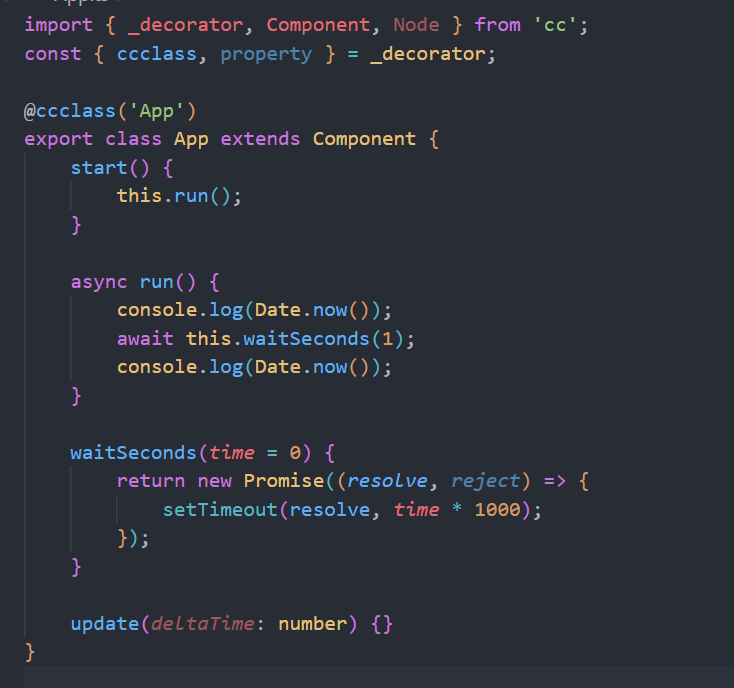
回复题主问题一写法:
回复题主问题二写法:
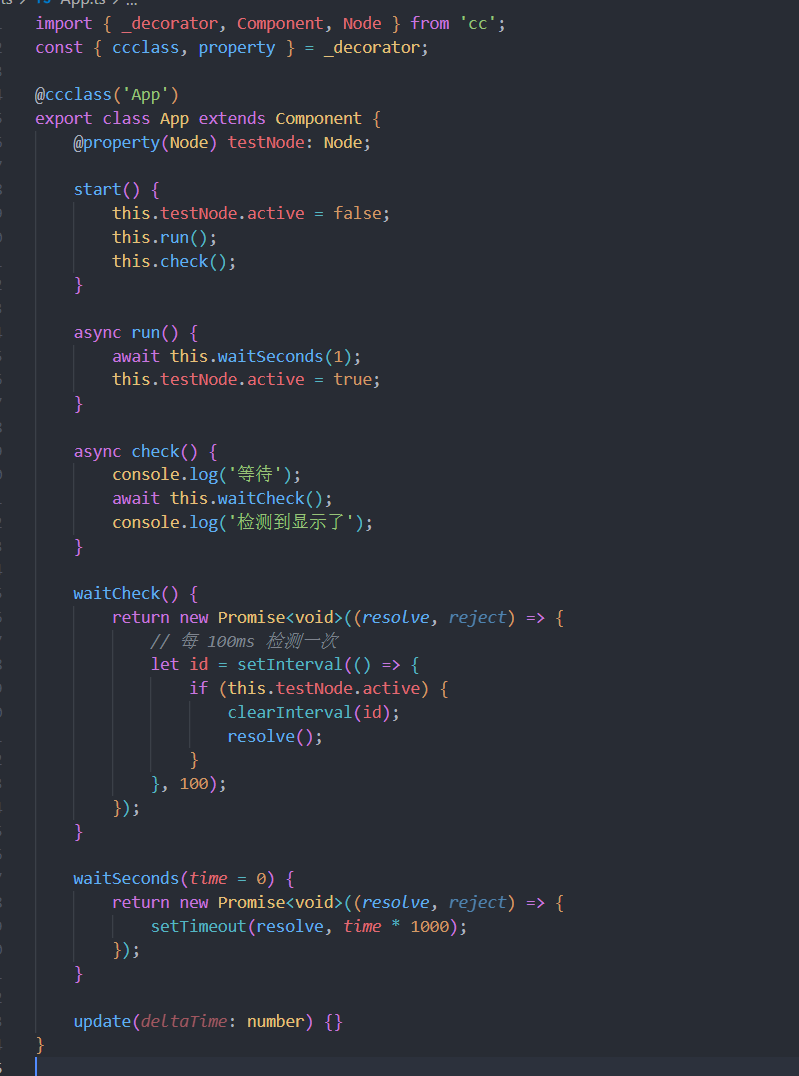
代码:
import { _decorator, Component, Node } from 'cc';
const { ccclass, property } = _decorator;

@ccclass('App')
export class App extends Component {
    @property(Node) testNode: Node;

    start() {
        this.testNode.active = false;
        this.run();
        this.check();
    }

    async run() {
        await this.waitSeconds(1);
        this.testNode.active = true;
    }

    async check() {
        console.log('等待');
        await this.waitCheck();
        console.log('检测到显示了');
    }

    waitCheck() {
        return new Promise<void>((resolve, reject) => {
            // 每 100ms 检测一次
            let id = setInterval(() => {
                if (this.testNode.active) {
                    clearInterval(id);
                    resolve();
                }
            }, 100);
        });
    }

    waitSeconds(time = 0) {
        return new Promise<void>((resolve, reject) => {
            setTimeout(resolve, time * 1000);
        });
    }

    update(deltaTime: number) {}
}
1赞
看楼主的需求更像是轮询。
如果想要 await,关键还是在你的异步 Promise 中什么时候去调用 resolve。
是的,其实我觉得他的这个都不太适合用async,正常用事件分发就可以了
为啥非得用这个东西- -回调就挺好的啊,await promise没有办法随时停掉,得注意各种暗坑。。。。
我看别人一直讨厌回调,但我却是不太喜欢promise(可能是我对promise一直都没有真正理解,经常遇到用promise反而难以去实现某种需求,而且经常没打印catch里的内容,导致报错了控制台没任何输出找老半天)
优化一下。
如果能有体系的 改为 async,也是很有趣。
class ActiveWatch extends cc.Component {
    protected onEnable(): void {
        this.node.emit("test_onEnable");
    }

    protected onDisable(): void {
        this.node.emit("test_onDisable");
    }
}

@ccclass('App')
export default class App extends cc.Component {

    @property(cc.Node)
    testNode: cc.Node = null;

    start() {
        this.testNode.active = false;
        this.run();
        this.check();
    }

    async run() {
        await this.waitSeconds(1);
        this.testNode.active = true;
    }

    async check() {
        console.log('等待');
        await this.waitCheck(this.testNode);
        console.log('检测到显示了');
        await this.waitCheck(this.testNode);
        console.log('第二次 检测到显示了');
    }

    waitCheck(node: cc.Node) {
        return new Promise<void>((resolve, reject) => {
            if (cc.isValid(node)) {
                if (node.active) {
                    cc.log("node.active resolve");
                    resolve();
                } else {
                    let activeWatch = node.getComponent(ActiveWatch);
                    if (!activeWatch) {
                        activeWatch = node.addComponent(ActiveWatch);
                    }
                    if (activeWatch) {
                        const nodeonEnable = () => {
                            cc.log("test_onEnable resolve");
                            resolve();
                            node.off("test_onEnable", nodeonEnable);
                        }
                        node.on("test_onEnable", nodeonEnable);
                    }
                }
            } else {
                reject();
            }
        });
    }

    waitSeconds(time = 0) {
        return new Promise<void>((resolve, reject) => {
            setTimeout(resolve, time * 1000);
        });
    }

    update(deltaTime: number) {}
}
1赞
好像一提到这种问题,就会出现写法对立的感觉
async function test() {
    let numTask = Task.create(Number);

    setTimeout(() => {
        numTask.setResult(123);
        numTask = null;
    }, 1000);

    let num = await numTask;

    console.log('numTask=', num);

    let stringTask = Task.create(String);

    setTimeout(() => {
        stringTask.setResult('456');
        stringTask = null;
    }, 1000);

    let str = await stringTask;

    console.log('stringTask=', str);
}
包装成Task也挺好的 Task
1赞
管线走起来
终于知道为什么很多公司都是java8了 
参考你的代码写的,await button click 事件。
const {property, ccclass} = cc._decorator;

@ccclass
export default class TestAsync extends cc.Component{
    @property(cc.Button)
    btn_click : cc.Button = null;

    onLoad(){
        cc.assert(this.btn_click != null);
        this.test();
    }

    async test() {
        cc.log("begin wait");
        await this.wait_for_click(this.btn_click);
        cc.log("end wait");
    }

    async wait_for_click(btn: cc.Button): Promise<void>{
        return new Promise<void>( (resolve, reject) => {
            const on_click = () => {
                btn.node.off('click', on_click);
                resolve();
            };
            btn.node.on('click', on_click);
        });
    };
}
1赞
async await 不用区别是否在cocos 里用吧,这一块不熟可以看看 https://es6.ruanyifeng.com/ 有一章节详细的讲了这个语法的用处,他存在自然有他存在的道理,看完了你就能自己解答你问的三个问题了
确实是这么回事,但是用await 的话能让代码变得更直观一点,以前套娃的逻辑可以变成并排的代码了,更容易让人看懂